Let's Encrypt made HTTPS free and automatic, and that turned TLS from a yearly purchase into a background process. This article explains how it works: what a certificate proves, the six steps every ACME client runs, how to choose a challenge type, the limits you can hit, and why certificate lifetimes are dropping from 90 days to 45.
It is Part 1 of two. Part 2 (opens in a new tab) shows the same ideas running on my k3s cluster, where cert-manager issues and renews a wildcard certificate with no manual step.
Why Let's Encrypt exists
Before Let's Encrypt launched in 2015, a certificate meant paying a certificate authority (CA), generating a CSR by hand, emailing proof of ownership and setting a calendar reminder to do it again in a year. Many outages blamed on "SSL" were a missed reminder.
A TLS certificate proves one thing: the server holding the private key controls the domain name in the certificate. Let's Encrypt issues Domain Validation (DV) certificates only. It does not check who you are as a company, and browsers encrypt a DV connection exactly like any other.
Three ideas make it work:
- A protocol instead of a person. The ACME protocol (RFC 8555) lets software prove domain control and collect a certificate with no human in the loop.
- Short lifetimes. Certificates last 90 days today and are moving to 45. A stolen key is useful for less time, and nobody can renew that often by hand, which forces automation.
- A trusted root. Certificates chain to ISRG roots that ship in every major browser and operating system.
A note on naming: everyone says "SSL certificate", but SSL itself was retired years ago. What you get is an X.509 certificate used with TLS 1.2 or 1.3.
How ACME issuance works
Every ACME client, whether Certbot on a VM or cert-manager in a cluster, runs the same steps.
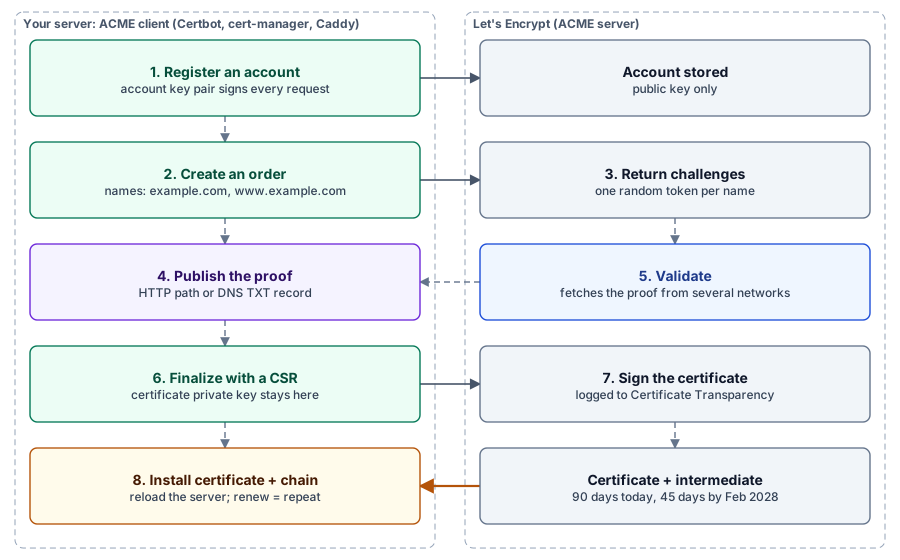
- Register an account. The client generates an account key pair and registers the public key. Every later request is signed with this key.
- Create an order. The client asks for a certificate covering one or more names, for example
example.comandwww.example.com. - Receive challenges. For each name, Let's Encrypt returns an authorization with a random token and a choice of challenge types.
- Answer the challenge. The client publishes a value derived from the token and its account key, at an HTTP path or in a DNS TXT record.
- Get validated. Let's Encrypt fetches that value from several network vantage points. If they agree, the authorization becomes valid.
- Finalize and download. The client sends a CSR signed by the certificate's private key. Let's Encrypt signs the certificate, logs it to Certificate Transparency and returns it with its intermediate chain.
Two keys are involved and they are easy to mix up. The account key identifies you to Let's Encrypt. The certificate key is the one your web server uses, and it never leaves your machine: only the CSR does.
Renewal is not a special operation. It is the same steps, run again before the old certificate expires.
Choosing a challenge type
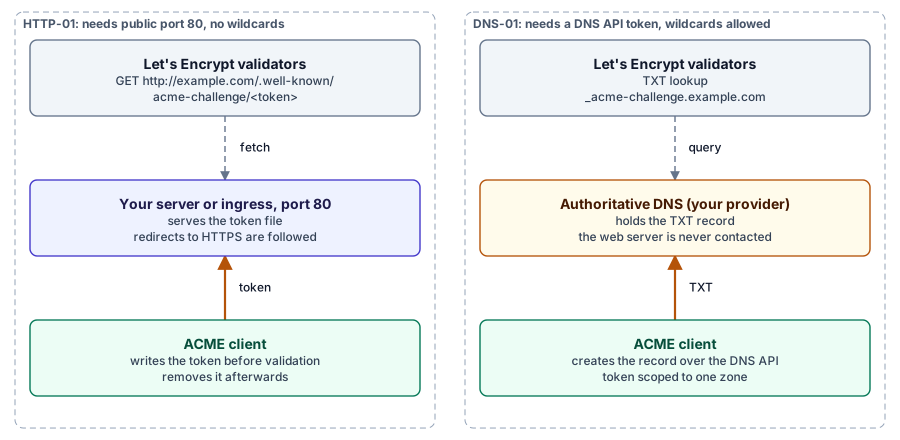
Use HTTP-01 when the server is reachable on port 80. Use DNS-01 when it is not, or when you need a wildcard.
| HTTP-01 | DNS-01 | TLS-ALPN-01 | |
|---|---|---|---|
| Proof is placed at | /.well-known/acme-challenge/TOKEN on port 80 | TXT record _acme-challenge.example.com | A special TLS handshake on port 443 |
| Needs | Public port 80 | API access to your DNS provider | Public port 443 and a client that terminates TLS |
| Wildcards | No | Yes | No |
| Private or internal hosts | No | Yes | No |
| Main risk | Firewalls, redirects, a CDN in front | A powerful DNS token; propagation delays | Limited client support |
| Typical user | Single server, Kubernetes ingress | Wildcards, hosts behind NAT, several clusters | Reverse proxies such as Caddy and Traefik |
Three details catch people out with HTTP-01:
- Validation always starts on port 80. Redirects to HTTPS are followed, but the first request is never on 443.
- If the name has an AAAA record, validation prefers IPv6. A stale AAAA record fails the challenge even when IPv4 works.
- Behind a load balancer, every backend must be able to serve the token, or the challenge path must be routed to the one that can.
For DNS-01, scope the API token to the single zone and to DNS edits only. A token that can rewrite all your DNS is a bigger risk than an expired certificate.
Certificate lifetimes are shrinking
The default Let's Encrypt certificate drops from 90 days to 64 days in February 2027 and to 45 days in February 2028. A CA/Browser Forum rule caps all public TLS certificates at 47 days from 15 March 2029, so every CA is moving the same way.
| Date | ACME profile | Certificate lifetime | Authorization reuse |
|---|---|---|---|
| Until February 2027 | classic (default) | 90 days | 30 days |
| 13 May 2026 (live) | tlsserver (opt-in) | 45 days | 30 days |
| 10 February 2027 | classic (default) | 64 days | 10 days |
| 16 February 2028 | classic (default) | 45 days | 7 hours |
Staging gets each change about a month earlier. There is also a shortlived profile whose certificates last about six days.
Two consequences matter more than the headline number.
Fixed renewal intervals break. A cron job that renews every 60 days is fine for a 90-day certificate and fatal for a 45-day one. Renew at about two thirds of the actual lifetime instead, or let the CA tell you when.
Every renewal becomes a real validation. Authorization reuse is the window in which Let's Encrypt skips re-checking a domain it validated recently. At 7 hours, effectively every renewal runs a fresh challenge. A challenge path that only worked on day one will fail on every renewal.
ARI: the CA tells the client when to renew
ACME Renewal Information (ARI, RFC 9773) is an endpoint the client polls for a suggested renewal window. Normally the window sits around two thirds of the lifetime. If Let's Encrypt has to revoke certificates in bulk, it moves the window earlier and clients renew before the revocation lands. Renewals made through ARI are also exempt from rate limits.
Let's Encrypt is also standardizing DNS-PERSIST-01, a challenge where the TXT record is set once and reused at every renewal. That removes the need to keep a DNS API token on the server.
Rate limits and the staging environment
Test against staging first. Production limits are easy to hit while debugging, and nobody can reset them for you.
| Limit | Value | What usually triggers it |
|---|---|---|
| New certificates per registered domain | 50 per 7 days | Many subdomains issued in one week |
| Same exact set of hostnames | 5 per 7 days | Deleting and re-creating one certificate in a loop |
| New orders per account | 300 per 3 hours | A misbehaving client retrying |
| Failed validations per hostname | 5 per hour | A broken challenge path being retried |
The second row is the one people hit. A Secret or a certificate file gets deleted, the client requests again, something is still misconfigured, and after five rounds that set of names is locked out for days.
Staging has the same API at a different URL, with much higher limits:
Production: https://acme-v02.api.letsencrypt.org/directory
Staging:    https://acme-staging-v02.api.letsencrypt.org/directory
Staging certificates are signed by an untrusted root, so browsers show a warning. That is expected. Once issuance and renewal work on staging, switch the URL and issue once on production.
Common mistakes
Most Let's Encrypt outages come from renewal, not first issuance.
| Mistake | What happens | Fix |
|---|---|---|
| Renewal never tested | First issuance works, renewal fails 60 days later | Force a renewal on staging before going live |
| Port 80 closed after setup | HTTP-01 renewals fail | Keep port 80 open and redirect to HTTPS instead of blocking |
| Serving only the leaf certificate | Browsers work, curl and some mobile clients fail | Serve the full chain |
| Hardcoded 60-day renewal | Breaks when lifetimes drop to 45 days | Renew at two thirds of the lifetime, or use ARI |
| No expiry monitoring | You find out from users | Alert when any certificate has under 14 days left |
| Debugging on production | Rate-limited for a week | Use staging until it works end to end |
| Web server not reloaded | New certificate on disk, old one in memory | Use a deploy hook, or a proxy that reloads certificates itself |
One change makes monitoring non-optional: Let's Encrypt stopped sending expiry reminder emails in June 2025. If renewal breaks, nothing outside your own alerting will tell you.
Where to go next
Let's Encrypt is a protocol you automate once, not a certificate you buy. Pick the challenge type that fits your network, prove it on staging, renew by lifetime fraction instead of a fixed day count, and alert on expiry.
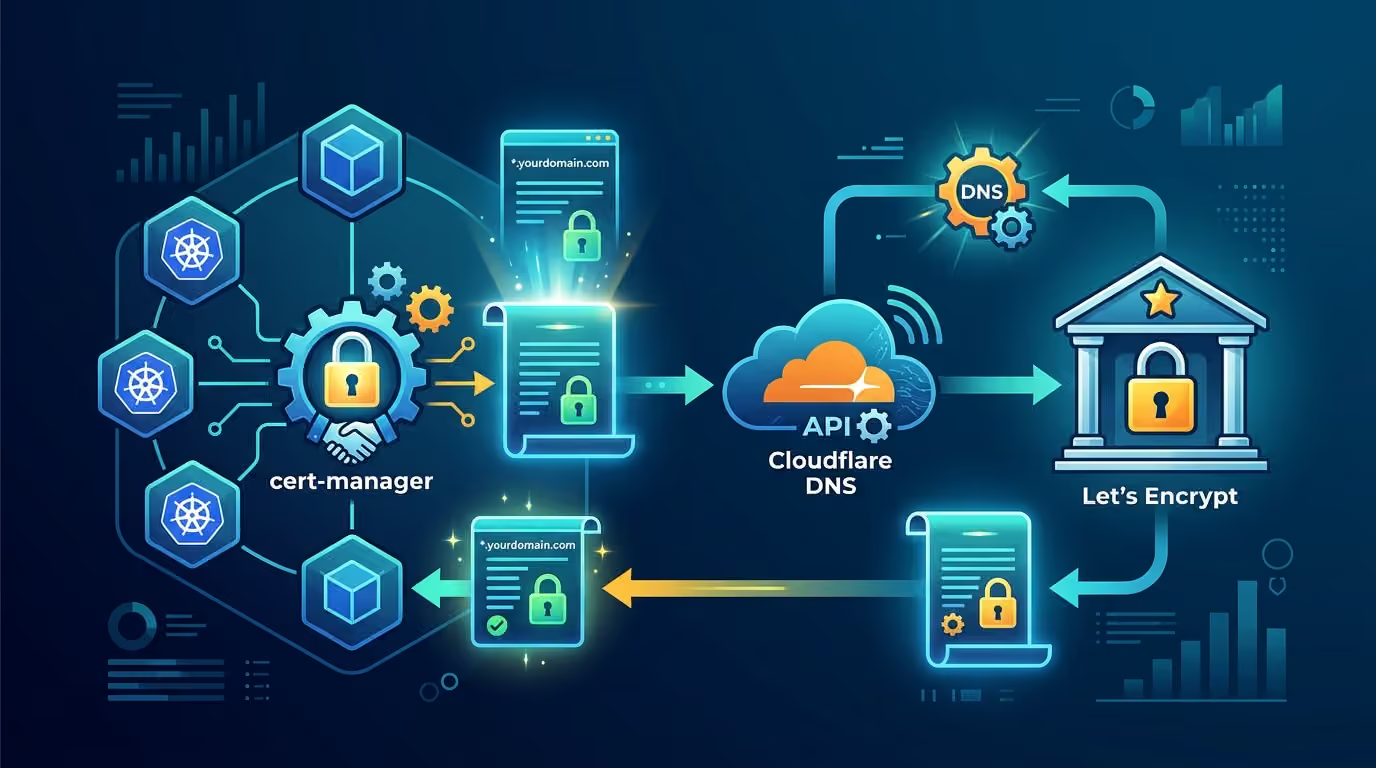
In Part 2 (opens in a new tab) I apply this to a k3s cluster: cert-manager, a Cloudflare DNS-01 issuer, one wildcard certificate on an Istio gateway, and renewals that need nobody.
Discussion comments
No comments yet. Start the discussion.