Part 1 covered getting software into a cluster and watching it. This part covers keeping it running under load and under attack: Karpenter and KEDA for scaling, Istio, Linkerd and Cilium for networking, cert-manager and Kyverno for security and Velero for recovery. Then come a production architecture, troubleshooting, interview questions and recommendations.
Same rules as Part 1. Versions are the latest stable releases on 8 November 2026, and every YAML block was validated against that project's CRD schema. The Kyverno policies were evaluated against test pods. Lab facts come from my repositories and a read-only look at my cluster, and anything that ran only on the EKS cluster I deleted on 2 November is marked as such.
8. Karpenter: just-in-time nodes
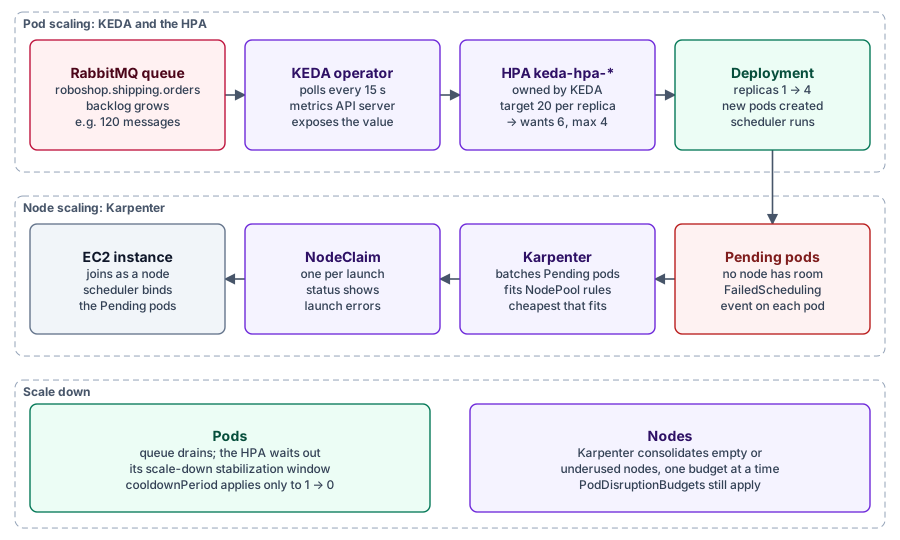
What and why. The Cluster Autoscaler resizes node groups you defined in advance, which on AWS means fixed instance types and half-empty nodes. Karpenter, from AWS and developed under Kubernetes SIG Autoscaling, watches unschedulable pods and launches the cheapest instances that fit them directly. EKS Auto Mode builds on it.
How it works. A NodePool says what may launch: architectures, Spot or On-Demand, instance families, taints, limits and disruption rules. An EC2NodeClass says how: AMI, subnets, security groups, IAM role and disks. Each launch is a NodeClaim. Afterwards, consolidation removes or replaces underused nodes, expireAfter recycles old ones, drift replaces nodes whose spec changed, and budgets cap disruption. Spot interruption notices arrive through SQS so nodes drain in time.
helm upgrade --install karpenter oci://public.ecr.aws/karpenter/karpenter \
  --version 1.15.1 --namespace kube-system \
  --set settings.clusterName=shop-prod \
  --set settings.interruptionQueue=shop-prod --wait
IAM roles, the SQS queue and karpenter.sh/discovery tags on subnets and security groups come first, usually from Terraform.
apiVersion: karpenter.sh/v1
kind: NodePool
metadata:
  name: general
spec:
  template:
    spec:
      nodeClassRef:
        group: karpenter.k8s.aws
        kind: EC2NodeClass
        name: default
      requirements:
        - key: kubernetes.io/arch
          operator: In
          values: ["arm64", "amd64"]
        - key: karpenter.sh/capacity-type
          operator: In
          values: ["spot", "on-demand"]
        - key: karpenter.k8s.aws/instance-category
          operator: In
          values: ["c", "m", "r"]
        - key: karpenter.k8s.aws/instance-generation
          operator: Gt
          values: ["5"]
      expireAfter: 720h
  limits:
    cpu: "64"
    memory: 256Gi
  disruption:
    consolidationPolicy: WhenEmptyOrUnderutilized
    consolidateAfter: 5m
    budgets:
      - nodes: "10%"
      - nodes: "0"
        reasons: ["Underutilized"]
        schedule: "0 9 * * mon-fri"
duration: 8hapiVersion: karpenter.k8s.aws/v1
kind: EC2NodeClass
metadata:
name: default
spec:
role: KarpenterNodeRole-shop-prod
amiSelectorTerms:
- alias: al2023@latest # pin a dated alias such as al2023@vYYYYMMDD in production
subnetSelectorTerms:
- tags:
karpenter.sh/discovery: shop-prod
securityGroupSelectorTerms:
- tags:
karpenter.sh/discovery: shop-prod
metadataOptions:
httpTokens: required
httpPutResponseHopLimit: 1
blockDeviceMappings:
- deviceName: /dev/xvda
ebs:
volumeSize: 40Gi
volumeType: gp3
encrypted: trueThe second budget blocks consolidation of underused nodes in weekday business hours; empty nodes can still go. Only Karpenter 1.15.x is listed for Kubernetes 1.37, so upgrade Karpenter before the cluster.
Karpenter or Cluster Autoscaler? Cluster Autoscaler runs on any cloud and is simple to reason about. Karpenter is faster and cheaper for variable workloads (batch, queue workers, Spot fleets, GPU bursts) because it picks from hundreds of instance types per launch. AWS is its first-class provider. Skip it for fixed capacity or non-cloud nodes, and set honest pod requests first: Karpenter sizes nodes from requests, not usage. Docs: karpenter.sh.
9. KEDA: event-driven autoscaling
What and why. The HorizontalPodAutoscaler (HPA) scales on CPU, memory or adapter metrics and never below one replica. Queue workers need to scale on backlog, ideally to zero. KEDA, CNCF graduated, adds that.
How it works. A ScaledObject (Deployments, StatefulSets) or ScaledJob (a Job per batch of events) lists triggers from more than 70 scalers. KEDA creates an HPA named keda-hpa-<name>, serves it the value through the external metrics API, and handles 0 ↔ 1 itself. Credentials go in a TriggerAuthentication. Install with helm install keda kedacore/keda --namespace keda --create-namespace.
RoboShop AI ran this on EKS (comments trimmed): one worker per 20 queued orders, at least one replica because the Java worker starts slowly, at most four because each holds database connections.
apiVersion: keda.sh/v1alpha1
kind: TriggerAuthentication
metadata:
  name: rabbitmq-monitor
  namespace: roboshop-ai
spec:
  secretTargetRef:
    - parameter: host
      name: keda-rabbitmq
      key: host
---
apiVersion: keda.sh/v1alpha1
kind: ScaledObject
metadata:
  name: shipping-worker
  namespace: roboshop-ai
spec:
  scaleTargetRef:
    name: shipping-worker
  minReplicaCount: 1
  maxReplicaCount: 4
  pollingInterval: 15
  cooldownPeriod: 300
  fallback:
    failureThreshold: 4
    replicas: 2
  triggers:
    - type: rabbitmq
      authenticationRef:
        name: rabbitmq-monitor
      metadata:
        protocol: http
        queueName: roboshop.shipping.orders
        vhostName: /
        mode: QueueLength
        value: "20"
        activationValue: "0"
Kafka lag, down to zero when idle:
apiVersion: keda.sh/v1alpha1
kind: ScaledObject
metadata:
  name: order-consumer
  namespace: shop
spec:
  scaleTargetRef:
    name: order-consumer
  minReplicaCount: 0
  maxReplicaCount: 12
  triggers:
    - type: kafka
      metadata:
        bootstrapServers: kafka-bootstrap.kafka.svc:9092
        consumerGroup: order-consumer
        topic: orders
        lagThreshold: "50"
        activationLagThreshold: "5"
A PromQL query:
apiVersion: keda.sh/v1alpha1
kind: ScaledObject
metadata:
  name: shop-web
  namespace: shop
spec:
  scaleTargetRef:
    name: shop-web
  minReplicaCount: 2
  maxReplicaCount: 10
  triggers:
    - type: prometheus
      metadata:
        serverAddress: http://prometheus-operated.monitoring.svc:9090
        query: sum(rate(http_server_requests_total{job="shop-web"}[2m]))
        threshold: "50"
A cron window as a floor, with CPU above it:
apiVersion: keda.sh/v1alpha1
kind: ScaledObject
metadata:
  name: report-api
  namespace: shop
spec:
  scaleTargetRef:
    name: report-api
  minReplicaCount: 0
  maxReplicaCount: 6
  triggers:
    - type: cron
      metadata:
        timezone: Asia/Kolkata
        start: 0 8 * * 1-5
        end: 0 20 * * 1-5
        desiredReplicas: "2"
    - type: cpu
      metricType: Utilization
      metadata:
        value: "70"
Scale-to-zero needs minReplicaCount: 0 and an event trigger, because CPU alone cannot wake a Deployment with no pods. Expect a cold start on the first event. cooldownPeriod only governs the step to zero. Kafka replicas stop at the partition count unless allowIdleConsumers is set.
KEDA or HPA? Plain HPA for CPU- or memory-bound services; KEDA when the signal is outside the pod or you want zero. Never point both at one Deployment. Docs: keda.sh.
10. Istio: the full-featured service mesh
What and why. With dozens of services calling each other you want encryption, identity-based access rules, retries, canary splits and per-call metrics without changing every app. Istio, CNCF graduated, puts that in the network.
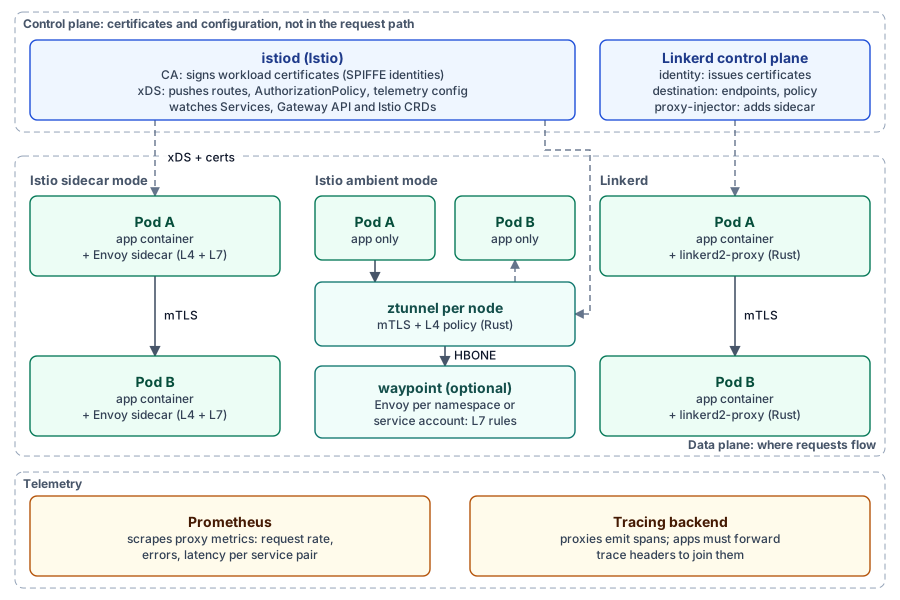
How it works. istiod is the control plane: a CA that gives each workload a SPIFFE identity, and an xDS server that pushes routes and policy to proxies. The data plane is either sidecar mode, with Envoy in every pod, or ambient mode (GA since 1.24), with a ztunnel per node for mTLS and L4 plus optional waypoint proxies for L7. Ambient needs no pod restarts and charges for L7 only where used.
istioctl install --set profile=ambient --skip-confirmation
kubectl label namespace shop istio.io/dataplane-mode=ambient
istioctl waypoint apply -n shop --enroll-namespace   # only if you need L7 rules
Require mTLS, then let only checkout call payment:
apiVersion: security.istio.io/v1
kind: PeerAuthentication
metadata:
  name: default
  namespace: shop
spec:
  mtls:
mode: STRICTapiVersion: security.istio.io/v1
kind: AuthorizationPolicy
metadata:
name: payment-allow-checkout
namespace: shop
spec:
selector:
matchLabels:
app: payment
action: ALLOW
rules:
- from:
- source:
principals: ["cluster.local/ns/shop/sa/checkout"]
to:
- operation:
methods: ["POST"]
paths: ["/api/pay"]A 90/10 canary with retries (in ambient mode this needs a waypoint):
apiVersion: networking.istio.io/v1
kind: DestinationRule
metadata:
  name: shop-web
  namespace: shop
spec:
  host: shop-web
  subsets:
    - name: stable
      labels:
        version: v1
    - name: canary
      labels:
        version: v2
---
apiVersion: networking.istio.io/v1
kind: VirtualService
metadata:
  name: shop-web
  namespace: shop
spec:
  hosts:
    - shop-web
  http:
    - route:
        - destination:
            host: shop-web
            subset: stable
          weight: 90
        - destination:
            host: shop-web
            subset: canary
          weight: 10
      retries:
        attempts: 2
        perTryTimeout: 2s
        retryOn: 5xx,connect-failure
Istio implements the Gateway API for ingress and mesh routing, so HTTPRoute weights can replace the VirtualService. Proxies export istio_requests_total for Prometheus, Kiali and Grafana draw the service graph, and spans go to Jaeger or any OpenTelemetry backend. Traces only join across services if the apps forward trace headers.
Limits. Most features, most to run: many CRDs, planned upgrades, memory per proxy. Istio 1.31 supports Kubernetes 1.32 to 1.37. Check the matrix before every cluster upgrade. Docs: istio.io.
11. Linkerd: the lightweight service mesh
What and why. Linkerd, the first CNCF graduated mesh, targets the common case: automatic mTLS, golden metrics and reliability, with little to configure.
How it works. Its control plane has identity (certificates), destination (endpoints and policy) and a proxy-injector. Each meshed pod gets linkerd2-proxy, a small proxy written in Rust for Linkerd. mTLS is on by default; retries and timeouts are annotations on Services or HTTPRoutes; the viz extension adds a dashboard.
curl --proto '=https' --tlsv1.2 -sSfL https://run.linkerd.io/install-edge | sh
kubectl apply -f https://github.com/kubernetes-sigs/gateway-api/releases/download/v1.5.1/standard-install.yaml
linkerd check --pre
linkerd install --crds | kubectl apply -f -
linkerd install | kubectl apply -f -
linkerd check
linkerd viz install | kubectl apply -f -
Linkerd 2.20 supports Gateway API 1.2.1 to 1.5.1, not the newest v1.7.0. Opt a namespace in, then restart its pods:
apiVersion: v1
kind: Namespace
metadata:
  name: shop
  annotations:
    linkerd.io/inject: enabled
Release model. Since February 2024 the open-source project ships only edge releases (edge-26.11.1 now). Stable builds come from vendors such as Buoyant. Pin an edge version or buy stable.
Linkerd or Istio? Linkerd has fewer moving parts and a smaller proxy, so it suits small teams and light clusters that need mTLS and metrics. Istio offers sidecar-less ambient mode, richer traffic management and Envoy extensibility. I have no benchmark of my own, so measure overhead on your workloads. Docs: linkerd.io.
12. Cilium: eBPF networking and security
What and why. Every cluster needs a CNI plugin to give pods addresses and connect them. Classic CNIs use iptables chains that grow with every Service. Cilium, CNCF graduated, uses eBPF: verified programs the kernel runs at network and socket hooks, updated through maps.
It provides pod networking, Kubernetes NetworkPolicy plus CiliumNetworkPolicy with L7 (HTTP, DNS) and FQDN rules, optional kube-proxy replacement, and Hubble flow logs with verdicts.
apiVersion: cilium.io/v2
kind: CiliumNetworkPolicy
metadata:
  name: payment
  namespace: shop
spec:
  endpointSelector:
    matchLabels:
      app: payment
  ingress:
    - fromEndpoints:
        - matchLabels:
            app: checkout
      toPorts:
        - ports:
            - port: "8080"
              protocol: TCP
          rules:
            http:
              - method: POST
                path: /api/pay
  egress:
    - toEndpoints:
        - matchLabels:
            k8s:io.kubernetes.pod.namespace: kube-system
            k8s-app: kube-dns
      toPorts:
        - ports:
            - port: "53"
              protocol: ANY
          rules:
            dns:
              - matchPattern: "*"
    - toFQDNs:
        - matchName: api.stripe.com
      toPorts:
        - ports:
            - port: "443"
              protocol: TCP
Only checkout may POST /api/pay, and payment may resolve DNS and reach api.stripe.com:443, nothing else.
cilium install --version 1.20.4
cilium status --wait
cilium hubble enable
hubble observe --namespace shop --verdict DROPPED --last 50
Replacing kube-proxy needs kubeProxyReplacement=true plus k8sServiceHost and k8sServicePort. Removing kube-proxy from a live cluster breaks Services until Cilium takes over, so decide at build time. Flannel and kindnet are simple with little policy, and Calico is the long-standing policy option with iptables and eBPF modes. Cilium adds DNS-aware and L7 policy and flow visibility. On EKS, chain it with the VPC CNI or run ENI mode; on Minikube, create the cluster with --cni=cilium. Docs: docs.cilium.io.
13. cert-manager: certificate lifecycle automation
What and why. Expired certificates still cause outages. cert-manager, CNCF graduated, requests certificates from an Issuer (one namespace) or ClusterIssuer, stores them as kubernetes.io/tls Secrets and renews them. Backends include Let's Encrypt (ACME), Vault and private CAs.
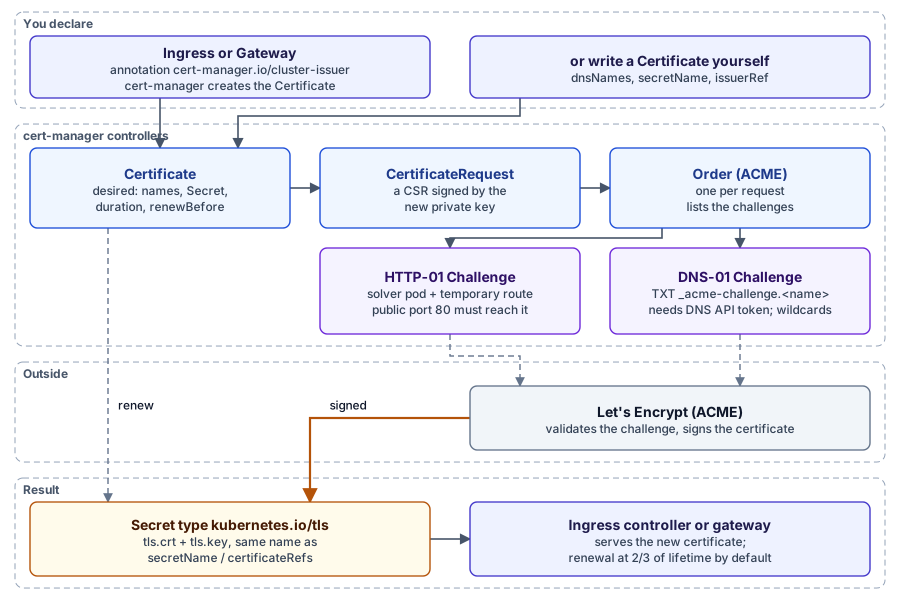
HTTP-01 serves a token on port 80, so the cluster must be reachable and wildcards are impossible. DNS-01 writes a TXT record through your DNS API, which works for wildcards and private clusters but needs a powerful token. Experiment against Let's Encrypt staging, because production is rate-limited.
apiVersion: cert-manager.io/v1
kind: ClusterIssuer
metadata:
  name: letsencrypt-staging
spec:
  acme:
    server: https://acme-staging-v02.api.letsencrypt.org/directory
    email: platform@example.com
    privateKeySecretRef:
      name: letsencrypt-staging-account
    solvers:
      - http01:
          ingress:
            ingressClassName: traefik
---
apiVersion: cert-manager.io/v1
kind: ClusterIssuer
metadata:
  name: letsencrypt-dns
spec:
  acme:
    server: https://acme-v02.api.letsencrypt.org/directory
    email: platform@example.com
    privateKeySecretRef:
      name: letsencrypt-dns-account
    solvers:
      - selector:
          dnsZones:
            - example.com
        dns01:
          cloudflare:
            apiTokenSecretRef:
              name: cloudflare-api-token
key: api-tokenapiVersion: cert-manager.io/v1
kind: Certificate
metadata:
name: shop-example-com
namespace: shop
spec:
secretName: shop-example-com-tls
dnsNames:
- shop.example.com
- "*.shop.example.com"
issuerRef:
kind: ClusterIssuer
name: letsencrypt-dns
privateKey:
algorithm: ECDSA
size: 256
rotationPolicy: AlwaysRenewal starts at two thirds of the lifetime (day 60 of 90) unless renewBefore says otherwise. It repeats the flow and updates the Secret in place, and rotationPolicy: Always uses a fresh key each time. For an Ingress, the cert-manager.io/cluster-issuer annotation is enough. For the Gateway API, set config.gatewayAPI.enabled: true in the Helm values and annotate the Gateway; each listener needs a hostname, tls.mode: Terminate and a certificateRefs name:
apiVersion: gateway.networking.k8s.io/v1
kind: Gateway
metadata:
  name: public
  namespace: shop
  annotations:
    cert-manager.io/cluster-issuer: letsencrypt-dns
spec:
  gatewayClassName: istio
  listeners:
    - name: https
      hostname: shop.example.com
      port: 443
      protocol: HTTPS
      tls:
        mode: Terminate
        certificateRefs:
          - name: shop-example-com-tls
      allowedRoutes:
        namespaces:
          from: Same
Docs: cert-manager.io/docs.
14. Velero: backup and disaster recovery
What and why. etcd snapshots restore a whole control plane, not one namespace, and hold no volume data. Velero, in the CNCF Sandbox since 2026, backs up Kubernetes objects to object storage and volume data, and restores all, one namespace or a filtered set, into the same or another cluster. Volume data has three routes:
- Cloud or CSI snapshots: fast, but tied to the same cloud and region.
- CSI snapshot data movement (
snapshotMoveData: true): copies the data to object storage. - File system backup with the node agent and Kopia: no snapshot support needed, but no hostPath volumes.
velero install --provider aws --plugins velero/velero-plugin-for-aws:v1.14.4 \
  --bucket shop-backups --backup-location-config region=us-east-1 \
  --secret-file ./credentials-velero --use-node-agent
velero backup create shop-before-upgrade --include-namespaces shop --wait
velero backup describe shop-before-upgrade --details
velero restore create --from-backup shop-before-upgrade \
  --namespace-mappings shop:shop-restore-test --wait
velero restore get
Match the plugin to Velero's compatibility table (v1.14.4 is pinned in my MOKS repository). --namespace-mappings both migrates a namespace and tests a restore away from production. Restore on a schedule, check that pods go Ready and data reads back, and alert when the last Completed backup is too old.
apiVersion: velero.io/v1
kind: Schedule
metadata:
  name: shop-daily
  namespace: velero
spec:
  schedule: "0 2 * * *"
  template:
    includedNamespaces:
      - shop
    snapshotMoveData: true
    storageLocation: default
    ttl: 720h0m0s
Velero copies a running database's files or snapshots, which is crash-consistent at best. Add native dumps, the operator's backup tool, or Velero pre-backup hooks that freeze writes. Docs: velero.io/docs.
15. Kyverno: policy as code
What and why. RBAC decides who may create a Pod, not whether it may be privileged. Kyverno, CNCF graduated in March 2026, is a dynamic admission controller: the API server sends it matching writes to accept, reject or mutate. It also generates resources, verifies image signatures and runs background scans that write PolicyReports.
Know this first. Kyverno 1.19 deprecated ClusterPolicy and Policy, which are scheduled for removal in 1.20. New policies use the CEL-based kinds under policies.kyverno.io/v1: ValidatingPolicy, MutatingPolicy, GeneratingPolicy, ImageValidatingPolicy and DeletingPolicy. Many tutorials still show the old kinds.
helm install kyverno kyverno/kyverno --namespace kyverno --create-namespace
kubectl get policyreports -A
Reject privileged containers, including init and ephemeral ones, and generate the rule for pod controllers too:
apiVersion: policies.kyverno.io/v1
kind: ValidatingPolicy
metadata:
  name: disallow-privileged-containers
spec:
  validationActions: [Deny]
  autogen:
    podControllers:
      controllers: [deployments, statefulsets, jobs, cronjobs]
  matchConstraints:
    resourceRules:
      - apiGroups: [""]
        apiVersions: [v1]
        operations: [CREATE, UPDATE]
        resources: [pods]
  variables:
    - name: allContainers
      expression: >-
        object.spec.containers
        + (has(object.spec.initContainers) ? object.spec.initContainers : [])
        + (has(object.spec.ephemeralContainers) ? object.spec.ephemeralContainers : [])
  validations:
    - expression: >-
        variables.allContainers.all(c,
          !has(c.securityContext) || !has(c.securityContext.privileged) || c.securityContext.privileged == false)
      message: Privileged containers are not allowed.
Report, without blocking yet, images from outside approved registries:
apiVersion: policies.kyverno.io/v1
kind: ValidatingPolicy
metadata:
  name: allowed-image-registries
spec:
  validationActions: [Audit]
  matchConstraints:
    resourceRules:
      - apiGroups: [""]
        apiVersions: [v1]
        operations: [CREATE, UPDATE]
        resources: [pods]
  variables:
    - name: allContainers
      expression: >-
        object.spec.containers
        + (has(object.spec.initContainers) ? object.spec.initContainers : [])
  validations:
    - expression: >-
        variables.allContainers.all(c,
          c.image.startsWith('registry.jithendar.com/') || c.image.startsWith('registry.k8s.io/'))
      messageExpression: >-
        'images must come from registry.jithendar.com or registry.k8s.io, found: '
        + variables.allContainers.map(c, c.image).join(', ')
Start with Audit, fix what the reports show, then switch to Deny. I evaluated both expressions against a pod with a privileged init container and a Docker Hub image (both rejected) and a compliant pod (both accepted).
Kyverno or OPA Gatekeeper? Gatekeeper uses Rego, which suits organisations using OPA elsewhere. Kyverno policies are Kubernetes YAML with CEL, easier for Kubernetes teams, and Kyverno also mutates, generates and verifies images. With either, a slow or down webhook can block every deploy, so set failure policies deliberately. Docs: kyverno.io.
How the 15 tools work together in production
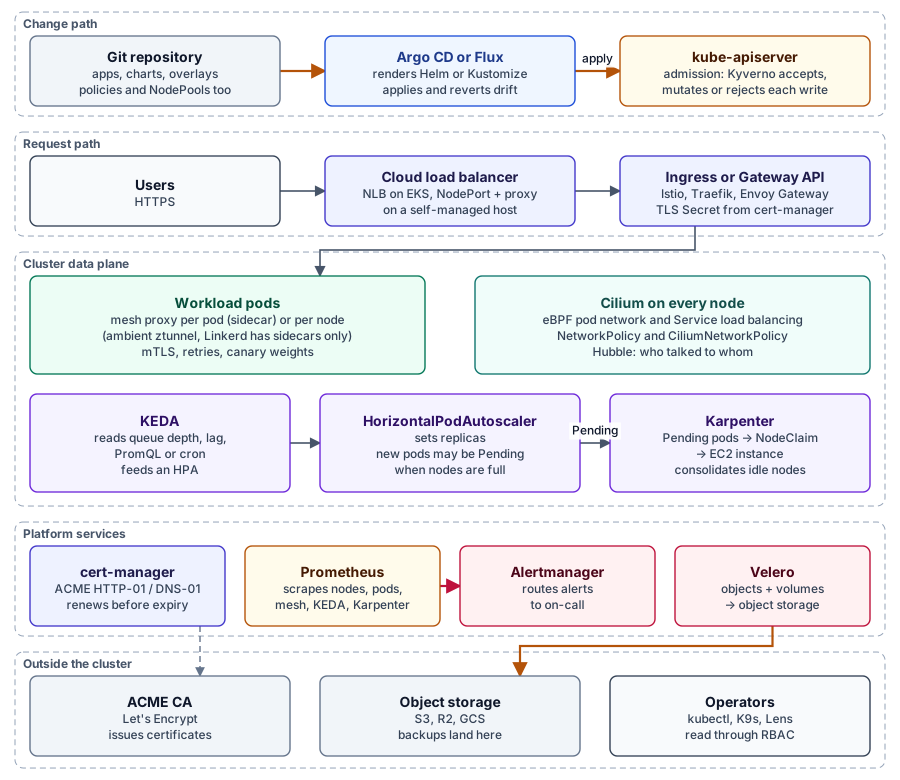
Three flows run through the platform:
- Change path (control plane). Commits go through GitOps into the API server, where Kyverno rejects bad manifests at admission. It never touches user traffic.
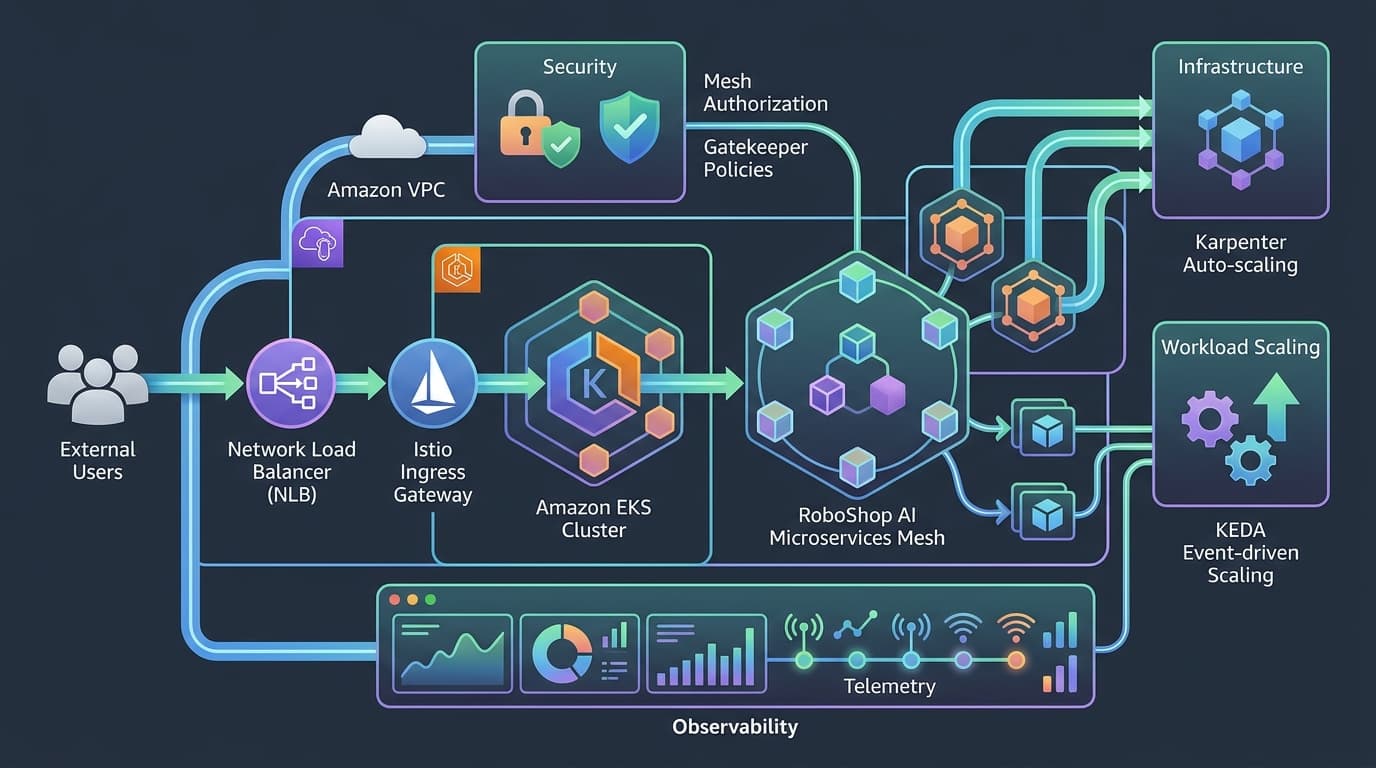
- Request path (data plane). Users go through a load balancer and a gateway to pods. Cilium moves and filters packets, and a mesh adds identity, mTLS and traffic shaping. cert-manager only keeps the gateway's Secret fresh.
- Telemetry and recovery. Prometheus scrapes nodes, pods, proxies, KEDA and Karpenter, Alertmanager pages people, and Velero copies state out.
Pick one GitOps controller, one mesh and one policy engine. Cilium and a mesh overlap on L7 policy and encryption: many teams run Cilium and add a mesh only for per-request identity and traffic splitting. KEDA (pods) and Karpenter (nodes) complement each other.
My lab: what runs, what ran on EKS, what would fit
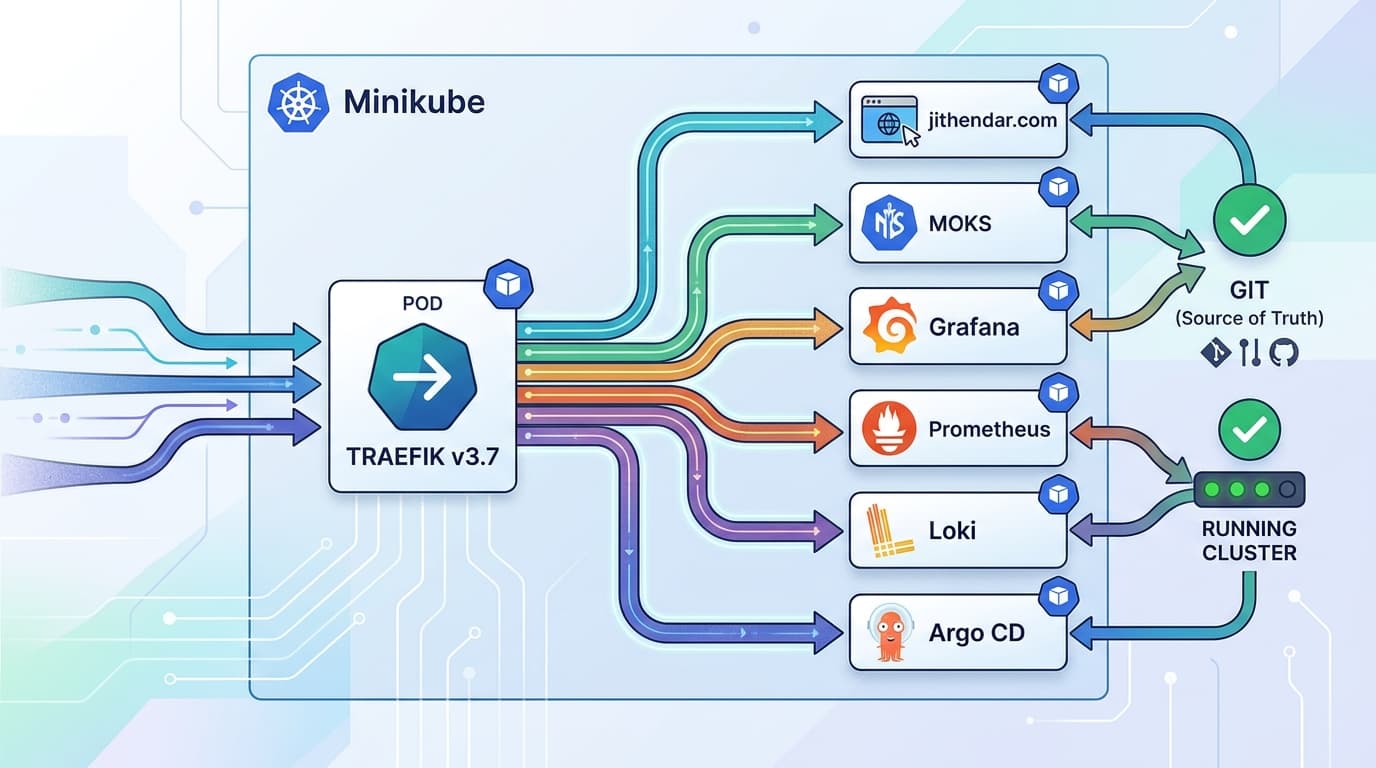
On mk4, the eight-node Minikube cluster from Part 1, only cert-manager from this part runs. Most of the rest ran on RoboShop AI's EKS cluster, whose manifests left the roboshop-ai repository in commit a6d5e10 on 1 November, the day before the cluster was deleted. Resource figures are chart default requests, not measurements.
| Tool | Verified 8 Nov 2026 | Justified on mk4? | On EKS |
|---|---|---|---|
| Karpenter | EKS had arm64 general and spot NodePools with a business-hours consolidation block | No, Minikube nodes are fixed | Yes, the main cost lever |
| KEDA | Not installed; the RabbitMQ example scaled shipping-worker on EKS | Yes for queue workers (3 × 100m, 100 MiB) | Yes, with Karpenter |
| Istio | Not running; EKS used it as gateway and mesh; Terraform plan in tools (e18e0e6) pins 1.30.7, unapplied | Doubtful: istiod 500m and 2 GiB, ztunnel 512 MiB per node (4 GiB across 8), sidecars 128 MiB per pod | If you need its traffic features |
| Linkerd | Not installed | The lighter option if mk4 needs mTLS | Yes, for small teams |
| Cilium | No, mk4 runs kindnet, which cannot express the FQDN egress rules MOKS's terminal design asks for | Only by recreating the profile | Chaining or ENI mode |
| cert-manager | v1.20.4 (1.21.3 is current), 2 HTTP-01 ClusterIssuers via Traefik, 4 Certificates Ready | Yes | Yes, often DNS-01 on Route 53 |
| Velero | Broken: CRDs, the R2 location and a daily schedule exist but no server runs; last completed backup 1 November, 7 requests never processed | Yes for objects; hostPath volumes need database dumps | Yes, with snapshot data movement |
| Kyverno | Not installed; EKS used OPA Gatekeeper with five templates | Yes, Audit first (4 controllers, 400m and 320 MiB in total) | Yes |
Two findings to fix first:
- The planned Istio does not support this cluster. Istio 1.30 covers Kubernetes 1.32 to 1.36, and mk4 runs 1.37.0. 1.31.x covers 1.37, but on 8 November the Istio Helm repository's newest
istiodchart was 1.30.8, so either wait for 1.31 charts or useistioctl. - Velero needs a running server or a clean-up. MOKS shows backup requests nothing will process. Syncing
moks/deploy/argocd/velero.yaml(chart 12.2.2, node agent off) brings the server back.
Troubleshooting scenarios
Karpenter cannot provision nodes for Pending pods
kubectl get pods -A --field-selector=status.phase=Pending
kubectl describe pod "$POD" -n "$NS" | sed -n '/Events:/,$p'
kubectl get nodepools,nodeclaims
kubectl describe nodeclaim "$NODECLAIM"
kubectl get ec2nodeclass default -o jsonpath='{.status.conditions}'
kubectl logs -n kube-system -l app.kubernetes.io/name=karpenter --tail=200 | grep -iE "error|incompatible|limit"
In order: a NodePool limit reached; no pool matches the pod's tolerations, architecture or zone; the pod is bigger than any allowed instance; the EC2NodeClass is not Ready (selectors match nothing, wrong IAM role); Spot capacity short, so widen the requirements.
KEDA does not scale despite a queue backlog
kubectl get scaledobject shipping-worker -n roboshop-ai          # READY and ACTIVE columns
kubectl describe scaledobject shipping-worker -n roboshop-ai
kubectl get hpa keda-hpa-shipping-worker -n roboshop-ai
kubectl get apiservice v1beta1.external.metrics.k8s.io           # KEDA metrics server Available?
kubectl logs -n keda deploy/keda-operator --tail=200
READY False means the scaler cannot read the source (authentication, host, queue name). ACTIVE False with messages waiting points at activationValue or the protocol's counting. An HPA pinned at maxReplicaCount needs a higher cap only if downstream capacity allows. Pods Pending after scaling is the Karpenter scenario above. Also check that no second HPA targets the Deployment.
cert-manager fails to issue or renew a certificate
kubectl get certificate,certificaterequest,order,challenge -n shop
kubectl describe certificate shop-example-com -n shop
kubectl describe challenge -n shop
cmctl status certificate shop-example-com -n shop
kubectl logs -n cert-manager deploy/cert-manager --tail=200 | grep -i shop-example-com
Follow the chain to the first link that is not Ready; Challenges carry the real error. For HTTP-01 it is usually port 80 unreachable, or auth or a firewall in front of /.well-known/acme-challenge/. For DNS-01, a token without zone permission, a zone selector mismatch or slow propagation. For both, a CAA record or rate limits. cmctl renew retries once the cause is fixed.
Istio: calls fail after enabling STRICT mTLS
istioctl analyze -n shop
istioctl proxy-status
kubectl get peerauthentication -A
istioctl x describe pod "$POD" -n shop
Usually a caller outside the mesh (an uninjected namespace, a CronJob, a probe) gets resets or 503s because plaintext is refused. Use PERMISSIVE while you enrol every client, then return to STRICT. An AuthorizationPolicy naming the wrong ServiceAccount gives the same symptom.
Interview questions
KEDA or HPA?
The HPA scales on resource or custom metrics and stops at one replica. KEDA adds external event sources and scale-to-zero by creating and feeding an HPA, so they are layers. Never target one Deployment with both.
Karpenter or Cluster Autoscaler?
Cluster Autoscaler resizes predefined node groups on many clouds. Karpenter launches instances straight from NodePool constraints, picks the cheapest fit and keeps consolidating, which is better for variable or Spot-heavy workloads, mainly on AWS.
Istio or Linkerd?
Both give mTLS, identity policy and golden metrics. Linkerd is smaller and simpler, with a Rust sidecar. Istio has richer traffic management, Envoy extensibility and a sidecar-less ambient mode.
What is eBPF?
Verified programs that run inside the Linux kernel at hooks such as network devices and sockets, sharing state through maps. Cilium uses it for networking, load balancing and policy without long iptables chains, and Hubble reads flows from the same hooks.
How does cert-manager renew certificates?
At two thirds of the lifetime, or at renewBefore, it creates a new CertificateRequest (and an ACME Order and Challenges) and updates the same Secret, which the ingress or gateway reloads.
How does Velero restore persistent volumes?
It restores objects, then data from cloud or CSI snapshots, from moved snapshot data in object storage, or, for file system backups, by having the node agent fill the new volume before the pod starts. Databases still need consistent dumps.
How does Kyverno enforce policies?
Through admission webhooks. The API server sends matching writes, Kyverno evaluates CEL policies and denies, audits or mutates them, and background scans report on existing resources.
Which tools to learn next
After Part 1's beginner path:
Intermediate: Argo CD → cert-manager → Kyverno → KEDA → Velero. You need RBAC and Services first. Move an app to automated Argo CD sync and break it with kubectl edit; issue a staging certificate; run the privileged-container policy in Audit, then Deny; scale a worker to zero and back; restore a namespace under a new name. Outcome: a secure, self-healing platform for one team.
Advanced: Cilium → Istio or Linkerd → Karpenter → multi-cluster GitOps. You need Linux networking, TLS and an AWS account to experiment in. Read drops with Hubble; roll a mesh out namespace by namespace to STRICT; run Karpenter with Spot and watch consolidation; drive two clusters from one ApplicationSet. Outcome: you can design the architecture above and defend each trade-off.
Final recommendations
Mastering Kubernetes is not about installing every CNCF tool. It is about understanding operational problems, choosing the right components, and building a secure, observable, reliable platform without unnecessary complexity.
- Minikube and home labs. Helm, Kustomize, one GitOps controller, cert-manager, Prometheus with Alertmanager and kube-state-metrics, K9s, and Velero for objects. Add Kyverno in Audit and KEDA if you have queues. Skip Karpenter, and think twice about a mesh on a shared 32 GB host.
- Startups on managed Kubernetes. Add Karpenter, KEDA for workers, Kyverno enforcing a short list (no privileged pods, approved registries, requests set), Velero with tested restores, and managed Prometheus if nobody wants to run storage. Linkerd if you need mTLS and little else.
- Enterprise EKS. All of the above, plus Cilium for policy and flow visibility, Istio where traffic management or zero-trust identity is required, ApplicationSets with SSO and AppProjects, long-term metrics, image verification, and restore drills audit can see.
At any size, budget for the work after installation: upgrades against compatibility matrices (Karpenter, Istio and Kyverno all have them), CRD migrations such as Kyverno's move to CEL, and alerts someone actually receives. Start with Part 1 if you skipped it, see how RoboShop AI used several of these tools in its EKS system design, and practise with the DevOps interview preparation guide.

Discussion comments
No comments yet. Start the discussion.