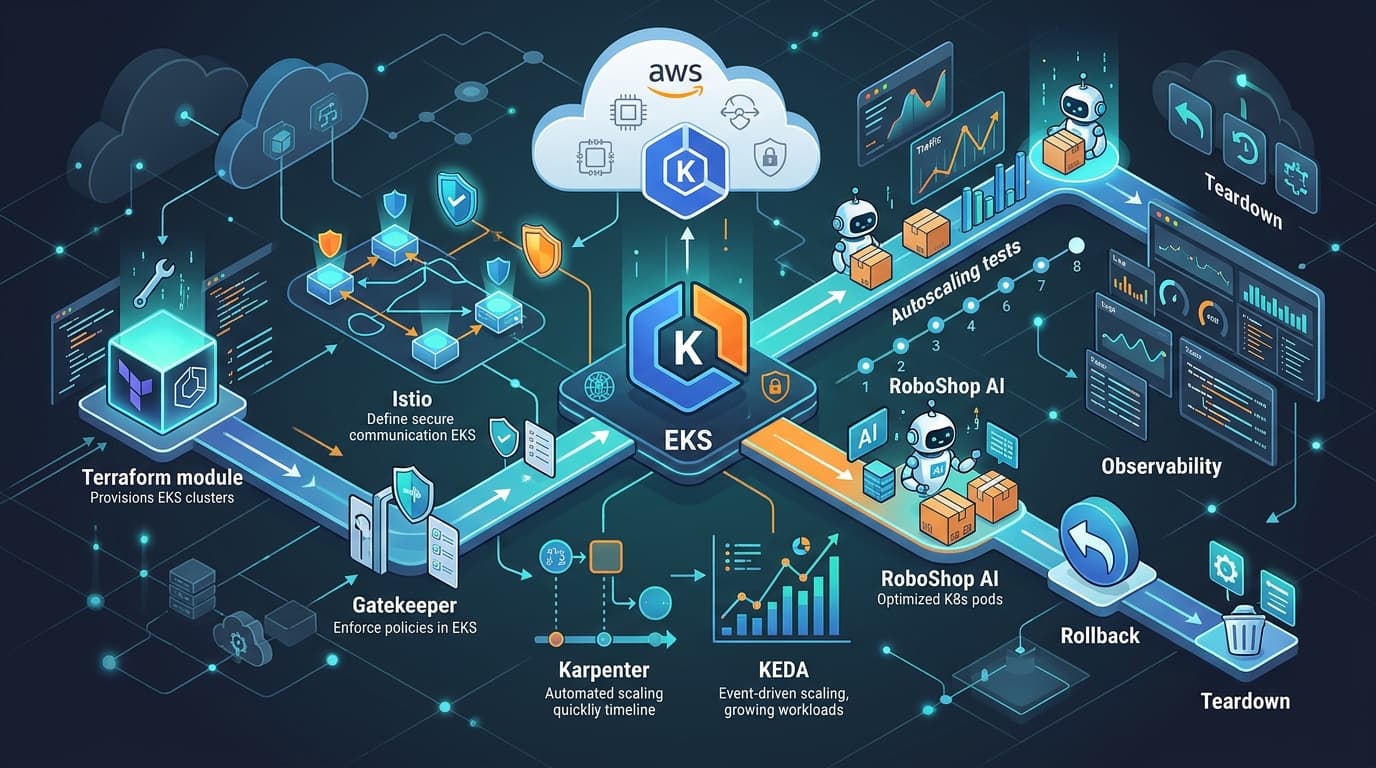
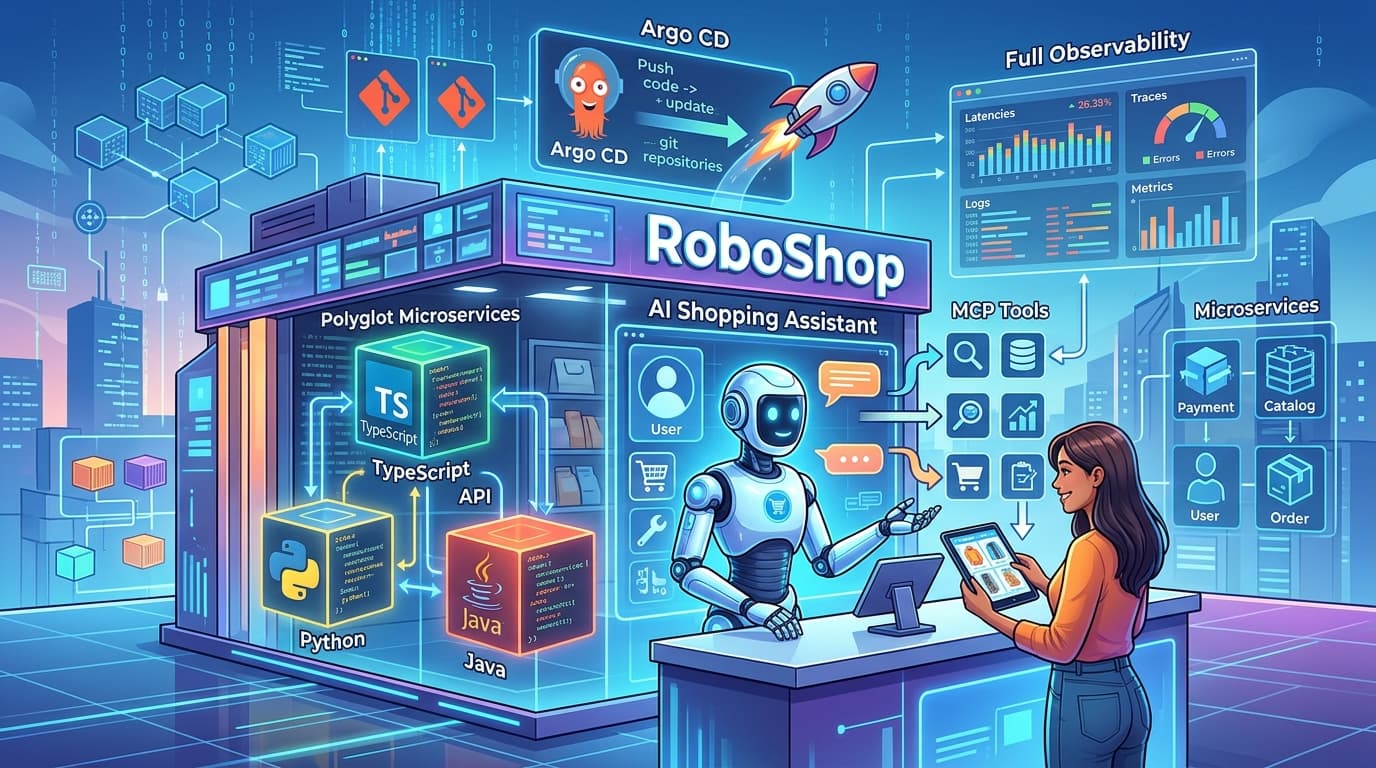
RoboShop AI is a personal showcase project: a robot store with a storefront, checkout in Razorpay test mode, an optional AI shopping assistant and a private Model Context Protocol (MCP) server, split into independently deployable services. It runs on a small Minikube lab today. This article explains how the same services map onto Amazon EKS, and why each platform component is there. It describes a design and its configuration. The configuration has been validated offline but has not yet run on AWS, and nothing here describes production traffic or measured performance.
The authoritative configuration lives in the repository under deploy/eks. The step-by-step guide is Deploy RoboShop AI on Amazon EKS.
Who this is for
Engineers who know Kubernetes basics and want a worked example of how the common EKS building blocks fit together around a real, multi-language application: ingress, a service mesh, admission policy, event-driven autoscaling, node provisioning and telemetry. Each section says what the code does today and which choices are new for EKS.
What the services do
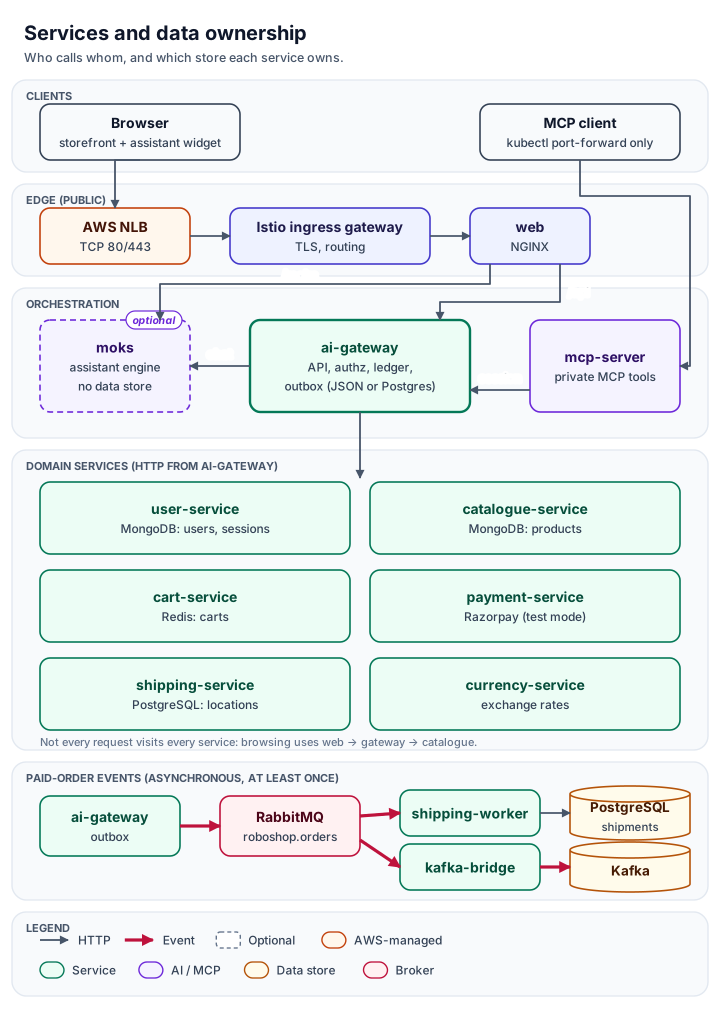
| Service | Responsibility | Owns |
|---|---|---|
| web | NGINX: pages, /api proxy to the gateway, /moks proxy to the assistant | nothing |
| ai-gateway | Public API, authorization, checkout, order ledger and outbox | MongoDB settings; JSON or PostgreSQL ledger |
| user-service | Accounts, hashed sessions, MFA | MongoDB users |
| catalogue-service | Product reads and imports, recommendations | MongoDB products |
| cart-service | Editable carts | Redis |
| payment-service | Razorpay orders and verification (test mode by default) | nothing |
| shipping-service | Locations and quotes over HTTP | PostgreSQL |
| shipping-worker | The same image with its RabbitMQ consumer on (EKS only) | PostgreSQL shipments |
| currency-service | Exchange rates | nothing |
| moks | Optional assistant: retrieval, then a model only if one is configured | nothing |
| mcp-server | Private MCP tools that call the gateway with the user's own session | nothing |
| kafka-bridge | Copies paid-order events from RabbitMQ to Kafka for analytics | nothing |
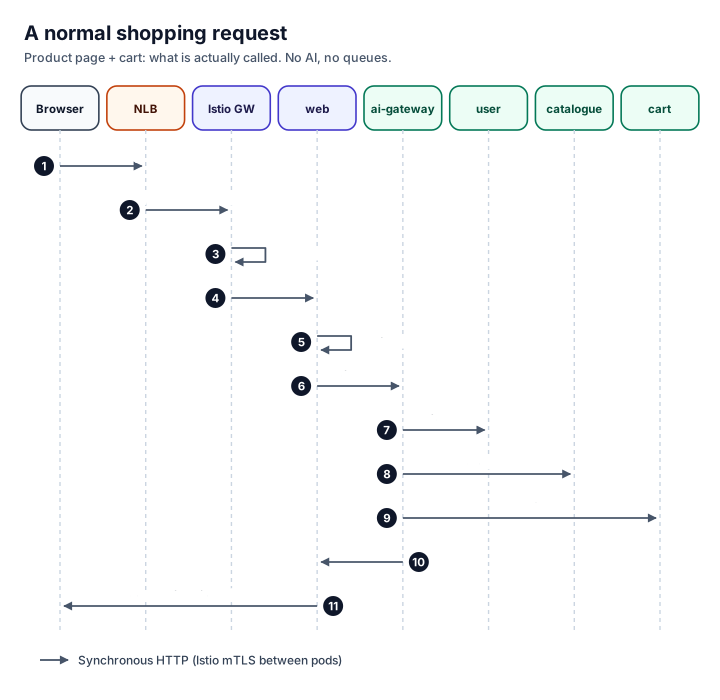
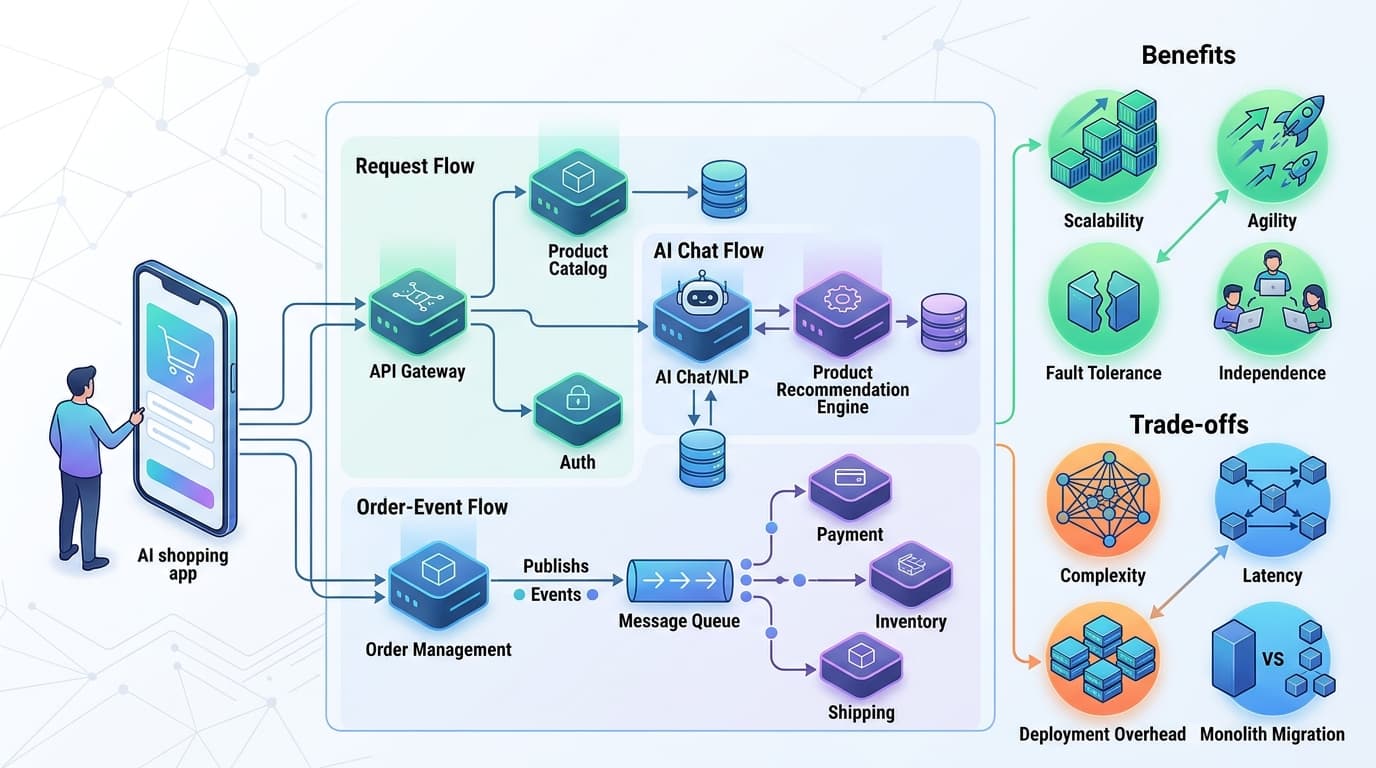
Not every request visits every service. Browsing a product touches web, the gateway and the catalogue. Checkout adds cart, payment, user and shipping. Chat adds Moks, and calls a model only when the super admin has configured one.
Ingress: one Layer 7 hop
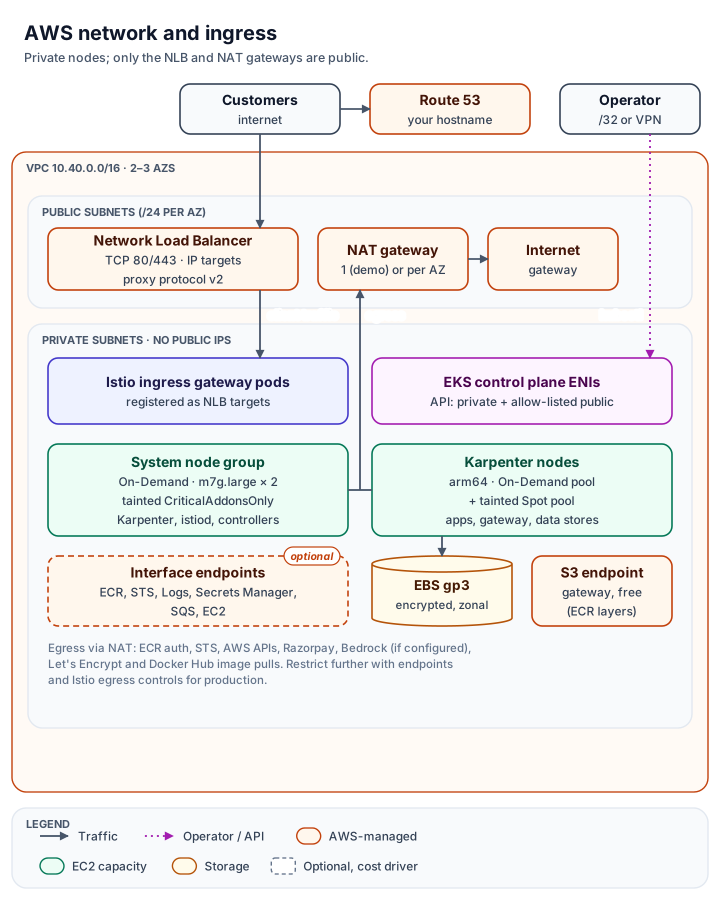
Traffic flows Internet → Network Load Balancer → Istio ingress gateway → web. Istio's gateway already handles routing, TLS and workload identity. An Application Load Balancer in front would add a second Layer 7 hop and a second place to keep routing rules, so the design uses an NLB that only passes TCP through:
- Targets: IP targets, so gateway pods are registered directly, with an HTTP health check on the gateway's readiness port.
- TLS: terminates on the gateway pods with a Let's Encrypt certificate that cert-manager obtains through a Route 53 DNS-01 challenge.
- Client IP: reaches Envoy through proxy protocol v2.
- Exposure: the AWS Load Balancer Controller creates a frontend security group restricted to the configured source ranges.
The trade-off is that certificate management lives in the cluster. If you prefer AWS Certificate Manager, the NLB can terminate TLS instead, at the cost of plaintext traffic inside the VPC unless you re-encrypt.
Mesh: identity per workload, nothing replayed
The mesh runs Istio in sidecar mode. Sidecars give Layer 7 authorization on every hop without extra waypoint proxies, and the enrollment boundary is explicit: the roboshop-ai namespace is labelled for injection, and the data stores opt out per pod. The Istio CNI node agent removes the privileged init container from application pods. Native sidecars let jobs finish and let draining workers keep their network until they exit.
Two rules matter more than any feature list:
- Every workload has its own ServiceAccount. On Minikube all pods shared the default account, so identity-based authorization was meaningless. On EKS each service is a distinct SPIFFE identity.
- Nothing is retried automatically. The mesh-wide default HTTP retry policy is off. Only idempotent GETs to the catalogue and currency services retry, and only when the connection failed before the request reached the application. A checkout or payment call can never be replayed by the mesh.
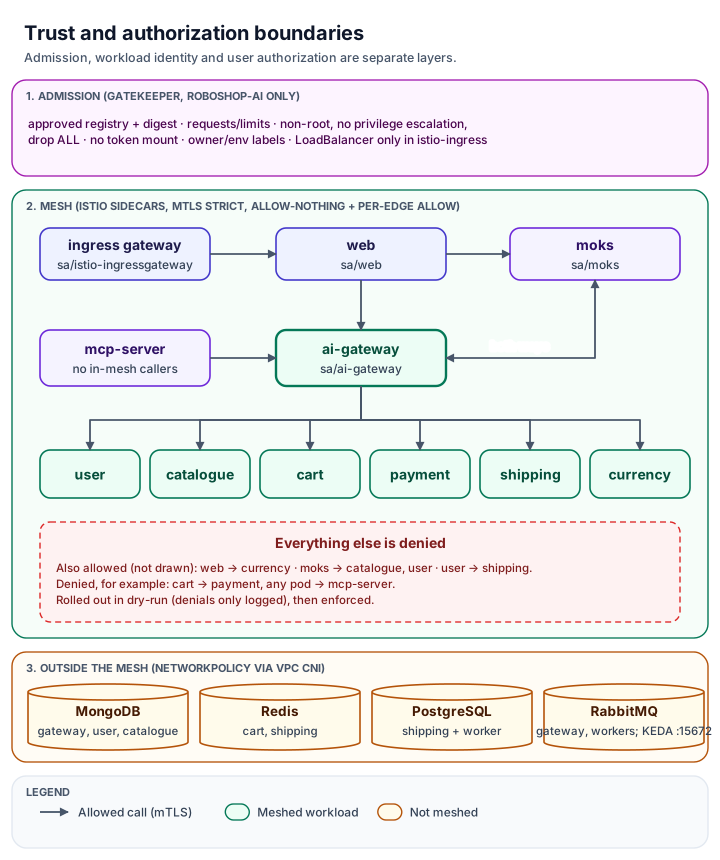
Authorization is split three ways on purpose:
- Gatekeeper decides what may be admitted to the cluster.
- Istio AuthorizationPolicy decides which workload may call which service. An allow-nothing policy denies everything, then one ALLOW policy per call edge found in the code opens each path.
- The applications decide what a user may do: sessions, roles, cart ownership and the protected super admin.
Admission policy with Gatekeeper
Gatekeeper policies require:
- images from approved registries, pinned by digest;
- CPU and memory requests and a memory limit on every container;
- non-root containers with no privilege escalation and all capabilities dropped;
- no auto-mounted service-account tokens;
- owner and environment labels on every workload;
- load balancers only in the ingress namespace.
They match only the application namespace, so they can never block Istio, CSI, the VPC CNI, KEDA, Karpenter or the logging agents. They start in audit mode, and enforcement is a one-line change once the audit is clean.
Exceptions are narrow and visible. The demo data stores carry a labelled exception from the restricted-pod rule, because their official images start as root and then drop privileges. The injected Istio containers are exempt only from digest pinning, because istiod pins their version.
NetworkPolicies isolate the data stores. They are enforced only because the VPC CNI add-on runs its network policy agent. Without an engine, the same YAML does nothing.
Checkout and events
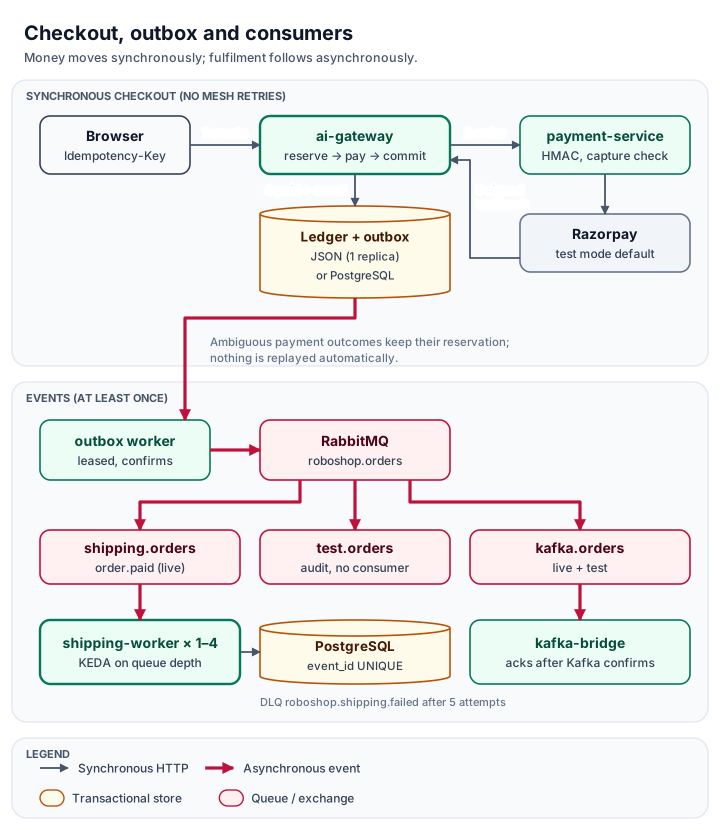
The gateway's default ledger is a JSON file that only one process may write. The demo profile keeps it at one replica with a Recreate strategy and does not pretend it is highly available. The code already supports a transactional PostgreSQL ledger with a leased outbox. Moving to it is an explicit, reviewed migration, and it is the production option.
Assistant and MCP
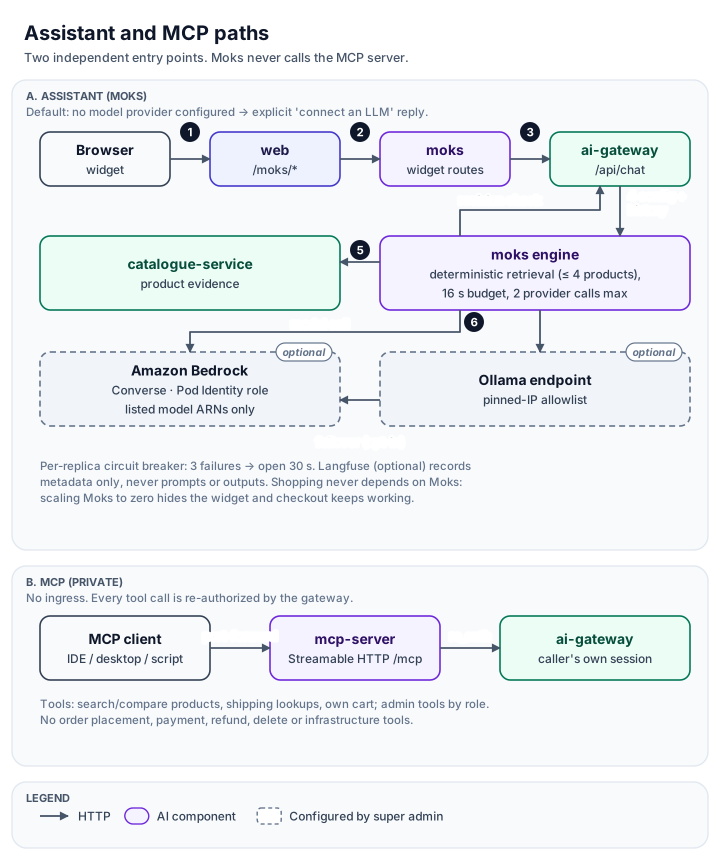
No model provider is configured by default, and shopping never depends on the assistant. Moks retrieves products deterministically and calls a model only after the super admin enables Amazon Bedrock or an approved Ollama endpoint. On EKS, Bedrock access uses an EKS Pod Identity role limited to the listed model ARNs, with no stored keys. The MCP server stays private: it has no ingress, and every tool call carries the user's own session and is authorized again by the gateway.
Scaling: KEDA for pods, Karpenter for nodes
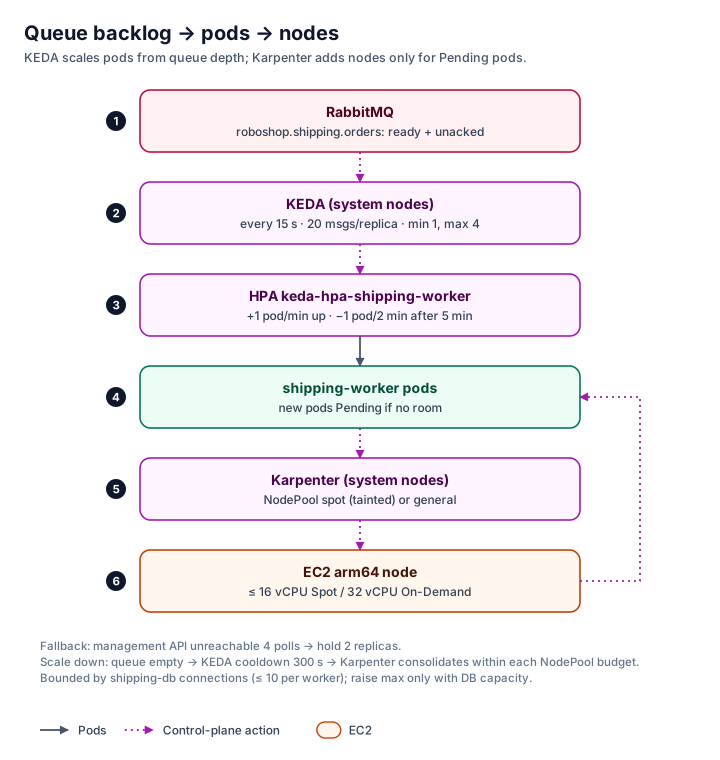
KEDA needs a consumer that is safe to run many times in parallel. In RoboShop that is shipping's RabbitMQ listener, and the code shows why it is safe:
- it acknowledges a message only after the database insert commits;
- duplicate deliveries hit a unique event ID and are counted, not reprocessed;
- failures retry five times and then go to a dead-letter queue;
- schema migrations are serialized by an advisory lock.
The Kafka bridge does not qualify, because it shares a pod with the single Kafka broker.
So the EKS overlay runs the same shipping image twice. shipping-service serves HTTP with the consumer off. shipping-worker consumes with no Service in front of it. KEDA owns the worker's HPA. No application code changed.
The worker keeps at least one replica, because a Java cold start plus migrations would delay the first paid order. It is capped at four replicas, because each worker holds up to ten database connections. Raise that cap only together with database capacity.
Karpenter runs on a small, tainted On-Demand managed node group, so node provisioning never depends on nodes Karpenter created itself. It has two pools, both arm64-only to match the published images, both with CPU and memory limits:
- On-Demand: the default for everything.
- Spot: tainted, so only interruption-tolerant pods such as the worker opt in. Interruption notices arrive through an SQS queue.
Consolidation is rate-limited by disruption budgets, and PodDisruptionBudgets keep one replica of each two-replica service during drains. A GPU pool for a self-hosted model is provided but never applied by default.
Telemetry
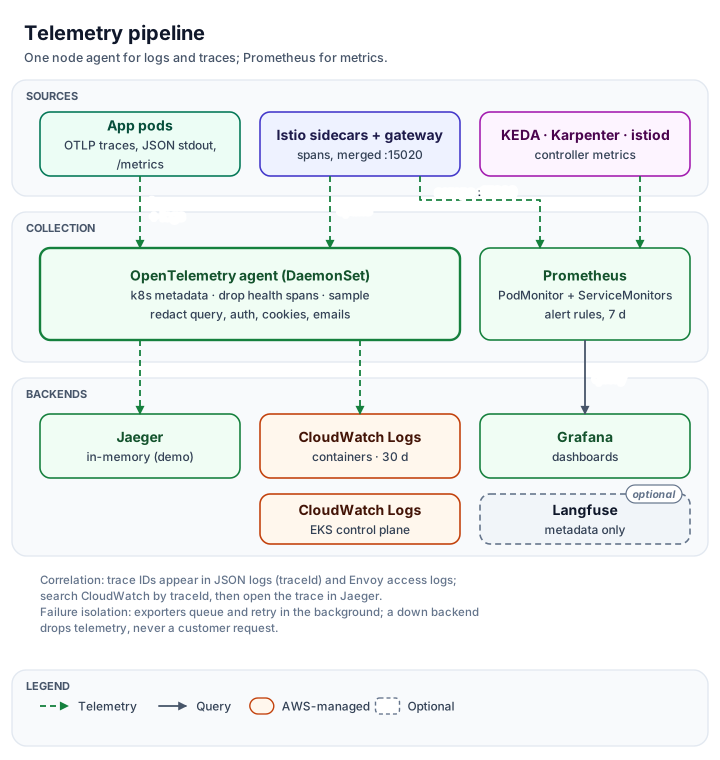
The baseline uses one backend per signal and no duplicate agents:
- Metrics: Prometheus and Grafana. Prometheus scrapes application and Envoy metrics that the sidecar merges on a plaintext port, so strict mTLS needs no exceptions.
- Logs and traces: one OpenTelemetry Collector per node. It removes query strings, authorization headers, cookies and email addresses before export, writes logs to CloudWatch Logs and sends traces to Jaeger.
- Control plane: EKS logs only the
api,auditandauthenticatorcategories, with 30-day retention. - Alerts: error ratio, p95 latency, queue backlog, worker at its replica cap, pods pending, a NodePool near its limit, and enforced policy violations.
Exporters queue and retry in the background, so a telemetry outage drops telemetry, never a customer request.
Delivery with Argo CD
Terraform builds the AWS layer, and a script installs the controllers from pinned Helm charts. The application layers are rendered: a script resolves every image to its digest and fills in your own values, then writes plain manifests that you review as a Git diff before Argo CD syncs them in dependency order. Argo CD never manages the controllers it depends on. It ignores the worker's replica count, which KEDA owns.
Lab versus production
The default profile is a demonstration, and it is not highly available. MongoDB, PostgreSQL, Redis, RabbitMQ and Kafka run as single pods on single EBS volumes, Jaeger keeps traces in memory, and there is one NAT gateway. The repository lists the production replacements:
- managed databases with Multi-AZ;
- Amazon MQ and Amazon MSK for the brokers;
- the PostgreSQL ledger;
- AWS Backup with tested restores;
- interface endpoints;
- Gatekeeper failing closed.
Benefits and trade-offs
Benefits this design enables:
- Each concern has one owner and one place to change it.
- Every image is reviewed by digest before it runs.
- Service-to-service access follows the real call graph.
- Queue backlog turns into pods, and pods into nodes, without manual capacity planning.
- Telemetry is redacted before it leaves the node.
Trade-offs:
- More moving parts than the application itself: eleven controllers to keep upgraded.
- Costs that run even when idle: the control plane, two system nodes, NAT and the load balancer.
- A short version window: Istio 1.30 support ends around December 2026, so a 1.31 upgrade is already due.
- Demo-grade data stores until they move to managed services.
For a small store a managed platform or a modular monolith would be cheaper. The point here is to show the platform pieces working together on real code.
Next
The deployment guide walks through every step in order, with checks and recovery, from an empty AWS account to scaling tests and teardown. Pinned versions and their sources are in versions.md.
Discussion comments
No comments yet. Start the discussion.