This guide deploys RoboShop AI, a personal showcase project, onto Amazon EKS, from an empty AWS account to scaling tests and teardown. It is the companion to RoboShop AI on Amazon EKS: system design, which explains why each component is there.
Every command comes from the repository runbook, deploy/eks/RUNBOOK.md. The configuration files stay authoritative in the repository; this page links to them instead of copying them.
Tested so far:
- Passed offline, with no AWS account: Terraform validate and mocked plan tests, Helm template of every chart, a full manifest render, and a policy pre-check.
- Not yet run on real AWS: the end-to-end deployment.
Steps marked runtime check confirm behaviour that cannot be proven offline.
Before you start
Audience: you are comfortable with the AWS CLI, Terraform and kubectl, and you use a sandbox AWS account where you may create VPCs, EKS clusters and IAM roles.
Tools: AWS CLI v2, Terraform 1.10 or later, kubectl 1.35–1.37, Helm 3.8 or later, envsubst, jq and git.
You provide:
- a region and two or three Availability Zones;
- an S3 bucket for Terraform state;
- your public IP for API access;
- a hostname in a Route 53 hosted zone you control;
- an email address for Let's Encrypt;
- a commit SHA whose images you will build.
Defaults: payments stay in Razorpay test mode, and no AI provider is configured.
Cost: the control plane, two system nodes, a NAT gateway, the NLB and EBS volumes all bill while the cluster exists, even when idle. The README's cost section lists the drivers. Tear down when you finish.
| Component | Version |
|---|---|
| EKS (Kubernetes) | 1.36 |
| Karpenter | 1.15.1 |
| Istio | 1.30.7 |
| Gatekeeper | 3.23.1 |
| KEDA | 2.21.0 |
| AWS Load Balancer Controller | 3.6.2 |
| cert-manager · External Secrets | v1.21.3 · 2.14.0 |
| Argo CD | 3.5.6 (chart 10.11.6) |
The full matrix, with sources, is in versions.md.
A. Configure and check
Run from the repository root:
cp deploy/eks/terraform/backend.hcl.example deploy/eks/terraform/backend.hcl
cp deploy/eks/terraform/demo.tfvars.example deploy/eks/terraform/demo.tfvars
cp deploy/eks/env/example.env deploy/eks/env/roboshop-demo.env
# edit all three, replacing every <placeholder>
deploy/eks/scripts/preflight.sh deploy/eks/env/roboshop-demo.env
Expected: every line reads ok, and quotas are printed.
If it fails: a low vCPU quota fails late, inside Karpenter. Request an increase now.
B. Create the AWS infrastructure
cd deploy/eks/terraform
terraform init -backend-config=backend.hcl
terraform fmt -check && terraform validate && terraform test
terraform plan -var-file=demo.tfvars -out=eks.tfplan
terraform apply eks.tfplan
What it creates:
- a VPC with private worker subnets and one NAT gateway;
- EKS 1.36 with pinned add-ons, including the VPC CNI with network policy enabled and EBS CSI;
- a tainted two-node arm64 system node group;
- EKS Pod Identity roles, each scoped to one service account;
- Karpenter's IAM roles and interruption queue;
- immutable ECR repositories;
- an empty Secrets Manager secret;
- a log group with 30-day retention.
Check: terraform output.
If it fails: RepositoryAlreadyExistsException means the repositories already exist in this account. Set manage_ecr_repositories = false to reuse them.
Then build and push the arm64 images for one commit, either through the GitHub Actions OIDC role in terraform output or locally with docker buildx --platform linux/arm64 (runbook step B3). Set IMAGE_TAG in your env file to that commit SHA.
C. Connect to the cluster
$(terraform -chdir=deploy/eks/terraform output -raw kubeconfig_command)
kubectl get nodes -L roboshop.dev/pool,kubernetes.io/arch
Expected: two Ready arm64 nodes labelled system.
If it fails:
- Credentials error: your identity is not in
admin_principal_arns. - Timeout: your IP changed. Update
api_public_access_cidrs.
D. Controllers, rendered layers and secrets
deploy/eks/platform/install.sh deploy/eks/env/roboshop-demo.env
deploy/eks/scripts/render.sh deploy/eks/env/roboshop-demo.env
git add deploy/eks/clusters/roboshop-demo && git commit -m "Render roboshop-demo" && git push   # your fork
kubectl apply -f deploy/eks/clusters/roboshop-demo/argocd/manifests.yaml
deploy/eks/scripts/put-secrets.sh deploy/eks/env/roboshop-demo.env
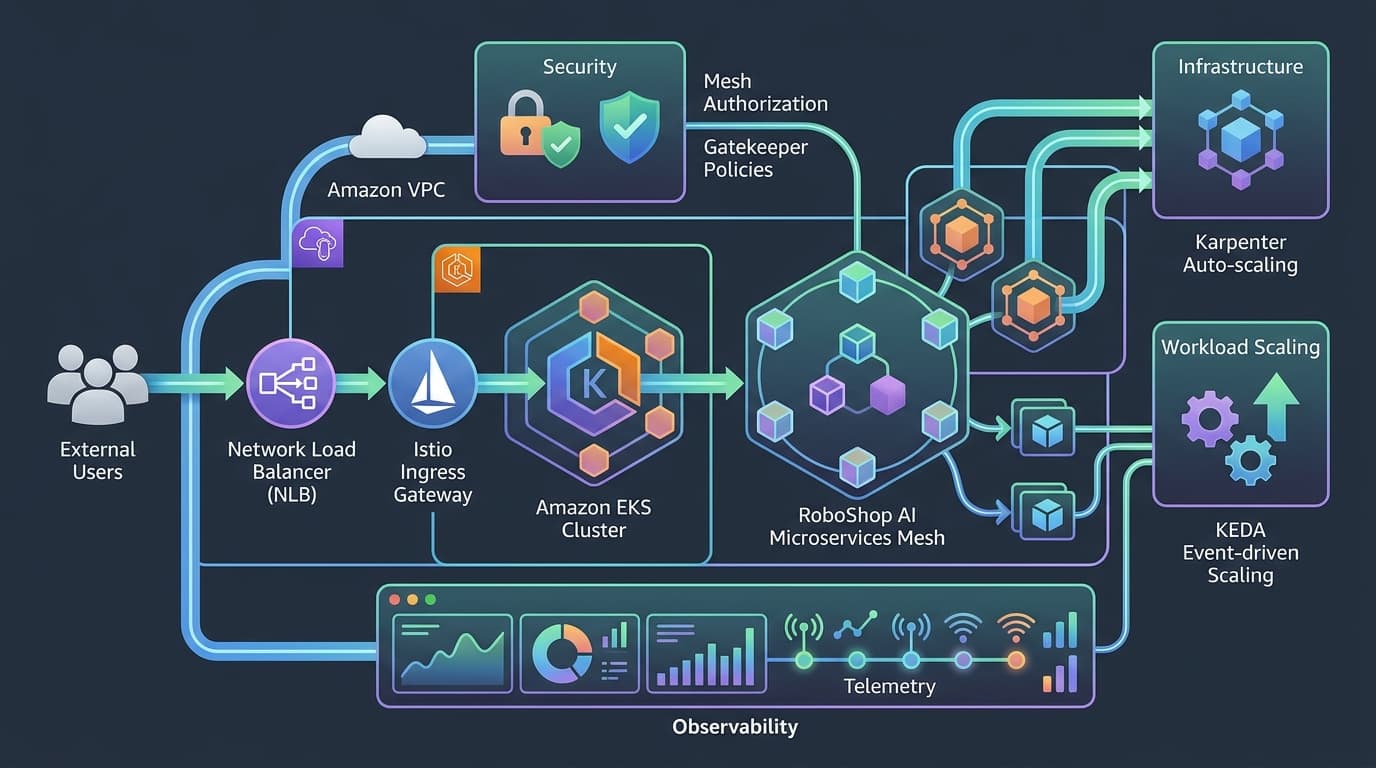
Install order (install.sh uses pinned Helm charts and always this order): Karpenter first, then the load balancer controller, cert-manager, External Secrets, Prometheus, Istio, Gatekeeper, KEDA, the telemetry agents and Argo CD.
Rendering: render.sh resolves every image to a digest, so the Git diff shows exactly what will run.
Sync order: Argo CD syncs the layers in waves:
- namespace and storage;
- NodePools, secrets and TLS;
- policy templates, mesh configuration and monitors;
- applications;
- policy constraints and autoscaling.
Secrets: put-secrets.sh generates random credentials locally and stores them in Secrets Manager. It asks for the super admin silently and never prints a value.
Check: kubectl -n roboshop-ai get externalsecret shows Ready, and kubectl get nodepools shows two Ready pools.
If it fails: if the ingress gateway's first install times out, the NodePools did not exist yet. Re-run install.sh <env> istio after they sync.
E. Data and explicit migrations
The demo data stores start as single pods on encrypted gp3 volumes. Shipping applies its own schema migrations at start-up, serialized by an advisory lock. Confirm them, then run the one-off location seed:
kubectl -n roboshop-ai exec deploy/shipping-db -- psql -U shipping -d shipping \
  -c 'SELECT version, applied_at FROM public.shipping_migrations ORDER BY version'
kubectl apply --server-side -f deploy/eks/clusters/roboshop-demo/jobs/manifests.yaml
kubectl -n roboshop-ai wait job/shipping-location-import --for=condition=Complete --timeout=10m
The demo keeps the gateway's single-writer JSON ledger, so it runs one replica and needs no migration. Moving to the PostgreSQL ledger is a reviewed production step. These volumes have no automatic backups, so snapshot them before you rely on any data.
F. Roll out the mesh and policies gradually
The first render uses three permissive settings:
MTLS_MODE=PERMISSIVE   # sidecars accept plaintext as well as mTLS
AUTHZ_DRY_RUN=true     # Istio only logs would-be denials
POLICY_ACTION=dryrun   # Gatekeeper only reports violations
Check each layer before tightening:
kubectl get constraints -o custom-columns=NAME:.metadata.name,ACTION:.spec.enforcementAction,VIOLATIONS:.status.totalViolationsCheck: Gatekeeper reports zero violations, which is what the offline pre-check found.
Runtime check:
- Raise each sidecar's
rbaclog level withistioctl proxy-config log. - Use the shop for a few minutes: browse, sign in, add to cart, test checkout and open the assistant.
- Search the proxy logs for
shadow denied. Each line names a call the code makes that the policy does not yet allow.
Then change the three values to STRICT, false and deny, re-render, commit and push. Rolling back is the same three values in reverse.
G. Release a new version
Build images for the new commit, then:
sed -i.bak "s/^IMAGE_TAG=.*/IMAGE_TAG=<new-sha>/" deploy/eks/env/roboshop-demo.env
deploy/eks/scripts/render.sh deploy/eks/env/roboshop-demo.env
git diff deploy/eks/clusters/roboshop-demo/apps     # only digests should change
git commit -am "Deploy <new-sha>" && git push
H. DNS, TLS and the public endpoint
kubectl -n istio-ingress get svc istio-ingressgateway -o jsonpath='{.status.loadBalancer.ingress[0].hostname}'- Point your hostname at that NLB with a Route 53 alias record.
- Wait for the staging certificate:
kubectl -n istio-ingress get certificate roboshop. - Set
CERT_ISSUER=letsencrypt-prod, re-render and push. - Run the checks:
curl -sSI https://<your-host>/ | head -1
deploy/eks/scripts/verify.sh deploy/eks/env/roboshop-demo.env
Runtime check: the ingress gateway's access log should show your public IP, not an NLB address. If requests hang, proxy protocol is enabled on one side only.
I. Prove the scaling chain
KEDA reads queue depth through the RabbitMQ management API using a monitoring-only user, which you create once (runbook step I1). Then run the controlled test:
deploy/eks/scripts/backlog-test.sh deploy/eks/env/roboshop-demo.env 60The test uses a throwaway queue and a throwaway Deployment, so real orders are never touched. Synthetic events on the real queue would fail the worker's fail-closed checks and fill the dead-letter queue.
Expected output: replicas rise towards six, some pods sit Pending, Karpenter NodeClaims appear, and the pods become ready. The script then cleans up, and Karpenter removes the extra nodes about five minutes later.
J. Observability
kubectl -n monitoring port-forward svc/kube-prometheus-stack-grafana 3000:80
kubectl -n observability port-forward svc/jaeger 16686:16686
Where to look:
- Prometheus targets: the
roboshop-meshPodMonitor should list every application pod. - Container logs: CloudWatch Logs group
/roboshop/<cluster>/containers, one stream per pod. - Control-plane logs: CloudWatch Logs group
/aws/eks/<cluster>/cluster.
Investigating a failed checkout:
- The
RoboShopHighErrorRatioalert names a workload. - A Prometheus query on
istio_requests_totalby response code shows whether payment-service is returning errors. - CloudWatch Logs Insights finds the error line and its
traceId. - Jaeger shows the full span tree: ingress, web, ai-gateway, payment-service and the Razorpay call.
K. Roll back and tear down
Roll back:
- An application release:
git revertthe deploy commit and push. For an immediate fix,kubectl rollout undofirst. - A controller: set the previous version in
platform/versions.envand re-runinstall.sh <env> <component>.
Tear down, in this order. The runbook has the exact commands.
- Snapshot the EBS volumes you want to keep.
- Delete the Argo CD applications.
- Uninstall the ingress gateway, so the NLB is deleted before the VPC.
- Delete the namespace and the NodePools, then wait for Karpenter's nodes to go.
- Delete the persistent volumes. This is a separate step, because the StorageClass retains volumes.
- Run
terraform plan -destroyand apply it.
If it fails: a DependencyViolation on the VPC means a controller-created load balancer or network interface still exists.
Troubleshooting quick reference
| Symptom | Likely cause | Fix |
|---|---|---|
Pods Pending, no new nodes | NodePool limit, vCPU quota or Spot capacity | kubectl describe nodepool, quota increase, or allow more instance types |
ExternalSecret not ready | Secret name or Region mismatch | Name must be <prefix>/<environment>/app |
| Certificate stuck | Wrong hosted zone ID | Check cert-manager logs for Route 53 AccessDenied |
403 between services after STRICT | Missing allow edge | Find the shadow denied line from step F and add the edge only if the code makes that call |
| ScaledObject not ready | KEDA user missing or blocked | Runbook step I1; NetworkPolicy must allow the keda namespace on port 15672 |
| VPC destroy fails | Load balancer or network interface left behind | Delete the ingress gateway before terraform destroy |

Discussion comments
No comments yet. Start the discussion.