RoboShop's MCP server is a small Python service that lets an external AI client search the catalogue, compare products and manage the signed-in user's own cart. It uses FastMCP and holds no business data and no privileged credential. It forwards each caller's session to the same gateway a browser uses, so it can only do what that user could already do.
Two facts surprise people. The shopping assistant does not use this server. And on 1 November 2026 nothing in the cluster called it either: mcp-server was running on EKS with no in-cluster client and no public route. It is a working integration surface, verified by tests and a demo, waiting for a client.
For the wider system, see the architecture overview. This article describes commit c81e85a, pinned to FastMCP 4.1.3 and the MCP Python SDK 2.3.0.
MCP in plain language
The Model Context Protocol is a standard way for an AI application to discover and call capabilities it was not compiled with. Without it, each AI client needs custom integration code for each system. With it, a server publishes a list of tools, each with a name, a description and a JSON Schema, and any compatible client can read the list and call them.
The important part is what the description is for. A language model reads it and decides when to call the tool. So a tool definition is an API contract and a prompt at the same time.
Who plays which role
MCP defines three roles, and it is worth being exact about them here.
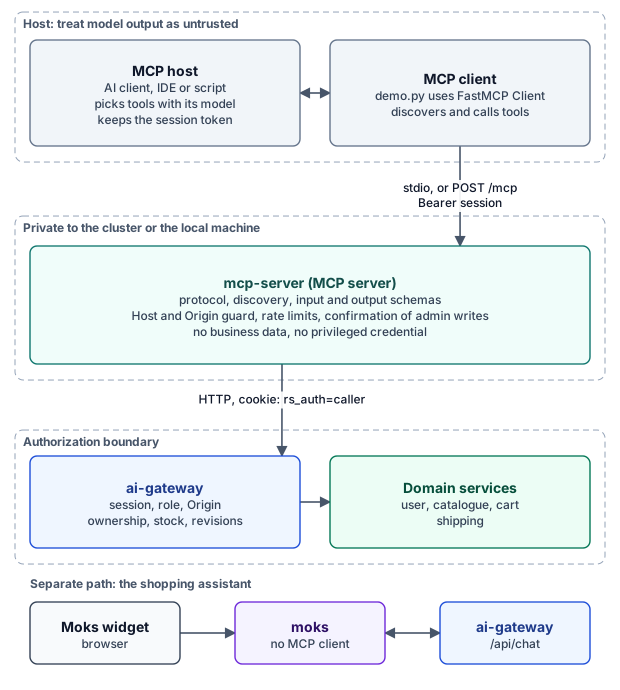
Figure 1. Hosts and clients live outside the application. The authorization boundary sits below the MCP server.
| Role | In this project |
|---|---|
| Host | Not part of the repository. Any external AI application the user runs |
| Client | The one inside that host. The repository's own example is demo/demo.py, using FastMCP's Client |
| Server | services/mcp-server/server.py |
Nothing in RoboShop AI acts as a host. No model runs in the MCP path on this side of the protocol, so mcp-server never decides anything by itself. It validates and forwards.
Transports and connection lifecycle
MCP_TRANSPORT selects one of two transports.
| stdio | Streamable HTTP | |
|---|---|---|
| Used by | A local client launching server.py | The Kubernetes Deployment, port 4107 |
| Identity | MCP_SESSION_TOKEN from the environment | Authorization: Bearer on every request |
| Tool list | Not filtered by role | Filtered by role |
| Enforcement | The gateway refuses what the session may not do | Both the server and the gateway refuse |
The HTTP options are short and worth reading:
# services/mcp-server/server.py
return {"path": "/mcp", "stateless_http": True, "json_response": True, "host_origin_protection": True,
        "allowed_hosts": hosts, "allowed_origins": origins}
stateless_http matches where the protocol went. Revision 2026-07-28 removed the initialize handshake and protocol-level sessions, so each request now carries its protocol version and capabilities. There is no connection state to lose and none that can leak between users. In a local test against the real server, the FastMCP client negotiated 2026-07-28. Older clients are still handled: the confirmation code keeps a path for handshake-era connections.
json_response means a tool answer arrives as one JSON document, which the specification allows as an alternative to a Server-Sent Events stream.
Tools, resources and prompts
MCP servers can offer three kinds of capability. This one uses only the first.
| Capability | Meant for | Status here |
|---|---|---|
| Tools | Actions the model chooses to call | Implemented |
| Resources | Data the application reads by URI | Not implemented |
| Prompts | Reusable templates a user picks | Not implemented |
| Elicitation | The server asking the user a question | Implemented, for admin writes only |
| Sampling | The server asking the client's model | Not implemented |
I confirmed this by connecting a client: list_resources, list_resource_templates and list_prompts all returned empty lists. References to resources/read in otel_bridge.py are only span-name handling.
How tools are defined
Each tool is a ToolSpec in gateway_tools.py, which keeps protocol code out of the catalogue. A spec holds a name, a description, an input schema, an output schema, a function that builds the gateway request, and a function that shapes the response. Here is the one write tool available to customers:
# services/mcp-server/gateway_tools.py
ToolSpec(
    "update_cart", "Set cart quantity",
    "Set the quantity of one SKU in the signed-in shopper's own cart; 0 removes it. Repeating the same call "
    "has no further effect. Does not reserve stock, take payment or place an order. Fails with a conflict "
    "while a payment is pending or when stock is insufficient.",
    {"sku": SKU, "quantity": {"type": "integer", "minimum": 0, "maximum": 20}},
    ["sku", "quantity"], CART,
    lambda args: ("POST", "/api/cart", None, {"sku": args["sku"], "quantity": args["quantity"]}),
    cart_view,
    roles=CUSTOMER, write=True, destructive=True, idempotent=True,
),
The description tells the model what the tool will not do, which is the part it would otherwise guess at. The quantity is absolute, so a model that repeats a call does not double the order.
Discovery
Fifteen tools exist in TOOLS. Registration and role filtering decide who sees what:
| Caller over HTTP | Tools discovered | Which |
|---|---|---|
| Customer | 8 | Search, compare, shipping lookups, health, recommendations, view_cart, update_cart |
| Admin | 9 | The above, plus admin_list_products |
| Super admin | 11 | The above, plus admin_list_users, admin_get_settings |
With MCP_ENABLE_ADMIN_WRITES=true | Up to 15 | Four admin write tools, each needing confirmation |
Running demo/demo.py shows a synthetic customer discovering exactly eight tools. Calling a hidden tool returns Unknown tool: 'admin_list_users', so its existence is not confirmed.
Validation
Arguments are checked by a strict local validator in addition to FastMCP's own: no unknown fields, no type coercion, bounded lengths and no control characters. In my test, quantity: "2" was refused with "The arguments do not match this tool's input schema", and no gateway call was made.
Output is validated as well. spec.shape projects the gateway response into a stable view, and a compiled JSON Schema validator checks it before anything returns. A malformed upstream response becomes invalid_response instead of reaching the model. The projection also preserves a useful distinction: an unreported fact stays null and never becomes 0, so inStock: 0 means sold out while inStock: null means nobody said.
A call from start to finish
Figure 2 traces update_cart.
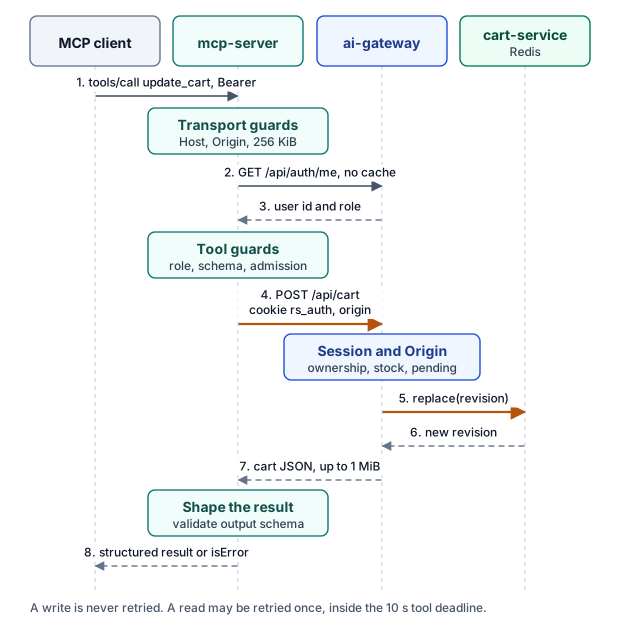
Figure 2. The session is checked at the MCP server and again at the gateway, on every request.
The HTTP layer checks the session with no cache, so an expired or revoked session fails on its next call:
# services/mcp-server/server.py
# No cache: expired and revoked sessions fail on the next request.
result = await self.gateway.request("GET", "/api/auth/me", session=token,
                                    deadline=anyio.current_time() + 3, retry=True)
Then GatewayClient builds a new request. It never forwards client headers:
# services/mcp-server/gateway_client.py
# Only these headers leave the server: never client headers, cookies or credentials.
headers = {"accept": "application/json"}
if body is not None:
    headers["origin"] = self.origin  # The gateway's CSRF check for state changes.
if session:
    headers["cookie"] = "rs_auth=" + session
A representative read works the same way, with one thing to notice. search_products calls GET /api/recommendations, which reaches catalogue-service's keyword ranking and reports strategy: catalogue-keyword-ranking. That is not the retrieval code Moks uses. The same question can return different products through the two AI paths.
Deadlines and retries follow the same rules as the gateway. Each tool call has a 10-second total deadline, retries included. A read is retried once on a transient failure. A write is never retried, and it is shielded from cancellation, so a started change runs to its deadline and is not replayed:
# services/mcp-server/server.py
if spec.write:
    # A started change runs to its own deadline even if the client cancels; never replayed.
    with anyio.CancelScope(shield=True):
        data = await call
Authentication, authorization and errors
The server performs authentication and a first authorization check, but the gateway is the authority. Roles in gateway_tools.py only filter discovery and fail fast. The module's docstring says so directly.
I tested the transport guards against the real server, using the synthetic fixture as a gateway:
| Request | Response |
|---|---|
| No bearer token | 401 |
| Malformed bearer token | 401, invalid_token |
Unknown Host | 421 |
Unknown Origin | 403 |
| Body over 256 KiB | 413 |
Tool failures do not use protocol errors. They return a normal result with isError: true and a safe structure. Asking for an unknown SKU produced this, with the correlation ID shortened:
{"error": {"code": "not_found", "message": "The requested record was not found.", "retryable": false, "detail": "Product not found.", "correlationId": "ad29..."}}detail is only ever the gateway's own public message for a 400, 404 or 409, truncated to 300 characters. correlationId is the trace ID. retryable is never true for a write, and that gives a model an explicit signal not to repeat a change.
Admission protects the shared gateway: 60 calls a minute per user and 32 in flight across the process. The per-user limit exists because every MCP user reaches the gateway from one pod address, a point the gateway article explores.
A gap against the specification
The session is an ordinary RoboShop session, not an OAuth token. That is reasonable for a private, port-forwarded service, and the README says plainly that a remote client needs OAuth 2.1 with an external identity provider, which is not implemented.
It should still be labelled correctly. The MCP authorization specification treats authorization as optional, but when followed, it requires servers to accept only tokens issued for them and says they "MUST NOT accept or transit any other tokens". Accepting a shop session and passing it to the gateway is that pattern. So this design does not conform to the MCP authorization profile, and the README's warning against exposing /mcp publicly is a real constraint rather than a formality.
The session also carries the user's full authority, with no narrower scope for an AI client, and it lives for up to eight hours. The repository does not describe how a real user gets one to give to a client; the demo uses a test session.
Trust boundaries and AI-specific risks
Three risks deserve direct answers.
Prompt injection
Text in a tool result can try to instruct the model reading it. search_products returns product descriptions of up to 1,000 characters, plus names and source labels, unmodified. Output schemas check structure, not intent, so a hostile description in the catalogue would reach the client's model intact. The server does not scan or neutralise this text, and it cannot, since it doesn't see the model.
What limits the damage is capability. Injected text can only cause a client to call tools the user's session allows. In the default deployment the only state change available is setting quantities in that user's own cart. There is no tool for payment, orders, deletion, URLs, SQL or shell commands, and no email or web tool that could carry data out. A host that combines this server with other tools loses that protection, because the injected text could then use those tools too.
Sensitive data
For customers, tool output contains the catalogue and the caller's own cart. The largest exposure is admin_list_users, which returns account emails to a super admin's client, and so to that client's model provider. Logs record tool name, outcome and duration, never arguments. Span attributes pass through an allowlist in otel_bridge.py, because FastMCP may attach arguments.
Unsafe writes
update_cart has no confirmation step. A model can change a cart without asking, unless the host chooses to ask. The annotations mark it destructiveHint: true, and the code comment is clear that these are hints for clients, not controls. The blast radius is small: quantities in one cart, with no reservation or charge, and a pending payment blocks the change entirely.
Admin writes are held to a higher standard. They are not registered unless MCP_ENABLE_ADMIN_WRITES=true, and the deployment sets it to false. When enabled, a boolean argument from the model is not accepted as approval. The server returns an elicitation with signed state, bound to the caller, the tool, a hash of the exact arguments, a two-minute expiry and a one-time nonce:
# services/mcp-server/confirmation.py
body = json.dumps({"d": digest(subject, tool, args), "exp": int(time.time()) + self.ttl,
                   "n": secrets.token_hex(16)}, separators=(",", ":"))
return body + "." + self._sign(body)
This uses the protocol's Multi Round-Trip Requests pattern: the client asks its user and retries with the answer. The docstring admits the limit of this approach: it proves the confirmation came through the authenticated client for those exact arguments, and it cannot prove a person clicked. The nonce store is also per process and lost on restart.
Where it runs
On EKS, mcp-server runs as one replica: non-root, read-only filesystem, all capabilities dropped and no service account token. It is a ClusterIP Service, and the ingress route comment confirms it has no public path.
A NetworkPolicy admits only pods labelled roboshop.ai/mcp-client: "true", and no workload carries that label. Mesh policy adds a wrinkle: the ai-gateway AuthorizationPolicy already allows the mcp-server identity, but argocd-eks/apps/mesh has no policy allowing traffic to mcp-server. Policies are in dry-run today, so nothing is blocked. Once the namespace-wide allow-nothing policy is enforced, a future in-cluster client will need one added.
Trying it
The demo needs only the service's Python dependencies. It starts the real server against a synthetic gateway, with no real accounts, payments or models:
python -m pip install -r services/mcp-server/requirements.txt
python services/mcp-server/demo/demo.py
python -m unittest discover -s services/mcp-server/tests -v
You should see the eight customer tools, search and compare results for synthetic products, a refused admin call, and a connected trace tree. I ran all of these on Python 3.11 with the pinned dependencies, and all 20 tests passed.
| Symptom | Check |
|---|---|
401 on /mcp | Token missing, not 64 hex characters, expired, or gateway unreachable. Look for mcp_authentication_failed |
| 421 or 403 | Host not in MCP_ALLOWED_HOSTS, or Origin not in MCP_ALLOWED_ORIGINS |
| "Unknown tool" | Role cannot see it, or it is an admin write that is not enabled |
rate_limited | Outcome admission_rejected is the local limit; otherwise a gateway 429 |
/ready is 503 | GATEWAY_URL is wrong, or the gateway's /health/ready is failing |
When MCP is worth it
MCP earned its place here because the clients are unknown in advance. Anyone can point a compatible AI client at it without RoboShop shipping integration code. That is the case MCP is designed for.
A direct API is enough when you own both ends. Moks is the proof. It runs in the same trust domain and needs one fixed read, so it calls GET /api/products directly. Adding MCP would add a hop, a schema layer and a loop, and gain no authorization.
| Use MCP when | Use a direct API when |
|---|---|
| Clients are third-party or varied | You own the only client |
| A model chooses among tools | Code decides what to call |
| Discovery matters | The call is fixed at build time |
| You can separate user identity properly | You need the lowest latency path |
Frequently asked questions
Why not use the official SDK directly instead of FastMCP?
The repository does not record that decision. FastMCP supplies the HTTP app, Host and Origin protection, the token verifier interface and role-based tool visibility, all of which this service uses.
Can I point Claude or another client at this server?
Locally, yes, over stdio or through a port-forward to http://localhost:4107/mcp, with the session in the client's secret settings. Do not expose it publicly without OAuth.

Discussion comments
No comments yet. Start the discussion.