A web page is slow for one of two reasons: the server takes long to produce it, or the browser takes long to download and display it. Caching attacks both. It lets the server skip work it has already done, and it lets the network and the browser skip bytes they already have.
This guide walks through every caching layer of a real Next.js application, this site, from the reader's browser down to the database. It explains the two rendering techniques that matter most for content sites, SSG and ISR, shows how this site implements them across two Kubernetes replicas, and covers image optimisation, which for most pages saves more bytes than everything else combined.
Why caching matters for a web application
Three things improve when a page is cached well.
Speed for readers. The time to first byte (TTFB) is the floor of everything else: a browser can't paint what it hasn't received, and Largest Contentful Paint, one of Google's Core Web Vitals, can't start before it. On this site an article rendered from the database takes about 0.49 s of server time. The same page from memory takes 5–9 ms.
Load on the system. Without a cache every visit runs the same queries and renders the same HTML. With one, the database sees one render per page per change. Traffic spikes, a post shared widely or a crawler sweeping the site, land on memory instead of Postgres.
Resilience. If the database is slow or briefly unavailable, cached pages keep being served.
The cost is the hard part: freshness. A cache that serves an old version after you publish a correction is worse than no cache. Most of the engineering in this article is about making cached pages fast and current.
The layers, from browser to database
A request on this site passes up to six caches. Each one has a different scope (one reader, one pod, everyone), a different lifetime, and a different way of being cleared.
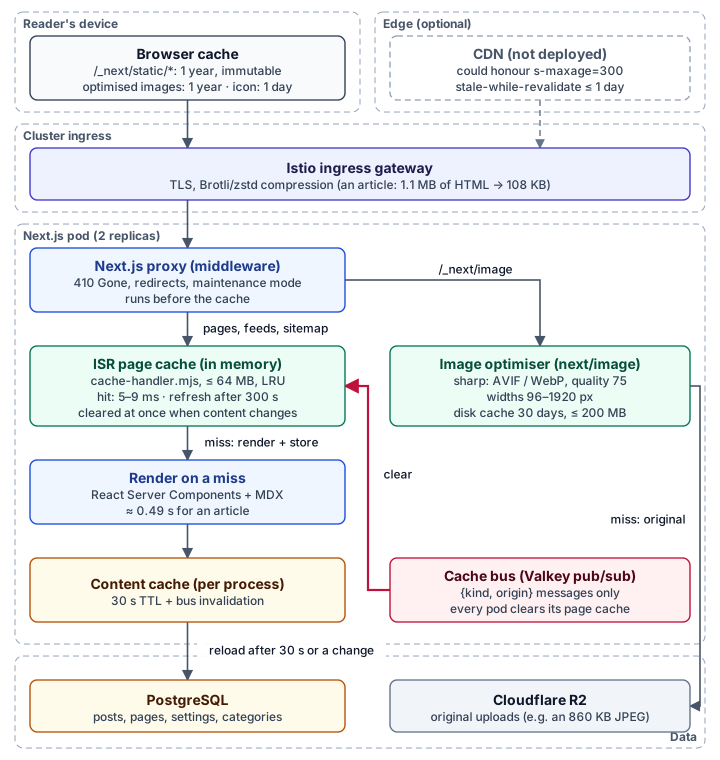
| Layer | Scope | What it keeps | Lifetime | Cleared by |
|---|---|---|---|---|
| Browser cache | One reader | JS, CSS, fonts, optimised images, icon | 1 year (hashed files), 1 day (icon) | New file names on deploy |
| CDN (optional) | Everyone near an edge | Pages, if one is added | s-maxage=300, stale ≤ 1 day | Time |
| Compression at the ingress | Per response | Not a cache: makes every response smaller | — | — |
| ISR page cache | One pod | Rendered HTML and route responses | 300 s, then refreshed in the background | Any content or settings change, on every pod |
| Image optimiser cache | One pod | Resized AVIF/WebP/JPEG files | 30 days | Time, eviction at 200 MB |
| Content cache | One process | Posts, pages, settings read from Postgres | 30 s | Any content change, on every pod |
Two principles come out of that table and apply to any web application:
- Cache immutable things forever and name them by their content. Next.js puts a hash in every JavaScript and CSS file name, so
Cache-Control: public, max-age=31536000, immutableis safe: a new deploy produces new names, and old files are simply never asked for again. - Cache mutable things briefly and clear them on change. HTML changes when you publish. It gets a short lifetime as a safety net and an explicit clear as the real mechanism.
Three ways to produce HTML: SSG, ISR and dynamic rendering
Before caching responses, decide when the HTML gets made at all.
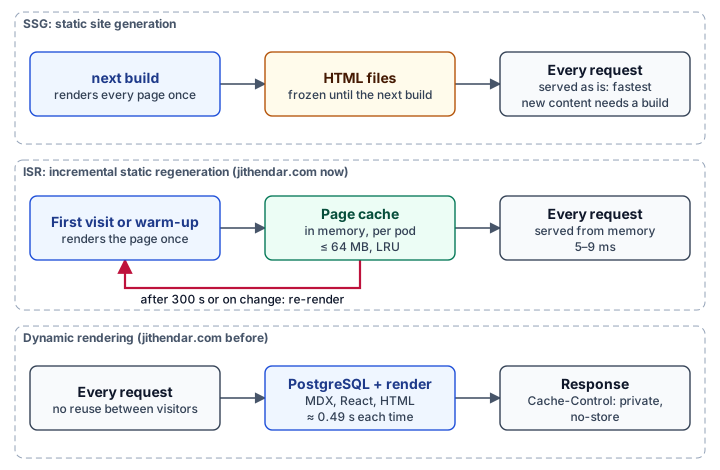
Static Site Generation (SSG) renders every page during next build. The output is plain HTML, served without touching a database. It is the fastest option, but content is frozen until the next build: ideal for docs rebuilt on every commit, not for a site edited in an admin panel.
Incremental Static Regeneration (ISR) keeps the "render once, serve many times" property of SSG but drops the freeze. Each page is cached on its own and re-rendered after a set time, or immediately when you report that its data changed. Readers almost always get a cached page; the site never needs a full rebuild.
Dynamic rendering builds the page on every request. You need it when the response depends on the visitor: an account page, search results, a shopping cart. For a page every visitor sees identically, it repeats the same work for everyone.
| SSG | ISR | Dynamic | |
|---|---|---|---|
| HTML made | At build | On first request (or warm-up), then in the background | On every request |
| Database per visit | Never | Never on a hit | Always |
| New content | Next build | Seconds (on change) or minutes (timer) | Immediately |
| Good for | Docs, marketing pages | Blogs, news, product catalogues | Per-user pages |
How this site ended up fully dynamic
The original plan for jithendar.com said "static-first". When articles moved from MDX files into Postgres so they could be edited in the admin, every public route got:
export const dynamic = "force-dynamic";There was also a quieter cause. The root layout read a cookie on every request to support a theme preview:
const token = (await cookies()).get(PREVIEW_COOKIE)?.value;In the Next.js App Router, reading cookies() or headers() while rendering opts that route into dynamic rendering. In the root layout, it opts in every page. Removing force-dynamic alone would have changed nothing. The lesson generalises: one per-request read in a shared layout disables caching for the whole site, so check the build output, not just the route files.
Implementing ISR in Next.js
Step 1: mark routes as ISR
Each public route replaces force-dynamic with a revalidation time. Routes with a parameter also export an empty generateStaticParams:
// src/app/blog/[slug]/page.tsx
export const revalidate = 300;

// No paths at build time (the build has no database): each one is rendered
// on its first request, then cached.
export async function generateStaticParams() {
  return [];
}
The empty list matters. It tells Next.js the route is static but its paths aren't known at build time, so each one is rendered on demand and then cached. The alternative, listing every slug at build, needs a database during the build, which this site's CI doesn't have.
After the change, next build marks the public routes ○ (static) or ● (SSG) with a revalidate column, and keeps admin, account, search, sign-in and the Python practice area ƒ (dynamic).
Step 2: remove per-visitor reads from shared code
The theme preview now uses Next.js draft mode, designed for exactly this. The preview endpoint enables it for the admin's browser, and the layout only reads the cookie when it's on:
const { cookies, draftMode } = await import("next/headers");
// Checking draft mode first keeps every other request static.
if (!(await draftMode()).isEnabled) return undefined;
return (await cookies()).get(PREVIEW_COOKIE)?.value;
Draft-mode requests bypass the cache and are never stored in it. I tested that directly: a page requested in draft mode and then anonymously was a cache miss the second time, so an admin's unpublished theme can't leak to readers.
The last per-visitor read was the contact form asking the server whether the visitor was signed in. That check moved to the browser; the form's server action still verifies the session itself. Anything else per user (the account menu, comments) was already client-side.
Step 3: understand what ISR does over time
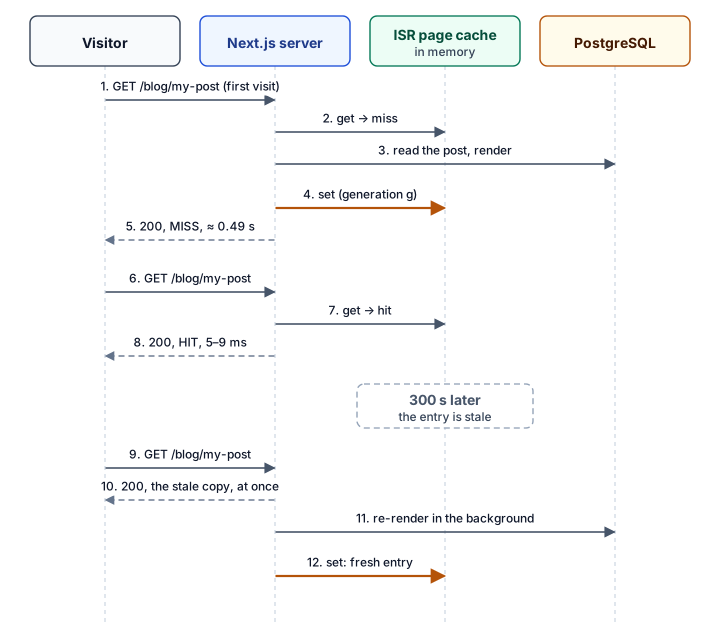
The key behaviour is stale-while-revalidate. When a cached page passes its 300 seconds, the next visitor isn't made to wait: they get the cached copy immediately, and the re-render happens behind them. Only a page that has never been rendered, or has been explicitly cleared, costs a visitor the full render.
The same idea appears in the response header Next.js sends:
Cache-Control: s-maxage=300, stale-while-revalidate=86100s-maxage addresses shared caches such as a CDN; browsers ignore it and ask the server each time, which then answers from memory. The stale-while-revalidate value comes from expireTime in next.config.ts. Next.js defaults it to a year, which would let a CDN serve a year-old page while it refreshes. This site sets a day:
// next.config.ts
expireTime: 86_400,
The hard part: invalidation across replicas
ISR in a single process is easy. Call revalidatePath() after a write and the next request re-renders. This site runs two replicas behind Istio, and Next.js's default cache lives inside each process. An edit saved on replica A would clear A's cache, while replica B kept serving the old page until its timer ran out. The Next.js docs say the same thing: with multiple instances, on-demand revalidation only reaches the instance that received the call.
The site already had a cache bus: small {kind, origin} messages over Valkey pub/sub that tell every replica to drop its in-process caches when content changes. The problem was the other end. A bus message arrives outside any request, and Next.js refuses to revalidate there:
Error: Invariant: static generation store missing in revalidatePath("/")The fix is a custom cache handler that can be cleared from anywhere.
A cache handler with a generation counter
Next.js lets you replace the ISR store with cacheHandler. Setting cacheMaxMemorySize: 0 removes Next's own memory layer, so the handler is the only one:
// next.config.ts
cacheHandler: path.join(siteRoot, "cache-handler.mjs"),
cacheMaxMemorySize: 0,
Every cached entry records the generation it was rendered in. Clearing the whole cache is a single increment: older entries stop matching on their next lookup. Next.js creates a new handler object per request, so the store lives on globalThis, where the cache-bus listener in the same process can reach it.
// cache-handler.mjs (abridged)
export default class PageCacheHandler {
  async get(key) {
    const s = pageCacheState();
    const e = s.entries.get(key);
    if (!e || e.generation !== s.generation) {
      if (e) drop(s, key);
      s.pending.set(key, s.generation); // the render after this miss starts now
      return null;
    }
    s.entries.delete(key);
    s.entries.set(key, e); // least recently used goes first
    return { lastModified: e.lastModified, value: e.value, cacheControl: e.cacheControl };
  }

  async set(key, data, ctx) {
    const s = pageCacheState();
    const started = s.pending.get(key) ?? s.generation;
    s.pending.delete(key);
    drop(s, key);
    if (data === null || started !== s.generation) return; // cleared mid-render
    s.entries.set(key, { value: data, lastModified: Date.now(), generation: s.generation,
                         cacheControl: ctx?.cacheControl, bytes: sizeOf(data) });
    // evict the least recently used entries above PAGE_CACHE_MAX_MB (64 MB)
  }

  async revalidateTag() {
    pageCacheState().generation++; // a small site: any tag clears every page
  }
}
One detail closes a real race. If an edit lands while a page is rendering, that render read the old data. The handler remembers the generation at the cache miss and refuses to store a result that finished after a clear. Without it, a correction could be hidden for five minutes by an unlucky render already in progress.
Clearing everything instead of individual pages is deliberate. An edit to one article also changes the listings, tag pages, category pages, sitemap and feeds that mention it. Working out that set is error-prone, and for a few hundred pages re-rendering everything takes seconds.
Wiring the bus to the page cache
// src/lib/page-cache.ts
export const PAGE_KINDS = ["content", "categories", "settings", "integrations"];

for (const kind of PAGE_KINDS) onInvalidate(kind, clearPageCache);
The handlers run on the replica that made the change and on every replica that receives the message:
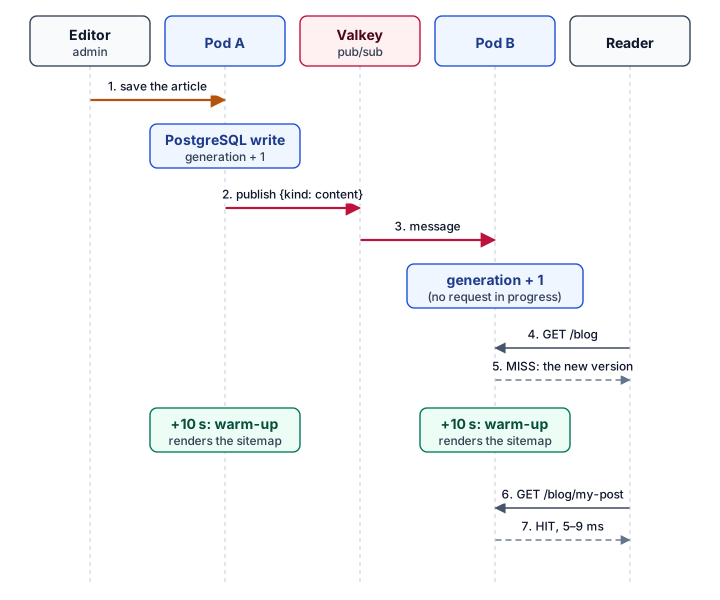
If Valkey is down, other replicas fall back to the 300-second timer, the same guarantee the site's other caches already had. Python practice messages are deliberately left out: those pages are per user and never cached.
"SSG" without a database at build time: the warm-up
Classic SSG renders pages during the build. Here the build can't reach the database, so each pod does the equivalent right after it starts: it reads its own sitemap and requests every URL from 127.0.0.1, two at a time.
export async function warmPages(fetcher = localFetcher()) {
  const sitemap = await fetcher("/sitemap.xml");
  const paths = sitemapPaths(sitemap.body, new URL(siteUrl()).origin); // + feeds, search index
  let next = 0;
  async function worker() {
    while (next < paths.length) await fetcher(paths[next++]);
  }
  await Promise.all([worker(), worker()]);
}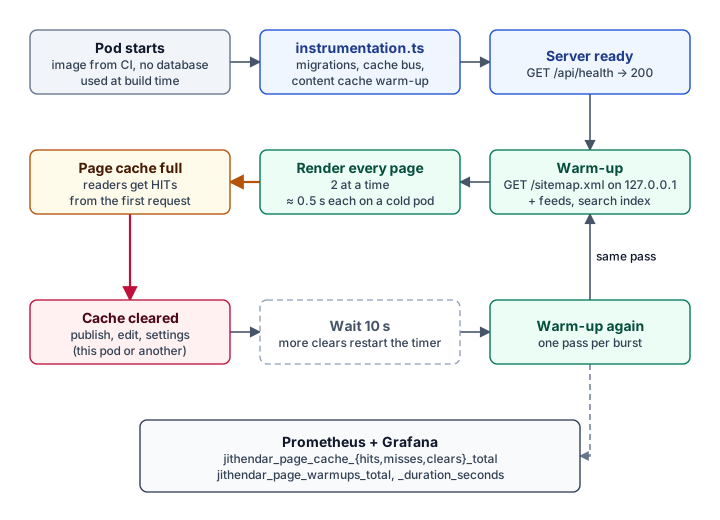
It runs again 10 seconds after any clear, debounced, so a burst of edits causes a single pass. The first reader after a deploy or a publish gets a cached page instead of paying for the render.
The build still prerenders the few parameter-free routes (home, /blog and so on), using the bundled MDX files instead of the database. That output is never served: the custom cache handler starts empty and doesn't read build files, so the first real request renders from Postgres.
Image optimisation: usually the biggest saving
HTML is a few dozen kilobytes once compressed. A single unoptimised photo can be a megabyte. For most content pages, images are where the bytes are.
What image optimisation means
Four separate techniques, each worth doing:
- Right size. Don't send a 2400-pixel image to a 400-pixel card. Generate several widths and let the browser choose.
- Right format. AVIF and WebP compress photos far better than JPEG at similar visual quality. Serve them to browsers that accept them and fall back for the rest.
- Right priority. Load images below the fold lazily. Load the main image above the fold early, because it is often the Largest Contentful Paint element.
- Right caching. An optimised image never changes for a given URL, so the browser can keep it for a year.
How it works on this site
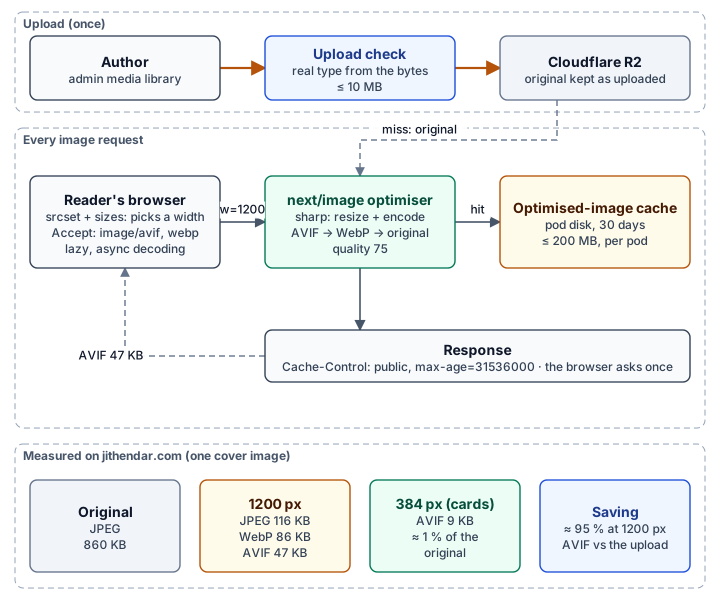
Every content image goes through the Next.js Image component, which renders a srcset and sizes and points at /_next/image. The optimiser, using sharp inside the site's pods, resizes and encodes each requested width once and keeps the result on disk.
The configuration is short, and most of it is about safety as much as speed:
// next.config.ts
images: {
  // only our own files: /images/** (shipped with the site) and /media/** (uploads)
  localPatterns: [{ pathname: "/images/**" }, { pathname: "/media/**" }],
  formats: ["image/avif", "image/webp"],
  qualities: [75],
  deviceSizes: [640, 750, 828, 1080, 1200, 1920],
  imageSizes: [96, 128, 256, 384],
  maximumResponseBody: 12_000_000,
  maximumRedirects: 0,
  maximumDiskCacheSize: 200_000_000,
  minimumCacheTTL: 60 * 60 * 24 * 30,
},
An image optimiser is a CPU-heavy endpoint anyone can call. Unbounded, it is a denial-of-service lever: request every width at every quality for every image, or point it at a huge remote file. Here it accepts only the site's own paths, one quality, ten widths and two formats, so each source image has at most 20 variants; it refuses originals over 12 MB and follows no redirects.
On the page, the article component tells the browser how wide the image will actually be:
<Image src={image.src} alt={alt} width={image.width} height={image.height}
       sizes="(min-width: 1024px) 768px, 100vw" />
width and height reserve the space before the image loads, so the text doesn't jump (Cumulative Layout Shift, another Core Web Vital). sizes lets a phone pick a 640- or 828-pixel file instead of the 1920-pixel one.
The numbers
Measured on the live site, for one cover image:
| Version | Size | vs original |
|---|---|---|
| Original upload (JPEG) | 860 KB | — |
| 1200 px, JPEG (old browsers) | 116 KB | −87 % |
| 1200 px, WebP | 86 KB | −90 % |
| 1200 px, AVIF (modern browsers) | 47 KB | −95 % |
| 384 px, AVIF (cards on phones) | 9 KB | −99 % |
Every one of those responses carries Cache-Control: public, max-age=31536000. A returning reader downloads each image once.
What it changed
Measured on a production build of the site against PostgreSQL 18:
| Check | Before | After |
|---|---|---|
| Server time for an article | ≈ 0.49 s every request | 5–9 ms (cache hit) |
| First reader after a deploy | Full render | Cache hit (warm-up) |
| Article Open Graph image | 194 ms every request | 6 ms once cached |
Cache-Control on pages | private, no-store | s-maxage=300, stale-while-revalidate=86100 |
| Edit or unpublish | Visible on the next request | Still visible on the next request, on every replica |
| Theme preview in draft mode | — | Rendered per request, never cached |
| Cover image on a card | 860 KB original | 9 KB AVIF |
On the live site, every public page now answers x-nextjs-cache: HIT.
Measuring a cache: what to watch
A cache you can't see is a cache you can't tune. The page cache exports Prometheus metrics, read at scrape time:
jithendar_page_cache_hits_total
jithendar_page_cache_misses_total
jithendar_page_cache_clears_total
jithendar_page_cache_entries
jithendar_page_cache_bytes
jithendar_page_warmups_total{reason, outcome}
jithendar_page_warmup_duration_seconds
The most useful single number is the hit ratio:
sum(increase(jithendar_page_cache_hits_total[1h]))
/ (sum(increase(jithendar_page_cache_hits_total[1h]))
   + sum(increase(jithendar_page_cache_misses_total[1h])))
A dip after a deploy or a burst of edits is expected. A ratio that stays well below 90 % means pages are being evicted, so raise PAGE_CACHE_MAX_MB and watch jithendar_page_cache_bytes, or that something clears the cache too often.
From the outside, two headers tell you what happened to a request:
curl -sI https://jithendar.com/blog | grep -iE "x-nextjs-cache|cache-control"
# x-nextjs-cache: HIT
# cache-control: s-maxage=300, stale-while-revalidate=86100
Trade-offs and limits
- Changes made outside the application aren't seen. An edit straight in SQL skips the cache bus. It appears within 5 minutes or after a pod restart.
- Scheduled posts wait up to 5 minutes. A post whose publish time passes is picked up by the next background refresh.
- Memory per pod. Each pod keeps its own copy, capped at 64 MB; the least recently used pages are evicted first and simply render again.
- Cold image caches. The optimised-image cache is on each pod's disk and empties on restart, so the first request for each width after a deploy pays for an AVIF encode.
- Lost ETags. Istio's compression filter drops the
ETagheader on compressed responses, so browsers can't revalidate HTML with a cheap304 Not Modified. That's a setting in the cluster's ingress, not the application. - Page weight beyond images. One long article is 1.1 MB of HTML before compression (108 KB after). Caching makes it fast to produce, but not lighter for a slow phone to parse.
A checklist for your own application
- Find out what is actually dynamic. Read the build output. One
cookies()call in a shared layout makes everything dynamic. - Give hashed assets a one-year, immutable lifetime. Next.js does this for
/_next/static. Do it for anything you name by content. - Use ISR for pages everyone sees the same way. A short
revalidateas a safety net, explicit invalidation as the real mechanism. - Plan invalidation for more than one instance from the start. The default cache is per process. A shared signal (pub/sub, a shared cache handler) is the difference between "updates instantly" and "updates eventually".
- Guard against races. Don't let a render that started before a change overwrite the cache after it.
- Keep previews out of the cache. Draft mode exists for this; test that a preview render is never served to anyone else.
- Bound every stale window. Set
expireTimeso a CDN can't serve year-old pages. - Optimise images at the source of the request. Several widths, AVIF/WebP,
sizes, intrinsic dimensions, lazy loading below the fold, and a strict allowlist on the optimiser. - Measure. Export hits, misses and size; alert on the hit ratio, not just on errors.
Caching isn't one setting. It's a series of small decisions about what may be reused, by whom, for how long, and what makes it stale. Made deliberately, they turn a site that does the same work for every visitor into one that does it once.
This article was drafted with AI assistance from the implementation, its tests and measurements.



Discussion comments
No comments yet. Start the discussion.