Imagine you've opened a chain of eight cafés, and every one of them has to be set up the same way. The same coffee machine, the same menu on the wall, the same opening checklist, the same locks on the safe. You could drive to each café and do it all yourself. You'd get tired, you'd forget a step somewhere, and six months later no two cafés would be quite the same.
Or you could write one very clear instruction manual, hand it to an assistant who never gets tired, and have them set up all eight cafés exactly as written. If you change the manual, the assistant updates every café to match.
That assistant is Ansible. Instead of cafés, it sets up computers.
This article explains Ansible using one real project: the Ansible repository (opens in a new tab) that sets up RoboShop, a demo online shop that runs on eight servers in Amazon's cloud. Every file name, setting and diagram below comes from that repository, so nothing here is a made-up textbook example. You don't need to write code to follow it. Engineers will find the real snippets along the way.
The one-minute version
If you read nothing else, read this table. The rest of the article explains each row.
| Ansible word | Think of it as | In the RoboShop repository |
|---|---|---|
| Ansible | A tireless assistant who follows written instructions exactly | Sets up eight servers for the online shop |
| Control machine | The office the assistant works from | Your laptop, or the Jenkins build server |
| Inventory | The address book | inventory/aws_ec2.yml asks AWS for the server list |
| Playbook | The run sheet for the day | roboshop.yml |
| Play | One section of the run sheet: "these servers, do this" | "Data tier", "Application tier", "Web tier" |
| Role | A recipe card for one kind of server | roles/cart, roles/frontend and eight more |
| Task | One step on the recipe card | "Install nginx", "Copy the app's files" |
| Module | A tool from the assistant's toolbox | dnf installs software, copy puts a file in place |
| Handler | "Only if something changed, do this at the end" | Restart a service after its settings change |
| Template | A form with blanks to fill in | A service file with the database address left blank |
| Variable | The value written in a blank | app_user: roboshop |
| Vault | A locked safe for passwords | group_vars/all/vault.yml, encrypted |
| Idempotent | Safe to repeat: doing it twice gives the same result as once | Run the playbook any time; only what's wrong gets fixed |
The problem Ansible solves
A web shop isn't one program on one computer. RoboShop is split into ten parts, each with one job: a website, a product catalogue, user logins, a shopping basket, shipping costs, payments, two databases, a cache and a message queue. Eight of those parts get a server of their own on Amazon Web Services (AWS). The other two, the MySQL database and the Redis cache, are rented as ready-made services from AWS.
Each of those eight servers starts life as a blank copy of Rocky Linux, a free version of Linux. Before it can do its job, someone has to:
- install the right software (a web server, Node.js, Java, Python or a database),
- create a safe user account for the app to run as,
- copy the app's code into place,
- write its settings, including passwords and the addresses of the other servers,
- start it, and make sure it starts again after a reboot.
Doing that by hand means typing dozens of commands on each server. It's slow, it's easy to get one server slightly wrong, and when a server is rebuilt you have to do it all again from memory. Over time, servers that were meant to be identical drift apart. Engineers call this configuration drift, and it's behind a lot of "it works on that server but not this one" mysteries.
Ansible replaces the typing with a written description of how each server should look. You write it once, keep it in Git (a system that records every change to a set of files), and run it whenever you like.
What Ansible is
Ansible is free, open-source software, maintained by Red Hat, that connects to computers and makes them match a description you've written. Three things make it easy to start with.
It needs nothing installed on the servers. Many tools like this need a small helper program, called an agent, running on every server. Ansible doesn't. It logs in over SSH, the same secure remote login engineers use every day, does its work, and leaves. The servers only need SSH and Python, which almost every Linux server already has.
It works from one place. You run Ansible on a single computer, called the control machine. In this project that's either an engineer's laptop or Jenkins, the build server. From there it reaches out to every server at once.
Its instructions read almost like English. They're written in YAML, a plain text format built from indented lists. You'll see some below, and you'll find you can mostly read them without training.
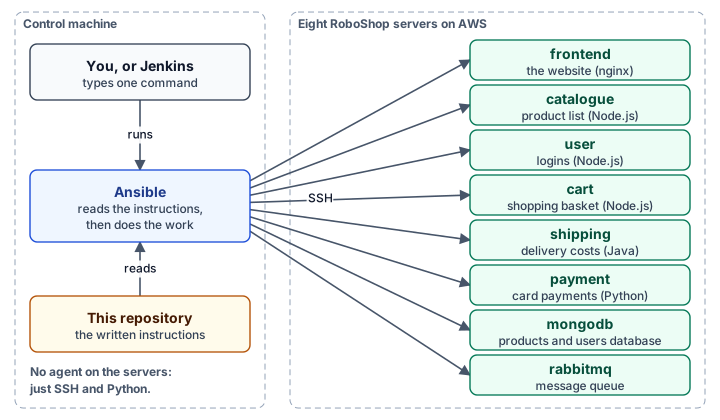
One command on the control machine sets up the whole shop:
ansible-playbook roboshop.yml --ask-vault-passansible-playbook is the program, roboshop.yml is the instructions, and --ask-vault-pass asks for the password that unlocks the secrets. We'll come back to that.
The building blocks
Ansible has a handful of ideas that fit inside each other like boxes. Once you know them, every Ansible project in the world looks familiar.
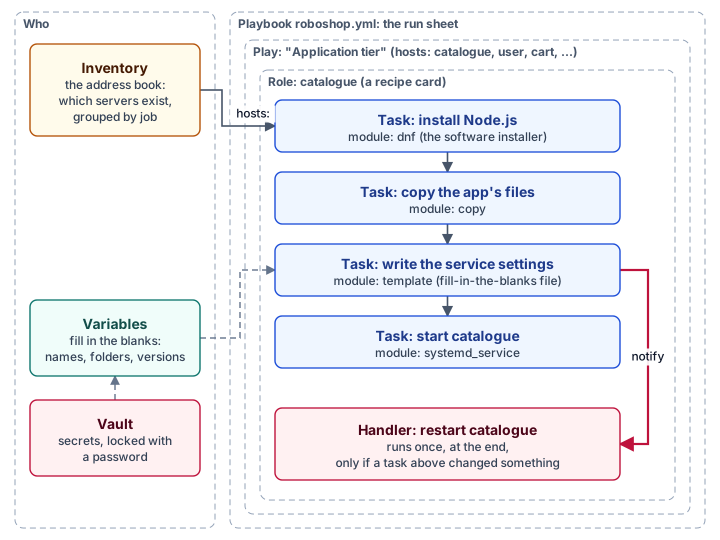
- The inventory answers "who?": which servers exist, and what job each one has.
- The playbook answers "what, and in what order?". It's made of plays. Each play picks some servers from the inventory and says what to do to them.
- A role is a reusable recipe card for one kind of server. The play says "apply the catalogue role to the catalogue server".
- A role is made of tasks, the individual steps.
- Each task uses one module, a ready-made tool. Ansible comes with thousands: one installs software, one copies files, one starts services, one creates user accounts, one talks to AWS.
- A handler is a task that waits in the wings and only runs if another task changed something.
- Variables fill in the blanks, and the vault keeps the secret ones locked.
Here is one real task from the repository. It's the step that creates the account the shop's apps run as:
- name: Create the application user
  ansible.builtin.user:
    name: "{{ app_user }}"
    group: "{{ app_user }}"
    system: true
    create_home: true
    shell: /sbin/nologin
    comment: RoboShop application user
In plain English: "Using the user tool, make sure there's an account whose name is whatever app_user is set to (it's roboshop). It's a system account with a home folder, and nobody can log in to it interactively." The double curly brackets, {{ app_user }}, are a blank that Ansible fills in from a variable.
Notice the wording: make sure there is an account. That's the most important idea in this article, and it gets its own section further down.
A tour of the repository
Here's what each part of the repository holds. You only need the top four boxes to understand how the shop gets set up. The rest support them.
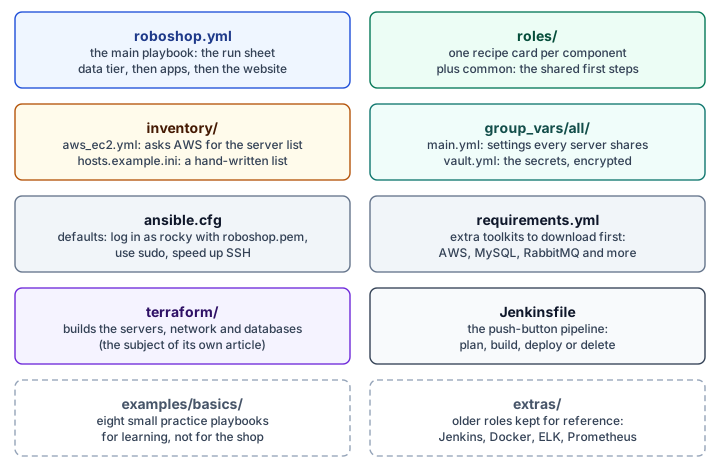
Two of these are easy to overlook but save a lot of typing.
ansible.cfg is Ansible's settings file. It tells Ansible to log in as the user rocky (the default on Rocky Linux servers), to use the key file roboshop.pem instead of a password, and to use sudo, the Linux "run as administrator" command, for its work. Without this file, every command would need half a dozen extra options.
requirements.yml lists extra toolkits, called collections, that the project needs on top of the ones Ansible ships with: one for AWS, one for MySQL, one for RabbitMQ and two general-purpose ones. They're downloaded once with:
ansible-galaxy collection install -r requirements.ymlThe inventory: how Ansible finds the servers
Before Ansible can set up a server, it needs to know the server exists. The simplest inventory is a hand-written list of addresses, and the repository includes one as an example (inventory/hosts.example.ini). The trouble with a hand-written list is that cloud servers come and go. Every time the shop is rebuilt, the servers get new addresses, and the list is out of date.
So this project uses a dynamic inventory: instead of a list, a small file that tells Ansible how to ask AWS for the list each time it runs.
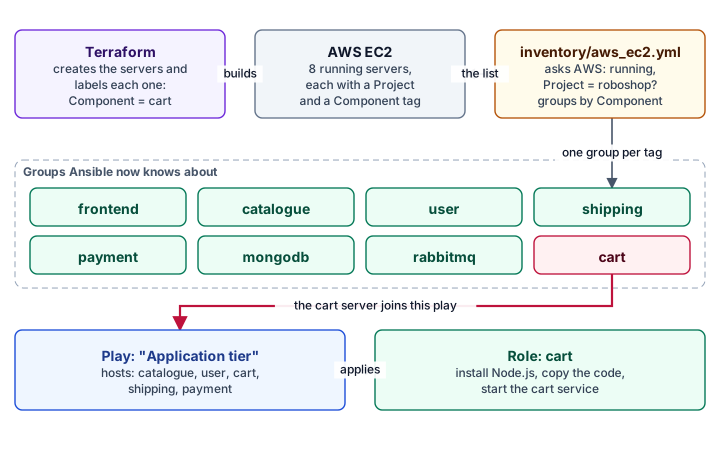
It works because of labels. When Terraform (the tool that builds the servers) creates each one, it attaches tags, which are name-and-value labels, like a luggage tag. Every RoboShop server gets Project = roboshop, and each gets a Component tag saying what it's for: cart, frontend, mongodb and so on.
The inventory file then says, in effect: "Ask AWS in us-east-1 for every running server tagged Project = roboshop, and sort them into groups by their Component tag":
plugin: amazon.aws.aws_ec2
regions:
  - us-east-1
filters:
  tag:Project: roboshop
  instance-state-name: running
keyed_groups:
  - key: tags.Component
    prefix: ""
    separator: ""
The result is a group called cart containing the cart server, a group called frontend containing the frontend server, and so on. Nobody has to type an address, and the list is never out of date.
The playbook: doing things in the right order
The playbook, roboshop.yml, is the run sheet. Its job is mostly about order. The shopping basket can't start properly if the database it saves to isn't there yet, and the website can't forward customers to services that don't exist. So the playbook runs in four steps.
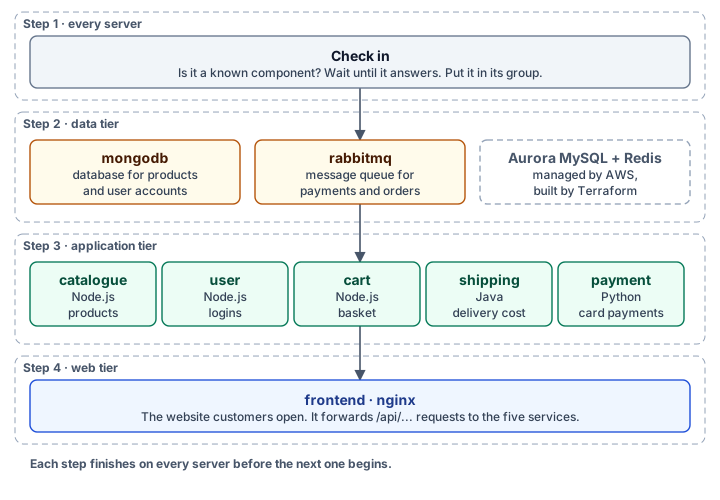
Step 1, check in. Every server is checked first: does it have a component Ansible knows about? Ansible waits up to five minutes for it to accept a login, because freshly built servers take a moment to boot, and then files it into its group.
Step 2, the data tier. The databases and message queue go first. MongoDB is installed and filled with the starting products and users. RabbitMQ, which passes messages between the payment and shipping services, is installed and given a user account.
Step 3, the application tier. The five services that make up the shop are set up next. Three are written in Node.js, one in Java and one in Python. They don't need to start in any particular order among themselves, so Ansible works on all five at the same time.
Step 4, the web tier. Last comes the website itself, served by nginx, a popular web server. It shows customers the pages and forwards anything starting with /api/ to the right service.
Each step is a play. Here's the application tier in full. It's short because the detail lives in the roles:
- name: Application tier
  hosts: catalogue:user:cart:shipping:payment
  become: true
  tasks:
    - name: Apply the component role
      ansible.builtin.include_role:
        name: "{{ roboshop_component }}"
hosts names the groups from the inventory. become: true means "act as administrator". And roboshop_component is a variable that works out, for each server, which component it is, so the cart server gets the cart role and the user server gets the user role, from one short instruction.
Inside a role: the recipe card
A role is a folder with a standard layout. Because every Ansible role in the world uses the same layout, anyone who has seen one can find their way around another. Here's the catalogue role, the service that lists the shop's products, and what each part of it produces on the server.
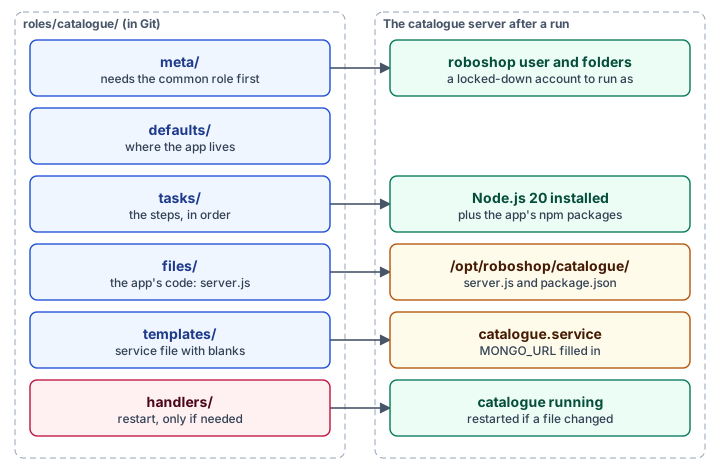
| Folder | What it holds | In the catalogue role |
|---|---|---|
tasks/ | The steps, in order | Install Node.js, create the folder, copy the code, install its packages, write the service file, start it |
files/ | Files copied as they are | The app's code, server.js and package.json |
templates/ | Files with blanks filled in on the way | catalogue.service.j2, the instructions for starting the app |
handlers/ | Steps that run only if something changed | "Restart catalogue" |
defaults/ | Default values for variables, easy to override | The app lives in /opt/roboshop/catalogue |
meta/ | Facts about the role, including what it depends on | "Run the common role first" |
That last line matters. Every component needs the same groundwork: set the server's name, create the roboshop account and make the folders the apps live in. Rather than repeat those steps ten times, they live once in a role called common, and every other role lists it as a dependency. Ansible runs common first, automatically.
This is how the repository stays short. The user and cart roles look almost the same as catalogue, because they're the same kind of Node.js service, and they reuse the shared Node.js steps from common instead of copying them.
Templates: forms with blanks
Some files need different contents on different servers. The catalogue service must know the address of the MongoDB database. That address comes from a setting, so it isn't written into the file directly. Instead, the role holds a template: a file with blanks in double curly brackets. Here's part of catalogue.service.j2:
[Service]
User={{ app_user }}
WorkingDirectory={{ catalogue_app_dir }}
Environment="MONGO_URL=mongodb://mongodb.{{ roboshop_domain }}:27017/catalogue"
ExecStart=/usr/bin/node {{ catalogue_app_dir }}/server.js
Restart=on-failure
When Ansible copies it to the server, it fills in each blank from the variables: roboshop, /opt/roboshop/catalogue, roboshop.com. The .j2 ending stands for Jinja2, the name of the fill-in-the-blanks language Ansible uses.
The variables themselves live in a few predictable places. Settings every server shares are in group_vars/all/main.yml: the shop's internal domain name, the AWS region, the name of the app account, the version of Node.js. Settings that belong to one role are in that role's defaults/ folder. You can override any of them for a single run from the command line, which is handy for testing.
Safe to run again: idempotency
Earlier, the task said "make sure there is an account", not "create an account". That difference is the heart of Ansible, and it has an awkward name: idempotency. It means doing something twice has the same result as doing it once, like pressing a lift's call button. Press it once or ten times, one lift comes.
Every Ansible task describes how things should end up, not a list of keystrokes. Before acting, Ansible checks how things are now. If the server already matches, it does nothing and reports ok. If not, it makes the change and reports changed.
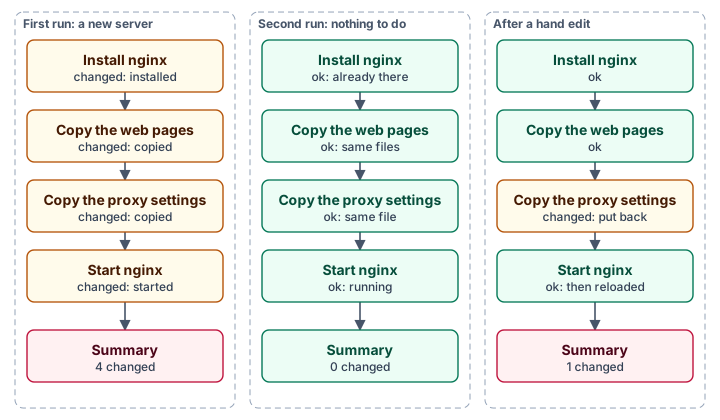
That makes the playbook safe to run whenever you like:
- On a brand-new server, everything is done.
- On a server that's already right, nothing is touched and nothing restarts.
- On a server someone fiddled with by hand, only the fiddled-with part is put back. That's the cure for configuration drift.
The repository takes care with the few steps where this doesn't come for free. Loading the starting products into MongoDB is a one-time job: run it twice and you'd have every product twice. So the MongoDB role first asks the database which collections already exist, and only loads the ones that are missing:
- name: Seed databases that do not exist yet
  ansible.builtin.command: mongosh --quiet --file {{ mongodb_data_dir }}/{{ item }}.js
  loop: "{{ mongodb_seed_databases }}"
  when: item not in mongodb_existing.stdout.split(',')
when is a condition, and loop repeats the task for each item in a list, here catalogue and users. Similarly, the Java shipping service is only compiled if the finished file isn't already there.
Handlers: restart only when something changed
If you change a program's settings, you usually have to restart it for them to take effect. But restarting a website on every run, even when nothing changed, would cut off customers for no reason. Handlers solve this.
A task that changes a settings file can notify a handler by name. If the file was already correct, the notification is never sent. If it did change, the handler is queued, and it runs once at the end of the play, however many tasks asked for it.
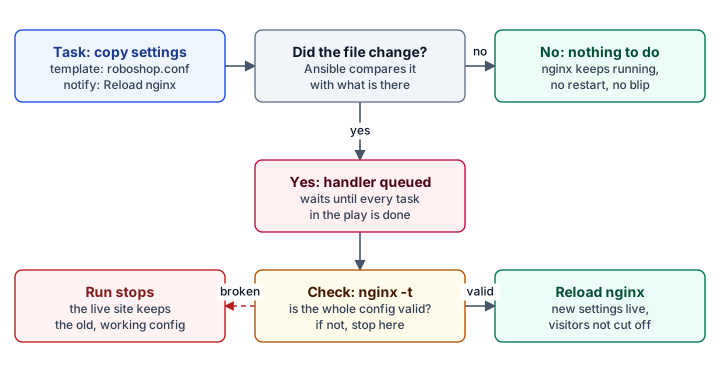
The frontend role adds a safety net. Its handler checks the whole nginx configuration with nginx -t before reloading. If someone made a typo, the run stops with an error and the live website carries on with its old, working settings. The nginx.conf task goes further and refuses to install a file that fails the same check. And it reloads nginx rather than restarting it, so visitors who are mid-page aren't cut off.
Keeping secrets
The shop needs passwords: for RabbitMQ, for the shipping service's database account, for the database administrator. Those can't sit in plain text in Git, where anyone who can read the repository could read them. The repository keeps them in four different places, each suited to its job.
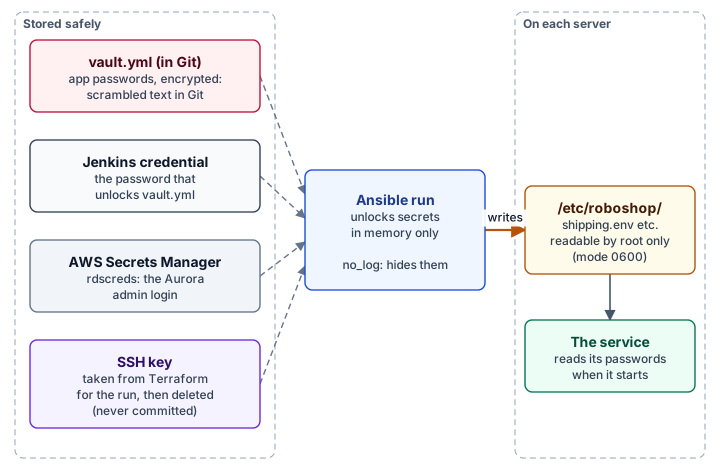
Ansible Vault is the main one. It's a built-in feature that encrypts a file with a password. The app passwords go in group_vars/all/vault.yml, which is encrypted before it's committed, so Git only ever stores scrambled text. Ansible unlocks it in memory during a run when given the password, either typed in (--ask-vault-pass) or, in Jenkins, from a stored credential. An example file shows which passwords are needed without containing any real ones. (Don't confuse it with HashiCorp Vault, a separate product that runs as its own server and hands out secrets to many tools. Ansible Vault is just an encrypted file.)
AWS Secrets Manager holds the database administrator's login. Terraform used the same secret to create the database, so Ansible looks it up from AWS at the moment it needs it, and it's never written to a file at all.
The SSH key, the file that lets Ansible log in to the servers, is created by Terraform. Jenkins extracts it just before the run, with permissions so only its owner can read it, and deletes it afterwards, whether the run succeeded or not. The repository's .gitignore file stops any .pem key being committed by accident.
On the servers, passwords end up in files under /etc/roboshop/ that only the administrator account can read. The tasks that write them are marked no_log: true, so the passwords never appear in Ansible's output or Jenkins's logs.
Pressing the button: Jenkins
Engineers can run the playbook from their laptops, but most of the time nobody types anything. Jenkins, an automation server, runs it for them. The repository's Jenkinsfile describes a job with one choice, called ACTION, and four options.
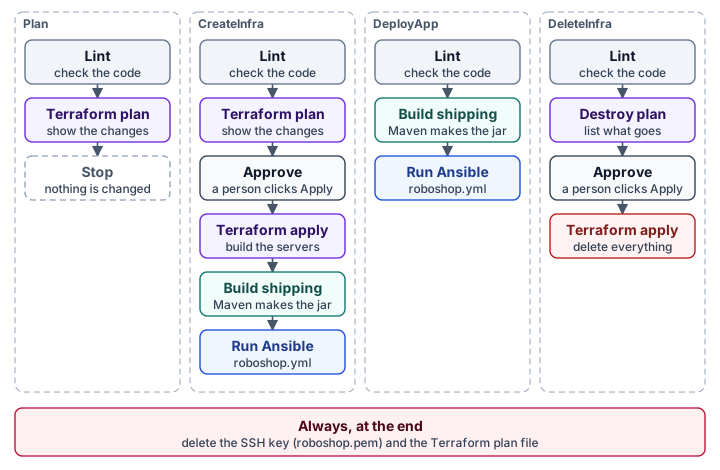
- Plan shows what would change, and changes nothing.
- CreateInfra builds everything from scratch: Terraform builds the servers, then Ansible sets them up. It pauses for a person to approve before building anything.
- DeployApp skips the building and just runs Ansible against the servers that already exist. This is the everyday option after changing a role.
- DeleteInfra tears everything down, again only after a person approves.
Every option starts with lint, an automatic check that reads the code and complains about mistakes and bad habits before anything runs. And every run ends by deleting the SSH key and the plan file, whatever happened.
This is where Ansible and Terraform meet, and it's worth being clear about who does what. Terraform builds the house: the network, the servers, the managed databases, the DNS names. Ansible furnishes it: the software, the settings, the running apps. Terraform is good at creating and deleting cloud resources. Ansible is good at what goes on inside a server. The same repository uses each for what it does best.
Push or pull
Everything so far has been push: the control machine reaches out to the servers. Ansible can also work the other way round.
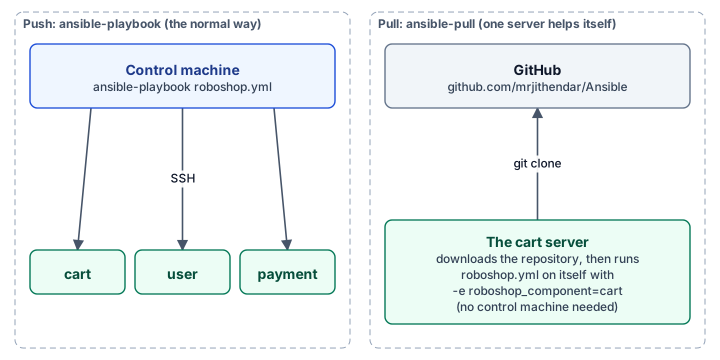
With ansible-pull, a single server downloads the repository from GitHub and runs the playbook on itself. There's no inventory to tag it, so it's told which component it is on the command line:
ansible-pull -U https://github.com/mrjithendar/Ansible.git -i localhost, \
  roboshop.yml -e roboshop_component=cart --ask-vault-pass
Push suits this project's usual workflow, where Jenkins controls everything from one place. Pull suits servers that set themselves up when they boot, or a quick fix on one machine. The same playbook works both ways because the very first step, checking which component a server is, accepts either an inventory group or an -e setting.
Keeping the code honest
Mistakes in automation are copied to every server, so the repository checks itself before anything runs.
- yamllint checks the files are well-formed YAML: consistent indentation, no stray spaces.
- ansible-lint checks for Ansible bad habits, such as tasks without names, commands that aren't idempotent, or short module names that could be ambiguous.
- terraform fmt, terraform validate and tflint do the same for the Terraform code.
- gitleaks scans for passwords and keys that have been committed by mistake.
GitHub runs all of them on every change. Engineers can run the same checks on their own computers before committing, using a tool called pre-commit, which also blocks private keys and very large files.
You'll notice every module in the repository is written with its full name, like ansible.builtin.copy rather than just copy. That's one of ansible-lint's rules. It's a little longer to read, but there's never any doubt which tool is meant.
Learning Ansible from this repository
If you'd like to try Ansible yourself, examples/basics/ holds eight small practice playbooks, numbered in the order to read them. They start with printing "Hello" and work up through variables, facts (information Ansible gathers about a server, like its operating system), roles, conditions, copying files and templates, and tags (labels that let you run only part of a playbook). The first one is six lines long:
- name: Print Hello
  hosts: all
  tasks:
    - name: Print Hello
      debug:
        msg: "Hello"
They're teaching material, written to be short rather than to follow every rule the real playbook does. Once they make sense, read the real roles in this order: common, catalogue, frontend, then shipping and payment, which add databases, secrets and a build step.
The extras/ folder holds older roles for Jenkins, Docker, the ELK logging stack and Prometheus monitoring. They aren't part of the shop and aren't run, but they're there as reference.
Mistakes this design avoids
- Hand-written server lists. They go stale the moment a server is rebuilt. The dynamic inventory asks AWS every time.
- Starting apps before their databases. The tiered playbook sets up data first, apps second and the website last.
- Repeating the same steps in every role. Shared groundwork lives once, in
common. - Restarting on every run. Handlers restart a service only when its files changed.
- Pushing a broken configuration live. nginx's settings are checked before they're used, and a bad file stops the run.
- Loading starter data twice. The MongoDB role only loads databases that aren't there yet.
- Passwords in Git or in logs. Secrets are encrypted, fetched from AWS or held by Jenkins, and hidden from output.
- Running apps as the administrator. Every service runs as the unprivileged
roboshopaccount, which can't log in. - Changing everything without a human. Building or deleting servers waits for someone to click Approve.
Glossary
Agentless. Needs no helper program on the servers it manages. Ansible only needs SSH and Python.
Ansible Vault. Ansible's built-in way of encrypting files that hold secrets.
Collection. A downloadable bundle of extra modules, for example for AWS or MySQL.
Configuration drift. Servers that should be identical slowly becoming different through manual changes.
Control machine. The computer Ansible runs on and connects out from.
Dynamic inventory. An inventory that asks a cloud provider for the current list of servers instead of storing a list.
Facts. Information Ansible collects about a server, such as its operating system and IP address.
Handler. A task that runs once at the end of a play, and only if another task notified it.
Idempotent. Gives the same result whether it's run once or many times.
Inventory. The list of servers Ansible manages, organised into groups.
Jinja2. The fill-in-the-blanks language used in Ansible templates and variables.
Lint. An automatic check that reads code for mistakes and bad habits.
Module. A ready-made tool that performs one kind of action, such as installing software.
Play. One section of a playbook: a set of servers and what to do to them.
Playbook. A YAML file listing plays to run in order.
Role. A reusable folder of tasks, files, templates, handlers and defaults for one kind of server.
SSH. Secure Shell, the standard way to log in to a remote Linux computer securely.
Tag (AWS). A name-and-value label attached to a cloud resource.
Task. One step in a role or play, using one module.
Template. A file with blanks that Ansible fills in from variables when it copies the file.
Terraform. A tool that creates and deletes cloud infrastructure from code. It builds the servers that Ansible then sets up.
YAML. A plain-text format made of indented lists and "name: value" pairs.
Use the diagrams yourself
All eleven diagrams were made in draw.io. Open their source files at app.diagrams.net (opens in a new tab) or in the draw.io extension for VS Code, change the names, and use them to explain your own Ansible project.
This article was drafted with AI assistance from the repository, and reviewed by the author before publication.
Discussion comments
No comments yet. Start the discussion.