Python vs TypeScript: the short answer
Python is a general-purpose programming language. You run Python code with an interpreter, usually CPython, which reads your .py files and executes them directly.
TypeScript is JavaScript with a type system added on top. Every JavaScript program is also valid TypeScript syntax, and TypeScript adds type annotations such as name: string. A tool called the TypeScript compiler (tsc) checks those annotations and finds mistakes before the code runs.
Two facts shape everything else in this article:
- TypeScript types are erased. Browsers and Node.js run JavaScript, so a build tool removes the type annotations before the code runs. The TypeScript handbook puts it plainly: "Type annotations never change the runtime behavior of your program." At runtime, TypeScript code behaves exactly like JavaScript.
- Python type hints are not enforced at runtime. Python lets you write
def add(a: int, b: int) -> int, but the interpreter will still calladd("2", "3")without complaint. The Python documentation says: "The Python runtime does not enforce function and variable type annotations." Separate tools, called type checkers, read the hints.
So both languages let you describe types, and in both cases a separate tool checks them. The difference is where the check usually happens. TypeScript projects typically run the checker as part of the build. Python projects often treat the checker as optional.
Neither language is better in general. Each has a runtime, an ecosystem and habits that suit some jobs more than others. This Python vs TypeScript comparison is mostly about those details, with runnable examples in both languages and real code from my own projects.
Where each language runs in my projects
Before comparing syntax, here is what the three repositories actually contain. I counted tracked source files at the commits named in the sources list, test files included.
| Repository | Python | TypeScript | Other languages |
|---|---|---|---|
| jithendar.com (this site) | 22 .py files: 12 for the practice code runner in executor/, and 10 diagram and article-check scripts in www/docs/ | 395 .ts and .tsx files: the whole website in www/ | 3 .mjs config and check scripts |
| MOKS (an SRE investigation portal) | 222 .py files: the API, worker, CLI and reranker | 45 .ts and .tsx files: the React web UI in frontend/ | 1 .js test fixture |
| RoboShop AI (a demo shop) | 121 .py files: the AI gateway, cart, user, MCP and assistant services, plus tests | 8 .ts files: the storefront scripts in services/web/frontend/src/ | 52 .mjs files (plain JavaScript services and tests), Go, Java |
And the versions each part runs on:
| Part | Language and version | Framework or tool | Evidence |
|---|---|---|---|
| jithendar.com website | TypeScript 6.0.3 on Node.js 26 | Next.js 16.4.3, React 19.3.1 | www/package.json, www/.nvmrc, www/Dockerfile |
| jithendar.com practice executor | Python 3.13 | FastAPI 0.162.0, Pydantic 2.14.2 | executor/pyproject.toml, executor/Dockerfile |
| MOKS backend | Python 3.12 | FastAPI 0.162.0, Pydantic 2.14.2, LangGraph 1.2.19 | backend/requirements.txt, Dockerfile |
| MOKS web UI | TypeScript 5.9.3 | React 19.3.1, Vite 8.3.5 | frontend/package.json |
| RoboShop AI Python services | Python 3.14 (the Kafka bridge uses 3.13) | varies by service | services/*/Dockerfile |
| RoboShop AI storefront | TypeScript 7.0.2 | none: tsc compiles to plain JavaScript served by nginx | services/web/frontend/package.json |
A pattern shows up. In all three projects, the code that runs in a browser is TypeScript. The services that run models, call cloud SDKs or run learners' Python code are Python. RoboShop AI also shows that "Node.js service" does not mean "TypeScript": its catalogue and payment services are plain JavaScript .mjs files.
The repositories record what each part uses, not why it was chosen, so I will not invent reasons here. The project examples section below looks at real code from each project.
Python and TypeScript similarities: what do they have in common?
If you know one of these languages, you already know most of the ideas in the other. The names and punctuation change, but the concepts carry over.
| Shared idea | Python | TypeScript |
|---|---|---|
| Variables and expressions | total = price * qty | const total = price * qty; |
| Functions | def area(w, h): ... | function area(w: number, h: number) { ... } |
| Modules | import json, from app import models | import { z } from "zod"; |
| Ordered collections | list, tuple | Array, tuple types |
| Key-value data | dict | objects and Map |
| Unique values | set | Set |
| Classes | class Account: | class Account { } |
| Functional patterns | lambda, comprehensions, map, filter | arrow functions, .map(), .filter(), .reduce() |
| Errors | raise, try and except | throw, try and catch |
| Async code | async def, await, asyncio | async function, await, promises |
| Type annotations | Type hints, checked by tools such as mypy | Types, checked by tsc |
| Packages | PyPI, installed with pip | npm registry, installed with npm |
| Typical jobs | APIs, automation, data, machine learning, AI services | Browser UIs, full-stack web apps, APIs, automation, AI apps |
Here is one small task in both languages, to show how close they can look. Given a list of orders, it keeps the paid ones and adds up their amounts.
Standalone comparison example. Same output in both languages.
from typing import TypedDict


class Order(TypedDict):
    id: int
    status: str
    amount: int


orders: list[Order] = [
    {"id": 1, "status": "paid", "amount": 20},
    {"id": 2, "status": "pending", "amount": 15},
    {"id": 3, "status": "paid", "amount": 5},
]

paid = [order for order in orders if order["status"] == "paid"]
total = sum(order["amount"] for order in paid)
print(f"{len(paid)} paid orders, total {total}")

# Output:
# 2 paid orders, total 25type Order = { id: number; status: string; amount: number };
const orders: Order[] = [
{ id: 1, status: "paid", amount: 20 },
{ id: 2, status: "pending", amount: 15 },
{ id: 3, status: "paid", amount: 5 },
];
const paid = orders.filter((order) => order.status === "paid");
const total = paid.reduce((sum, order) => sum + order.amount, 0);
console.log(`${paid.length} paid orders, total ${total}`);
// Output:
// 2 paid orders, total 25The structure is the same: a collection of records, a filter, a sum and a formatted string. Both versions also name the shape of an order: TypeScript with a type, and Python with a TypedDict. Neither is required to run the code, but without them a type checker cannot tell that amount is a number. The type systems section explains both.
How to run the examples
Every Python vs TypeScript example marked Standalone comparison example is complete and runnable. Each one ends with an Output: comment showing what it prints. I ran every one of them, and the checker script is described at the end of the article.
The labels mean:
- Same output in both languages: the two programs print exactly the same text.
- Same values; the printed format differs: the results match, but Python and Node.js print them differently, for example
[1, 2]and[ 1, 2 ]. - The outputs differ on purpose: the example exists to show a behavior difference.
The project examples section also uses Actual project code (copied exactly from a repository) and Simplified from project code (shortened, with the change explained).
Python. Save the code as example.py and run python3 example.py. The examples use syntax that works on Python 3.11 and later, which covers the 3.12, 3.13 and 3.14 versions my projects run. Two examples need a package: install it with python3 -m pip install pydantic inside a virtual environment (the build and packaging section explains these).
TypeScript. Save the code as example.ts. Node.js 22.18 and later can run a .ts file directly with node example.ts, because Node removes the type annotations before running the code. Node does not check the types, though. To check them, install TypeScript and run the compiler without producing output files:
npm install --save-dev typescript @types/node
npx tsc --noEmit --strict --target es2022 --module nodenext example.ts
Node's built-in type stripping supports only TypeScript syntax that can be erased. Enums, namespaces with runtime code and constructor parameter properties need a real compiler, so the examples avoid them. One example needs Zod: npm install zod.
Python vs TypeScript examples, side by side
The topics go from simple to more involved, starting with printing a line and ending with calling an API. Each one has a Python block, a TypeScript block, and three short notes: the shared idea, the important difference, and a common mistake when you switch languages.
Printing output
Standalone comparison example. Same output in both languages.
print("Hello, world!")
print("Total:", 3)

# Output:
# Hello, world!
# Total: 3console.log("Hello, world!");
console.log("Total:", 3);
// Output:
// Hello, world!
// Total: 3Shared idea. Both functions write a line of text and put a space between multiple arguments.
Difference. print is a built-in Python function. console.log comes from the JavaScript runtime. In Node.js it writes to the terminal, but in a browser it writes to the developer tools console, not the page.
Common mistake. Expecting console.log to show a list the way Python does. Node prints [ 1, 2 ] with inner spaces, and prints objects in its own format. Use JSON.stringify(value) when you need a predictable string.
Variables and basic values
Standalone comparison example. Same values; the printed format differs.
name = "Ada"
age = 36
is_admin = False
nothing = None

age = age + 1
print(name, age, is_admin, nothing)

# Output:
# Ada 37 False Noneconst name = "Ada";
let age = 36;
const isAdmin = false;
const nothing = null;
age = age + 1;
console.log(name, age, isAdmin, nothing);
// Output:
// Ada 37 false nullShared idea. A variable is a name that refers to a value.
Difference. Python creates a variable the first time you assign to it. TypeScript declares it with const (cannot be reassigned) or let (can be reassigned). const stops reassignment, not changes: a const array can still grow. Python has no const. By convention, UPPER_CASE names are treated as constants. Python also writes True, False and None with capital letters.
Common mistake. Assigning to a name you never declared in TypeScript. In an ES module that is a ReferenceError, and tsc reports it first. Moving the other way, people bring camelCase into Python, where the convention is snake_case.
Strings and interpolation
Standalone comparison example. Same output in both languages.
name = "Ada"
items = 3

print(f"{name} has {items} items")
print(name.upper(), len(name), name[0])
print(" | ".join("a,b,c".split(",")))

# Output:
# Ada has 3 items
# ADA 3 A
# a | b | cconst name = "Ada";
const items = 3;
console.log(`${name} has ${items} items`);
console.log(name.toUpperCase(), name.length, name[0]);
console.log("a,b,c".split(",").join(" | "));
// Output:
// Ada has 3 items
// ADA 3 A
// a | b | cShared idea. Strings cannot be changed in place in either language. Methods such as upper() and toUpperCase() return a new string.
Difference. Python interpolates with f-strings, f"{name}". JavaScript uses template literals in backticks, `${name}`. Python's len() is a function, while JavaScript's .length is a property. Length also counts different things: len("😀") is 1 in Python, but "😀".length is 2 in JavaScript, because JavaScript counts UTF-16 code units.
Common mistake. Writing "${name}" in ordinary double quotes in TypeScript, which prints the literal text ${name}. In Python, the mirror mistake is forgetting the f prefix.
Numbers and basic arithmetic
Standalone comparison example. Same output in both languages.
print(7 + 2, 7 - 2, 7 * 2, 7 / 2)
print(7 // 2, 7 % 2, 2 ** 10)
print(0.1 + 0.2)

# Output:
# 9 5 14 3.5
# 3 1 1024
# 0.30000000000000004console.log(7 + 2, 7 - 2, 7 * 2, 7 / 2);
console.log(Math.floor(7 / 2), 7 % 2, 2 ** 10);
console.log(0.1 + 0.2);
// Output:
// 9 5 14 3.5
// 3 1 1024
// 0.30000000000000004Shared idea. The operators look the same, and / gives a fractional result in both. Both use the same 64-bit floating-point format for decimals, which is why 0.1 + 0.2 prints the same slightly-off value.
Difference. Python has separate int and float types, plus a floor-division operator, //. JavaScript has one number type for both, so you round explicitly with Math.floor or Math.trunc. The runtime behaviors section shows where this matters: negative numbers and very large integers.
Common mistake. Expecting // to exist in TypeScript. In JavaScript, // starts a comment.
Booleans and logical operators
Standalone comparison example. Same values; the printed format differs.
logged_in = True
is_admin = False

print(logged_in and not is_admin)
print(is_admin or "guest")
print(1 < 3 < 5)

# Output:
# True
# guest
# Trueconst loggedIn = true;
const isAdmin = false;
console.log(loggedIn && !isAdmin);
console.log(isAdmin || "guest");
console.log(1 < 3 && 3 < 5);
// Output:
// true
// guest
// trueShared idea. Both languages short-circuit. or and || return the first value that counts as true, which is why both print guest rather than a boolean.
Difference. Python spells the operators and, or and not. JavaScript uses &&, || and !. Python also allows chained comparisons such as 1 < 3 < 5.
Common mistake. Writing a chained comparison in JavaScript. 5 > 3 > 1 is evaluated as (5 > 3) > 1, which is true > 1, which is false. TypeScript rejects comparing a boolean with a number, so tsc catches it, but plain JavaScript does not.
Comments and code blocks
Standalone comparison example. Same output in both languages.
# A comment runs to the end of the line.
def describe(n: int) -> str:
    """A docstring documents the function."""
    if n > 0:
        return "positive"
    return "zero or negative"


print(describe(4))
print(describe.__doc__)

# Output:
# positive
# A docstring documents the function.// A comment runs to the end of the line.
/** A JSDoc comment documents the function. */
function describe(n: number): string {
if (n > 0) {
return "positive";
}
return "zero or negative";
}
console.log(describe(4));
console.log("A docstring documents the function.");
// Output:
// positive
// A docstring documents the function.Shared idea. Both have line comments and a documentation-comment style that editors show on hover.
Difference. In Python, indentation is syntax: the indented lines after if n > 0: are the block. TypeScript uses braces { }, and indentation is only for people. A Python docstring is a real string, readable at runtime as describe.__doc__. A JSDoc comment is just a comment, so the TypeScript version has to print the text itself. That line is an unavoidable difference.
Common mistake. Mixing tabs and spaces in Python, or mis-indenting one line so it falls outside a block. In TypeScript, forgetting braces on a multi-line if means only the first line is conditional.
Lists and arrays
Standalone comparison example. Same values; the printed format differs.
nums = [3, 1, 2]
nums.append(4)
nums.sort()

print(nums, len(nums), nums[0], nums[-1])
print(nums[1:3])

# Output:
# [1, 2, 3, 4] 4 1 4
# [2, 3]const nums = [3, 1, 2];
nums.push(4);
nums.sort((a, b) => a - b);
console.log(nums, nums.length, nums[0], nums.at(-1));
console.log(nums.slice(1, 3));
// Output:
// [ 1, 2, 3, 4 ] 4 1 4
// [ 2, 3 ]Shared idea. An ordered, growable collection, indexed from 0, that can be sorted in place.
Difference. Python supports negative indexes, nums[-1], and slices, nums[1:3]. JavaScript uses .at(-1) and .slice(1, 3), because nums[-1] is simply undefined.
Common mistake. Calling .sort() with no comparison function on numbers in JavaScript. It sorts as text, so [10, 9, 1].sort() gives [1, 10, 9]. Python sorts numbers numerically.
Dictionaries, JavaScript objects and Map
Standalone comparison example. Same values; the printed format differs.
user = {"name": "Ada", "role": "admin"}
user["email"] = "ada@example.com"
print(user["name"], len(user), "role" in user)

for key, value in user.items():
    print(key, "=", value)

counts = {1: "one"}
counts[2] = "two"
print(counts[2], len(counts), 1 in counts)

# Output:
# Ada 3 True
# name = Ada
# role = admin
# email = ada@example.com
# two 2 Trueconst user: Record<string, string> = { name: "Ada", role: "admin" };
user["email"] = "ada@example.com";
console.log(user["name"], Object.keys(user).length, "role" in user);
for (const [key, value] of Object.entries(user)) {
console.log(key, "=", value);
}
const counts = new Map<number, string>([[1, "one"]]);
counts.set(2, "two");
console.log(counts.get(2), counts.size, counts.has(1));
// Output:
// Ada 3 true
// name = Ada
// role = admin
// email = ada@example.com
// two 2 trueShared idea. Key-value lookup that keeps insertion order. Python guarantees order for dict. JavaScript keeps insertion order for string keys and for every Map.
Difference. A Python dict accepts any hashable key: strings, numbers, tuples. A JavaScript object is two things at once, a record with known fields and a string-keyed dictionary, and it converts other keys to strings: obj[1] and obj["1"] are the same entry. Map is JavaScript's real dictionary: it keeps key types and has .size, .get and .has.
Common mistake. Using a plain object as a general dictionary with non-string keys. Another one: in JavaScript, "toString" in {} is true, because in also checks inherited properties. Object.hasOwn(obj, key) checks only the object itself.
Sets
Standalone comparison example. Same values; the printed format differs.
tags = {"python", "api", "python"}
tags.add("ai")

print(len(tags), "api" in tags)
print(", ".join(sorted(tags)))
print(", ".join(sorted(tags & {"ai", "web"})))

# Output:
# 3 True
# ai, api, python
# aiconst tags = new Set(["python", "api", "python"]);
tags.add("ai");
console.log(tags.size, tags.has("api"));
console.log([...tags].sort().join(", "));
const wanted = new Set(["ai", "web"]);
console.log([...tags].filter((tag) => wanted.has(tag)).join(", "));
// Output:
// 3 true
// ai, api, python
// aiShared idea. A collection of unique values with fast membership tests.
Difference. Python has set operators: & (intersection), | (union) and - (difference). Recent JavaScript runtimes, Node 26 included, add methods such as tags.intersection(other), but TypeScript only knows about them when your lib setting includes ES2025 or esnext. The filter shown works everywhere. Uniqueness also works differently. A Python set compares tuples by value. A JavaScript Set compares arrays and objects by identity, so new Set([[1], [1]]).size is 2.
Common mistake. Putting a list in a Python set, which raises TypeError: unhashable type: 'list'. Use a tuple instead.
Tuples and their different runtime characteristics
Standalone comparison example. The outputs differ on purpose.
point = (3, 4)
x, y = point
print(x + y, len(point))

try:
    point[0] = 10  # a type checker flags this line
except TypeError as err:
    print("TypeError:", err)

# Output:
# 7 2
# TypeError: 'tuple' object does not support item assignmentconst point: [number, number] = [3, 4];
const [x, y] = point;
console.log(x + y, point.length);
const fixed: readonly [number, number] = [3, 4];
// @ts-expect-error: readonly is enforced by the type checker, not at runtime
fixed[0] = 10;
console.log(fixed);
// Output:
// 7 2
// [ 10, 4 ]Shared idea. A fixed-size group of values, often returned from a function and unpacked into variables.
Difference. A Python tuple is its own runtime type, and it is immutable: the interpreter refuses the assignment. A TypeScript tuple type such as [number, number] is just a description of an ordinary JavaScript array. Even readonly exists only for the type checker. I silenced the error with @ts-expect-error (a comment that tells tsc an error is expected on the next line), and at runtime the "read-only" tuple changed.
Common mistake. Treating a TypeScript tuple like a Python tuple as a dictionary key or set member. Python tuples are hashable and compare by value. JavaScript arrays are compared by identity.
Conditions
Standalone comparison example. Same output in both languages.
def grade(score: int) -> str:
    if score >= 90:
        return "A"
    elif score >= 75:
        return "B"
    else:
        return "C"


print(grade(95), grade(80), grade(40))
label = "pass" if grade(80) != "C" else "fail"
print(label)

# Output:
# A B C
# passfunction grade(score: number): string {
if (score >= 90) {
return "A";
} else if (score >= 75) {
return "B";
} else {
return "C";
}
}
console.log(grade(95), grade(80), grade(40));
const label = grade(80) !== "C" ? "pass" : "fail";
console.log(label);
// Output:
// A B C
// passShared idea. if, an else-if chain and else, plus a one-line conditional expression.
Difference. Python writes elif and puts the condition in the middle of its conditional expression: a if condition else b. JavaScript writes else if and uses the condition ? a : b operator. For many fixed cases, Python has match (3.10 and later) and JavaScript has switch. In a switch, a case without break falls through into the next case.
Common mistake. Using == in TypeScript. Use ===, which does not convert types first (see the runtime behaviors section).
for and while loops
Standalone comparison example. Same output in both languages.
for i in range(3):
    print("for", i)

for i, name in enumerate(["ada", "linus"]):
    print(i, name)

n = 2
while n > 0:
    print("while", n)
    n -= 1

# Output:
# for 0
# for 1
# for 2
# 0 ada
# 1 linus
# while 2
# while 1for (let i = 0; i < 3; i++) {
console.log("for", i);
}
for (const [i, name] of ["ada", "linus"].entries()) {
console.log(i, name);
}
let n = 2;
while (n > 0) {
console.log("while", n);
n--;
}
// Output:
// for 0
// for 1
// for 2
// 0 ada
// 1 linus
// while 2
// while 1Shared idea. Loop over a range, loop over items, and loop while a condition holds.
Difference. Python's for always loops over items; range(3) produces 0, 1 and 2. JavaScript has the C-style counting loop plus for...of for items. Python has no ++ operator; write n += 1.
Common mistake. Using for...in on a JavaScript array. It loops over the keys, as strings "0", "1" and so on, not the values. Use for...of.
Collection transformations: comprehensions, map and filter
Standalone comparison example. Same values; the printed format differs.
nums = [1, 2, 3, 4, 5, 6]

print([n * n for n in nums if n % 2 == 0])
print(list(map(lambda n: n * 10, nums[:2])))
print({name: len(name) for name in ["ada", "linus"]})
print(sum(nums), any(n > 5 for n in nums))

# Output:
# [4, 16, 36]
# [10, 20]
# {'ada': 3, 'linus': 5}
# 21 Trueconst nums = [1, 2, 3, 4, 5, 6];
console.log(nums.filter((n) => n % 2 === 0).map((n) => n * n));
console.log(nums.slice(0, 2).map((n) => n * 10));
console.log(Object.fromEntries(["ada", "linus"].map((name) => [name, name.length])));
console.log(nums.reduce((a, b) => a + b, 0), nums.some((n) => n > 5));
// Output:
// [ 4, 16, 36 ]
// [ 10, 20 ]
// { ada: 3, linus: 5 }
// 21 trueShared idea. Build a new collection from an old one by filtering and transforming, without writing a loop.
Difference. Python's idiom is the comprehension, [expression for item in items if condition], which also has dictionary and set forms. Python has map and filter too, but comprehensions are usually preferred. JavaScript chains array methods. Python's map and filter are lazy: they return an iterator that produces values on demand, and you can read it only once. JavaScript's .map() and .filter() build a new array immediately.
Common mistake. Printing a Python map(...) directly and seeing <map object at 0x...>, or reading the same map twice and getting nothing the second time. Wrap it in list(...) when you need a list.
Functions and return values
Standalone comparison example. Same values; the printed format differs.
def area(width: float, height: float) -> float:
    return width * height


def min_max(values: list[int]) -> tuple[int, int]:
    return min(values), max(values)


def log_only(message: str) -> None:
    message.upper()


print(area(3, 4))
low, high = min_max([4, 1, 9])
print(low, high)
print(log_only("hi"))  # a type checker flags this line

# Output:
# 12
# 1 9
# Nonefunction area(width: number, height: number): number {
return width * height;
}
function minMax(values: number[]): [number, number] {
return [Math.min(...values), Math.max(...values)];
}
function logOnly(message: string): void {
message.toUpperCase();
}
console.log(area(3, 4));
const [low, high] = minMax([4, 1, 9]);
console.log(low, high);
console.log(logOnly("hi"));
// Output:
// 12
// 1 9
// undefinedShared idea. A function takes inputs and returns one value. To return several, return a tuple or array and unpack it.
Difference. A function without return gives None in Python and undefined in JavaScript. Edge cases differ as well: max([]) raises ValueError in Python, while Math.max() with no arguments returns -Infinity.
Common mistake. In TypeScript, an arrow function with braces needs an explicit return: (n) => { n * 2 } returns undefined. In Python, forgetting return silently gives None. Annotating the return type lets a type checker catch both, and mypy also flags the last Python line above, because it prints the result of a function that never returns a value.
Default and optional parameters
Standalone comparison example. Same output in both languages.
def greet(name: str, greeting: str = "Hello", title: str | None = None) -> str:
    full = f"{title} {name}" if title else name
    return f"{greeting}, {full}!"


print(greet("Ada"))
print(greet("Ada", "Hi"))
print(greet("Ada", title="Dr."))

# Output:
# Hello, Ada!
# Hi, Ada!
# Hello, Dr. Ada!function greet(name: string, greeting = "Hello", title?: string): string {
const full = title ? `${title} ${name}` : name;
return `${greeting}, ${full}!`;
}
console.log(greet("Ada"));
console.log(greet("Ada", "Hi"));
console.log(greet("Ada", undefined, "Dr."));
// Output:
// Hello, Ada!
// Hi, Ada!
// Hello, Dr. Ada!Shared idea. A parameter can have a default value, or can be left out.
Difference. TypeScript marks an optional parameter with ?, which means its value may be undefined. To skip a parameter, you pass undefined in its place, as in the third call. Python lets the caller name the argument instead: title="Dr.". The two languages also evaluate defaults at different times. JavaScript evaluates a default on every call. Python evaluates it once, when the function is defined, which causes the trap shown in the runtime behaviors section.
Common mistake. Passing null in JavaScript and expecting the default. Only undefined triggers a default parameter.
Keyword arguments versus options objects
Standalone comparison example. The outputs differ on purpose.
def connect(host: str, *, port: int = 5432, timeout: float = 5.0, ssl: bool = True) -> str:
    return f"{host}:{port} timeout={timeout} ssl={ssl}"


print(connect("db.local", ssl=False))

# Output:
# db.local:5432 timeout=5.0 ssl=Falsetype ConnectOptions = { port?: number; timeout?: number; ssl?: boolean };
function connect(host: string, { port = 5432, timeout = 5.0, ssl = true }: ConnectOptions = {}): string {
return `${host}:${port} timeout=${timeout} ssl=${ssl}`;
}
console.log(connect("db.local", { ssl: false }));
// Output:
// db.local:5432 timeout=5 ssl=falseShared idea. When a function has many settings, let the caller name the ones they change.
Difference. Python has keyword arguments built in. The bare * makes everything after it keyword-only, so connect("db", 5433) is an error. JavaScript has no keyword arguments, so the common pattern is a single options object that the function destructures with defaults. Notice the output, too: Python prints the float 5.0 as 5.0, while JavaScript's single number type prints 5.
Common mistake. Misspelling an option. Python raises TypeError: connect() got an unexpected keyword argument at runtime. TypeScript catches a typo in an object literal at compile time, but at runtime JavaScript silently ignores unknown properties.
Lambdas and arrow functions
Standalone comparison example. Same output in both languages.
people = [("Ada", 36), ("Linus", 28), ("Grace", 45)]

by_age = sorted(people, key=lambda person: person[1])
print(", ".join(name for name, _ in by_age))

double = lambda n: n * 2
print(double(21))

# Output:
# Linus, Ada, Grace
# 42const people: [string, number][] = [["Ada", 36], ["Linus", 28], ["Grace", 45]];
const byAge = [...people].sort((a, b) => a[1] - b[1]);
console.log(byAge.map(([name]) => name).join(", "));
const double = (n: number) => n * 2;
console.log(double(21));
// Output:
// Linus, Ada, Grace
// 42Shared idea. A small function you write inline, often to tell sort how to order things.
Difference. A Python lambda is limited to a single expression, so anything longer becomes a normal def. A JavaScript arrow function can have a full body in braces. Sorting differs too. Python's sorted(..., key=...) returns a new list using a key function. JavaScript's .sort() changes the array in place and takes a comparison function that returns a negative, zero or positive number. That is why the example copies the array first with [...people].
Common mistake. Returning an object literal from an arrow function: () => { id: 1 } is a function body, not an object. Write () => ({ id: 1 }).
Destructuring and unpacking
Standalone comparison example. Same values; the printed format differs.
first, *rest = [1, 2, 3, 4]
print(first, rest)

a, b = 1, 2
a, b = b, a
print(a, b)

user = {"name": "Ada", "role": "admin", "team": "core"}
merged = {**user, "role": "owner"}
print(merged["name"], merged["role"])

# Output:
# 1 [2, 3, 4]
# 2 1
# Ada ownerconst [first, ...rest] = [1, 2, 3, 4];
console.log(first, rest);
let a = 1;
let b = 2;
[a, b] = [b, a];
console.log(a, b);
const user = { name: "Ada", role: "admin", team: "core" };
const { name, role } = { ...user, role: "owner" };
console.log(name, role);
// Output:
// 1 [ 2, 3, 4 ]
// 2 1
// Ada ownerShared idea. Pull several values out of a sequence in one line, and build a new record by spreading an old one.
Difference. JavaScript can destructure objects by property name: const { name, role } = user. Python has no direct equivalent for dictionaries. You index each key, or use a match statement with a mapping pattern. Spreading also differs: Python uses * for sequences and ** for dictionaries, while JavaScript uses ... for both.
Common mistake. In Python, unpacking the wrong number of items raises ValueError. In JavaScript, a missing item quietly becomes undefined.
Classes and object construction
Standalone comparison example. Same output in both languages.
class Account:
    def __init__(self, owner: str, balance: float = 0) -> None:
        self.owner = owner
        self.balance = balance

    def deposit(self, amount: float) -> None:
        if amount <= 0:
            raise ValueError("amount must be positive")
        self.balance += amount

    def __str__(self) -> str:
        return f"Account('{self.owner}', {self.balance})"


account = Account("Ada")
account.deposit(50)
print(account.balance, account)

# Output:
# 50 Account('Ada', 50)class Account {
owner: string;
balance: number;
constructor(owner: string, balance = 0) {
this.owner = owner;
this.balance = balance;
}
deposit(amount: number): void {
if (amount <= 0) {
throw new Error("amount must be positive");
}
this.balance += amount;
}
toString(): string {
return `Account('${this.owner}', ${this.balance})`;
}
}
const account = new Account("Ada");
account.deposit(50);
console.log(account.balance, String(account));
// Output:
// 50 Account('Ada', 50)Shared idea. A class bundles data and the methods that work on it. A constructor sets up each new object.
Difference. Python passes the object explicitly as self, and creates an object by calling the class: Account("Ada"). TypeScript uses an implicit this and the new keyword. TypeScript's private keyword is checked only at compile time. JavaScript's #field syntax is private at runtime. Python relies on a convention: names starting with _ are internal.
A note on syntax: TypeScript has a shorthand, constructor(public owner: string), called a parameter property. It works in compilers such as tsc and Vite, and the MOKS UI uses it. Node's built-in type stripping cannot run it, because it generates code rather than just removing types.
Common mistake. Forgetting self. or this. inside a method. In JavaScript, passing account.deposit as a callback also loses this. Wrap it in an arrow function: (n) => account.deposit(n).
Imports and exports
This example needs two files per language, in the same folder.
Standalone comparison example. Same output in both languages.
# greetings.py
DEFAULT_GREETING = "Hello"


def greet(name: str) -> str:
return f"{DEFAULT_GREETING}, {name}!"# main.py
import greetings
from greetings import greet
print(greet("Ada"))
print(greetings.DEFAULT_GREETING)
# Output:
# Hello, Ada!
# Hello// greetings.ts
export const DEFAULT_GREETING = "Hello";
export function greet(name: string): string {
return `${DEFAULT_GREETING}, ${name}!`;
}// main.ts
import * as greetings from "./greetings.ts";
import { greet } from "./greetings.ts";
console.log(greet("Ada"));
console.log(greetings.DEFAULT_GREETING);
// Output:
// Hello, Ada!
// HelloRun them with python3 main.py and node main.ts.
Shared idea. Each file is a module. You import a whole module, or specific names from it.
Difference. In Python, every top-level name in a module can be imported. In TypeScript, only names marked export can. Paths work differently, too. Python finds modules by name on its search path. JavaScript imports use relative paths, and Node's type stripping needs the .ts extension in them. To type-check those imports with tsc, add --allowImportingTsExtensions (or rewriteRelativeImportExtensions when emitting JavaScript). Bundler-based projects work differently: jithendar.com's Next.js app imports @/lib/practice/errors, with no extension, through a paths alias in tsconfig.json.
Common mistake. In Python, top-level code runs when a module is imported. Code that should run only when the file is executed directly belongs under if __name__ == "__main__":. ES modules also run top-level code on first import. Neither language has a built-in equivalent of that Python guard for ES modules.
Error handling
Standalone comparison example. The outputs differ on purpose.
def parse_port(text: str) -> int:
    port = int(text)
    if not 0 < port < 65536:
        raise ValueError(f"port out of range: {port}")
    return port


for text in ["8080", "abc", "70000"]:
    try:
        print("ok", parse_port(text))
    except ValueError as err:
        print("error", err)

# Output:
# ok 8080
# error invalid literal for int() with base 10: 'abc'
# error port out of range: 70000function parsePort(text: string): number {
const port = Number(text);
if (!Number.isInteger(port)) {
throw new Error(`not a number: ${text}`);
}
if (!(port > 0 && port < 65536)) {
throw new Error(`port out of range: ${port}`);
}
return port;
}
for (const text of ["8080", "abc", "70000"]) {
try {
console.log("ok", parsePort(text));
} catch (err) {
console.log("error", err instanceof Error ? err.message : String(err));
}
}
// Output:
// ok 8080
// error not a number: abc
// error port out of range: 70000Shared idea. Raise or throw when something is wrong, and catch it where you can handle it.
Difference. Python's int("abc") raises an exception. JavaScript's Number("abc") returns NaN (not a number) instead, so the TypeScript version has to check the result and throw its own error. Watch out for Number(""), which is 0. Catching differs as well. Python can catch by type, with one except clause per exception class. JavaScript has a single catch, and with strict enabled TypeScript types the caught value as unknown, because JavaScript can throw anything, not only Error objects. Python also has an else clause on try, which runs only when nothing was raised.
Common mistake. Catching too broadly: a bare except: in Python, or a catch that ignores the error in TypeScript. Both hide bugs. Catch what you expect, and let the rest propagate.
Async and await
Standalone comparison example. Same output in both languages.
import asyncio


async def fetch_item(name: str, delay: float) -> str:
    await asyncio.sleep(delay)
    return f"{name} done"


async def main() -> None:
    results = await asyncio.gather(fetch_item("a", 0.2), fetch_item("b", 0.1))
    print(", ".join(results))


asyncio.run(main())

# Output:
# a done, b doneconst sleep = (ms: number) => new Promise<void>((resolve) => setTimeout(resolve, ms));
async function fetchItem(name: string, delayMs: number): Promise<string> {
await sleep(delayMs);
return `${name} done`;
}
const results = await Promise.all([fetchItem("a", 200), fetchItem("b", 100)]);
console.log(results.join(", "));
// Output:
// a done, b doneShared idea. await pauses one function until a slow operation finishes, and other work can run in the meantime. Both programs take about 0.2 seconds, not 0.3, because the two waits overlap. Results come back in the order you asked for them, not the order they finished.
Difference. JavaScript always has an event loop running, which is the part of the runtime that schedules waiting work, and ES modules allow await at the top level. Python starts its event loop explicitly with asyncio.run(main()). The timing of when work starts also differs. Calling a JavaScript async function starts it immediately and returns a promise. Calling a Python async def function only creates a coroutine object, which does nothing until it is awaited or scheduled as a task.
Common mistake. Forgetting await. Python warns coroutine ... was never awaited, and the work never runs. JavaScript runs the work, but its errors escape your try. A second trap: calling a blocking function such as time.sleep() inside async Python code freezes everything else on the loop.
Reading JSON and calling an API
To keep this example local and free, both programs read from a mock server on your own machine. Create a folder with this file, named user.json:
{"id": 7, "name": "Ada", "roles": ["admin", "author"], "active": true}Then start Python's built-in static file server in that folder and leave it running:
python3 -m http.server 8000 --bind 127.0.0.1Standalone comparison example. Same values; the printed format differs.
import json
from urllib.request import urlopen

with urlopen("http://127.0.0.1:8000/user.json", timeout=5) as response:
    user = json.load(response)

print(user["name"], len(user["roles"]), user["active"])
print(json.dumps({"id": user["id"], "admin": "admin" in user["roles"]}))

# Output:
# Ada 2 True
# {"id": 7, "admin": true}type User = { id: number; name: string; roles: string[]; active: boolean };
const response = await fetch("http://127.0.0.1:8000/user.json", { signal: AbortSignal.timeout(5000) });
if (!response.ok) {
throw new Error(`HTTP ${response.status}`);
}
const user = (await response.json()) as User;
console.log(user.name, user.roles.length, user.active);
console.log(JSON.stringify({ id: user.id, admin: user.roles.includes("admin") }));
// Output:
// Ada 2 true
// {"id":7,"admin":true}Shared idea. Send an HTTP request, parse the JSON body into native data, use it, and turn data back into JSON text.
Difference. Python's standard-library urlopen blocks until the response arrives. My projects use the httpx package instead, which also offers an async client. fetch is always asynchronous. Errors work differently, too. urlopen raises an exception for 4xx and 5xx responses, but fetch only rejects on network failures, so you must check response.ok yourself. Even the JSON text differs: json.dumps adds spaces after : and ,, while JSON.stringify does not.
Common mistake. Believing as User checks the data. It does not. It tells the compiler to trust you, and the types are erased before the code runs. If the server sends {"name": 42}, the program carries on with wrong data. The type systems section covers runtime validation.
How do the type systems compare?
This section is about one question: when does each language find out that a value has the wrong type?
Dynamic typing, optional checking and erased types
Python is dynamically typed: values have types, variables do not, and Python checks operations only as they run. Type hints are optional notes that tools such as mypy and Pyright read. TypeScript statically checks JavaScript: tsc analyzes the program before it runs, then the types are removed.
So in both languages, the type annotations disappear by the time the code runs.
Standalone comparison example. Same output in both languages.
def add(a: int, b: int) -> int:
    return a + b


print(add(2, 3))
print(add("2", "3"))  # a type checker flags this line

# Output:
# 5
# 23function add(a: number, b: number): number {
return a + b;
}
console.log(add(2, 3));
// @ts-expect-error: TypeScript rejects strings here, but the check happens before runtime
console.log(add("2", "3"));
// Output:
// 5
// 23The two programs print the same thing. Both runtimes happily join two strings, because neither one checks annotations while running. The difference is in the workflow. Running mypy on the Python file reports the second call, and so does running tsc on the TypeScript file. In practice, TypeScript projects usually fail the build on that error, while a Python project only notices if it runs a type checker. None of my three repositories configures a Python type checker or runs one in CI. The TypeScript projects type-check in their builds (see the build and packaging section).
Type inference
Both checkers infer types: they work out the type from the value, so you do not have to write it everywhere. In TypeScript, const total = 3 is inferred as a number, and adding total.toUpperCase() is an error. mypy does the same for total = 3. The usual practice in both is to annotate function parameters and return types, and to let inference handle local variables.
Unions and narrowing
A union type says a value may be one of several types. You then narrow it: check which one you actually have, and the checker understands the rest of that branch.
Standalone comparison example. Same output in both languages.
def describe(value: int | str | None) -> str:
    if value is None:
        return "missing"
    if isinstance(value, int):
        return f"number {value}"
    return f"text {value.upper()}"


print(describe(None), describe(4), describe("hi"))

# Output:
# missing number 4 text HIfunction describe(value: number | string | null | undefined): string {
if (value == null) {
return "missing";
}
if (typeof value === "number") {
return `number ${value}`;
}
return `text ${value.toUpperCase()}`;
}
console.log(describe(null), describe(4), describe("hi"));
// Output:
// missing number 4 text HIThe syntax, A | B, is almost identical. Python narrows with isinstance() and is None. TypeScript narrows with typeof, instanceof, in and equality checks. The value == null check is the one place where TypeScript code commonly uses == on purpose: it matches both null and undefined.
Optional, more advanced: TypeScript code often uses discriminated unions, where a literal field tells the variants apart: { ok: true; value: number } | { ok: false; error: string }. Zod's safeParse returns this shape, as the project examples section shows. Python can express the same idea with Literal types and TypedDict, but it is less common.
Optional values and missing properties
Standalone comparison example. Same values; the printed format differs.
from typing import NotRequired, TypedDict


class UserRecord(TypedDict):
    name: str
    email: NotRequired[str]
    nickname: str | None


user: UserRecord = {"name": "Ada", "nickname": None}
print(user.get("email", "no email"), user["nickname"])

# Output:
# no email Nonetype UserRecord = { name: string; email?: string; nickname: string | null };
const user: UserRecord = { name: "Ada", nickname: null };
console.log(user.email ?? "no email", user.nickname);
// Output:
// no email nullA TypedDict describes the keys of an ordinary Python dictionary, and at runtime user is just a dict. TypeScript's type describes an ordinary object. Both separate two ideas:
- The key may be missing:
NotRequired[str]in Python,email?: stringin TypeScript. - The key is present, but the value may be empty:
str | Nonein Python,string | nullin TypeScript.
Why None is not the same as null and undefined
Python has one "no value" object, None. JavaScript has two:
undefinedmeans a value was never set: a missing property, a missing argument, or a function with noreturn.nullmeans something was deliberately left empty.
JSON has only null. When Python sends None, JavaScript receives null. When JavaScript serializes an object, properties set to undefined are left out completely. Check for both with value == null or value ?? fallback. In Python, use is None.
Python classes, dataclasses and Protocol, versus TypeScript interfaces
Standalone comparison example. The outputs differ on purpose.
from dataclasses import dataclass
from typing import Protocol


class HasName(Protocol):
    name: str


@dataclass
class Service:
    name: str
    port: int = 8080


@dataclass
class Person:
    name: str


def label(item: HasName) -> str:
    return item.name.upper()


service = Service("api")
print(service, label(service), label(Person("ada")))
print(service == Service("api"))

# Output:
# Service(name='api', port=8080) API ADA
# Trueinterface HasName {
name: string;
}
class Service {
name: string;
port: number;
constructor(name: string, port = 8080) {
this.name = name;
this.port = port;
}
}
function label(item: HasName): string {
return item.name.toUpperCase();
}
const service = new Service("api");
console.log(JSON.stringify(service), label(service), label({ name: "ada" }));
console.log(service === new Service("api"));
// Output:
// {"name":"api","port":8080} API ADA
// false- A dataclass is a normal Python class with generated methods:
__init__, a readable__repr__, and an__eq__that compares fields. That is whyservice == Service("api")isTrue. A TypeScript class gets none of these, and===compares identity. - A Protocol and an interface both describe a shape, and anything with a
namestring fits. This is called structural typing. The difference is what remains at runtime. A Protocol is a real Python class (isinstanceworks if you mark it@runtime_checkable). A TypeScript interface is erased completely, sox instanceof HasNamecannot exist. - Type aliases versus interfaces in TypeScript.
type User = { ... }andinterface User { ... }overlap a lot. Interfaces can be extended and merged. Aliases can also name unions and tuples. My projects mostly usetype: every shape in jithendar.com's executor client is atype.
Python Any versus TypeScript any and unknown
Standalone comparison example. The outputs differ on purpose.
from typing import Any


def shout(value: Any) -> str:
    return value.upper()


def shout_safe(value: object) -> str:
    if isinstance(value, str):
        return value.upper()
    return str(value)


print(shout_safe("hi"), shout_safe(42))
try:
    shout(42)
except AttributeError as err:
    print("AttributeError:", err)

# Output:
# HI 42
# AttributeError: 'int' object has no attribute 'upper'function shout(value: any): string {
return value.toUpperCase();
}
function shoutSafe(value: unknown): string {
if (typeof value === "string") {
return value.toUpperCase();
}
return String(value);
}
console.log(shoutSafe("hi"), shoutSafe(42));
try {
shout(42);
} catch (err) {
console.log("TypeError:", err instanceof Error ? err.message : String(err));
}
// Output:
// HI 42
// TypeError: value.toUpperCase is not a functionAny and any both switch the checker off: anything goes, and mistakes surface at runtime. The safe choices are Python's object and TypeScript's unknown. Both accept every value, but make you narrow it before you use it. The Python docs say to use object "to indicate that a value could be any type in a typesafe manner" and Any "to indicate that a value is dynamically typed."
Static checking versus runtime validation
Static checks cover your own code. They cannot check data that arrives while the program runs: HTTP request bodies, JSON files, environment variables, model output. For that you need runtime validation, code that inspects the actual value. My projects use Pydantic on the Python side and Zod on the TypeScript side. jithendar.com pins Pydantic 2.14.2 and Zod 4.6.7.
This example is modeled on the Limits model in jithendar.com's executor, with a positive-number rule added to show validation errors.
Standalone comparison example. The outputs differ on purpose.
from pydantic import BaseModel, Field, ValidationError


class Limits(BaseModel):
    per_test_seconds: float = 2.0
    memory_mb: int = Field(default=256, gt=0)


print(Limits.model_validate({"memory_mb": "512"}))

try:
    Limits.model_validate({"memory_mb": -1})
except ValidationError as err:
    print("invalid:", err.errors()[0]["loc"])

# Output:
# per_test_seconds=2.0 memory_mb=512
# invalid: ('memory_mb',)import { z } from "zod";
const Limits = z.object({
per_test_seconds: z.number().default(2.0),
memory_mb: z.number().int().positive().default(256),
});
type Limits = z.infer<typeof Limits>;
const strict = Limits.safeParse({ memory_mb: "512" });
console.log(strict.success ? strict.data : `invalid: ${strict.error.issues[0]?.path.join(".")}`);
const limits: Limits = Limits.parse({ memory_mb: 512 });
console.log(limits);
// Output:
// invalid: memory_mb
// { per_test_seconds: 2, memory_mb: 512 }Both libraries do the same job: declare a schema once, validate untrusted input against it, and get a static type for free. With Zod, that last part is z.infer. The defaults differ in one important way. Pydantic converts compatible input by default: the string "512" became the integer 512 (its docs call this lax mode, and a strict mode turns it off). Zod's z.number() rejects the string. If you need conversion in Zod, you ask for it, for example with z.coerce.number(). Know which behavior your service boundary has.
More pairs that look alike but are not
- Python dictionaries and JavaScript objects. The side-by-side examples covered keys. Objects also inherit properties from a prototype, and JSON turns both into the same text, so the difference only shows up in code.
- Python classes and TypeScript interfaces. A Python class always exists at runtime. A TypeScript interface never does. The closest Python match for an interface is a
Protocol, and the closest TypeScript match for a Python class is a TypeScript class. - Python tuples and TypeScript tuple types. A Python tuple is an immutable runtime object. A TypeScript tuple is a type over a normal, mutable array.
Which runtime behaviors differ?
TypeScript follows JavaScript's runtime behavior exactly, because by the time the code runs, it is JavaScript. Every difference below is a JavaScript-versus-Python difference that TypeScript's types do not change.
Indentation versus braces
Python uses indentation to define blocks, as the side-by-side examples showed. TypeScript uses braces and semicolons. Semicolons are optional in JavaScript because of automatic semicolon insertion, but all three of my projects write them. A formatter keeps the style consistent in either language.
Truthiness, including empty lists and arrays
Standalone comparison example. The outputs differ on purpose.
samples = [("0", 0), ('""', ""), ("[]", []), ("{}", {}), ("None", None), ('"0"', "0")]
for label, value in samples:
    print(label, bool(value))

# Output:
# 0 False
# "" False
# [] False
# {} False
# None False
# "0" Trueconst samples: [string, unknown][] = [["0", 0], ['""', ""], ["[]", []], ["{}", {}], ["null", null], ['"0"', "0"]];
for (const [label, value] of samples) {
console.log(label, Boolean(value));
}
// Output:
// 0 false
// "" false
// [] true
// {} true
// null false
// "0" trueThe important rows are [] and {}. In Python, empty collections are false, so if items: means "if there are items". In JavaScript, every array and object is true, even an empty one. Write if (items.length > 0) instead.
Equality and identity
Standalone comparison example. The outputs differ on purpose.
a = [1, 2]
b = [1, 2]
c = a

print(a == b, a is b, a is c)
print(float("nan") == float("nan"))

# Output:
# True False True
# Falseconst a = [1, 2];
const b = [1, 2];
const c = a;
console.log(a === b, a === c, JSON.stringify(a) === JSON.stringify(b));
console.log(Number.NaN === Number.NaN, Object.is(Number.NaN, Number.NaN));
// Output:
// false true true
// false true- Python's
==compares values, so two lists with the same items are equal. Python'siscompares identity: is it the same object? Useisonly forNone,TrueandFalse. - JavaScript's
===compares primitives (numbers, strings, booleans) by value, but arrays and objects by identity. There is no built-in deep-equality operator. Comparing JSON strings works for simple data, but breaks when key order differs. Test libraries provide deep-equality helpers. - JavaScript's
==converts types before comparing, so"1" == 1istrue. That is why===is the norm. TypeScript rejects"1" == 1because the types have no overlap.
Mutable objects and shared references
In both languages, assigning a list, array, dictionary or object copies the reference, not the data. Two names can point at the same object, and a change through one is visible through the other.
Standalone comparison example. Same values; the printed format differs.
original = {"admins": ["ada"], "authors": ["grace"]}
copy = dict(original)
copy["admins"] = ["linus"]
copy["authors"].append("alan")

print(original["admins"], original["authors"])

# Output:
# ['ada'] ['grace', 'alan']const original = { admins: ["ada"], authors: ["grace"] };
const copy = { ...original };
copy.admins = ["linus"];
copy.authors.push("alan");
console.log(original.admins, original.authors);
// Output:
// [ 'ada' ] [ 'grace', 'alan' ]dict(original) and { ...original } make shallow copies. The top level is new, so replacing admins on the copy leaves the original alone. The nested lists are still shared, so appending to authors changes both. For a full copy, use copy.deepcopy() in Python or structuredClone() in JavaScript.
Python's mutable default arguments
This trap exists only in Python.
Standalone comparison example. The outputs differ on purpose.
def add_tag(tag: str, tags: list[str] = []) -> list[str]:
    tags.append(tag)
    return tags


print(add_tag("a"), add_tag("b"))


def add_tag_fixed(tag: str, tags: list[str] | None = None) -> list[str]:
    tags = [] if tags is None else tags
    tags.append(tag)
    return tags


print(add_tag_fixed("a"), add_tag_fixed("b"))

# Output:
# ['a', 'b'] ['a', 'b']
# ['a'] ['b']function addTag(tag: string, tags: string[] = []): string[] {
tags.push(tag);
return tags;
}
console.log(addTag("a"), addTag("b"));
// Output:
// [ 'a' ] [ 'b' ]Python creates the default [] once, when the function is defined, and every call that omits tags shares that one list. The usual fix is None as the default, with a new list created inside. JavaScript creates the default on every call, so the TypeScript version is fine as written.
Missing dictionary keys versus missing object properties
Standalone comparison example. The outputs differ on purpose.
config = {"port": 8080, "retries": 0}

print(config.get("host"), config.get("host", "localhost"))
print(config["retries"] or 3)

try:
    config["host"]
except KeyError as err:
    print("KeyError:", err)

# Output:
# None localhost
# 3
# KeyError: 'host'const config: { port: number; retries: number; host?: string } = { port: 8080, retries: 0 };
console.log(config.host, config.host ?? "localhost");
console.log(config.retries || 3, config.retries ?? 3);
const raw = JSON.parse('{"port": 8080}');
console.log(raw.hots);
// Output:
// undefined localhost
// 3 0
// undefined- Python fails loudly. Indexing a missing key raises
KeyError, and.get()returnsNoneor a default you choose. - JavaScript fails quietly. A missing property is
undefined, with no error, until something later tries to use it. orin Python and||in JavaScript treat0,""and empty values as missing, so a real setting of0retries becomes 3. JavaScript's??(nullish coalescing) falls back only fornullandundefined. Python has no direct equivalent, so writex if x is not None else default.JSON.parsereturnsany, so the typoraw.hotspasses the type checker. jithendar.com'stsconfig.jsonalso enablesnoUncheckedIndexedAccess, which makesrecord[key]includeundefinedin its type, so the checker forces you to handle missing keys.
Integer division and numeric precision
Standalone comparison example. The outputs differ on purpose.
print(-7 // 2, -7 % 3, int(-7 / 2))
print(0.1 + 0.2 == 0.3, abs(0.1 + 0.2 - 0.3) < 1e-9)

from decimal import Decimal

print(Decimal("0.10") + Decimal("0.20"))

# Output:
# -4 2 -3
# False True
# 0.30console.log(Math.floor(-7 / 2), -7 % 3, Math.trunc(-7 / 2));
console.log(0.1 + 0.2 === 0.3, Math.abs(0.1 + 0.2 - 0.3) < 1e-9);
console.log((10 + 20) / 100);
// Output:
// -4 -1 -3
// false true
// 0.3Python's // rounds down, toward negative infinity, so -7 // 2 is -4. Converting with int() or Math.trunc rounds toward zero. The % operator differs for negative numbers: Python's result takes the sign of the divisor (2), JavaScript's takes the sign of the dividend (-1). Neither language stores decimals exactly, so compare floats with a tolerance. For money, Python's standard library has Decimal. JavaScript has no built-in decimal type, so a common approach is to store whole cents as integers, as the last TypeScript line hints.
Python int versus JavaScript number and BigInt
Standalone comparison example. The outputs differ on purpose.
print(2 ** 64)
print(2 ** 53 + 1)

# Output:
# 18446744073709551616
# 9007199254740993console.log(2 ** 64, 2n ** 64n);
console.log(2 ** 53 + 1, Number.isSafeInteger(2 ** 53 + 1));
// Output:
// 18446744073709552000 18446744073709551616n
// 9007199254740992 falsePython integers have no size limit. A JavaScript number is a 64-bit float, which holds integers exactly only up to Number.MAX_SAFE_INTEGER (9,007,199,254,740,991). Above that, 2 ** 53 + 1 silently comes out as 2 ** 53. JavaScript's BigInt type, written with an n suffix, holds integers of any size. You cannot mix it with number in arithmetic (that throws TypeError), and BigInt division drops the remainder: 5n / 2n is 2n.
Exceptions and rejected promises
Standalone comparison example. Same values; the printed format differs.
import asyncio


async def fail() -> None:
    raise RuntimeError("boom")


async def main() -> None:
    try:
        await fail()
    except RuntimeError as err:
        print("caught", err)

    task = asyncio.create_task(fail())
    await asyncio.sleep(0)
    print("task:", repr(task.exception()))


asyncio.run(main())

# Output:
# caught boom
# task: RuntimeError('boom')async function fail(): Promise<void> {
throw new Error("boom");
}
try {
await fail();
} catch (err) {
console.log("caught", err instanceof Error ? err.message : String(err));
}
const [settled] = await Promise.allSettled([fail()]);
console.log("task:", settled?.status === "rejected" ? String(settled.reason) : "ok");
// Output:
// caught boom
// task: Error: boomAn async function that throws produces a rejected promise. When you await it, the rejection becomes an ordinary exception that try and catch can handle. The risk is a promise that nobody awaits. By default, Node.js stops the whole process on an unhandled rejection. I checked this on Node 26: it exits with code 1. Python is gentler. An unawaited task's exception is stored on the task, and asyncio logs "Task exception was never retrieved" if nobody reads it. Either way, always await or handle what you start.
JSON limitations and serialization differences
Standalone comparison example. The outputs differ on purpose.
import json
from datetime import date

print(json.dumps({"id": 1, "tags": ("a", "b"), "ratio": float("nan"), "big": 2 ** 64}))
print(json.loads("12345678901234567890"))

try:
    json.dumps({"day": date(2026, 11, 3)})
except TypeError as err:
    print("TypeError:", err)
print(json.dumps({"day": date(2026, 11, 3)}, default=str))

# Output:
# {"id": 1, "tags": ["a", "b"], "ratio": NaN, "big": 18446744073709551616}
# 12345678901234567890
# TypeError: Object of type date is not JSON serializable
# {"day": "2026-11-03"}const data = { id: 1, tags: ["a", "b"], ratio: Number.NaN, missing: undefined, lookup: new Map([["k", 1]]) };
console.log(JSON.stringify(data));
console.log(JSON.parse("12345678901234567890"));
try {
JSON.stringify({ big: 2n ** 64n });
} catch (err) {
console.log("TypeError:", err instanceof Error ? err.message : String(err));
}
console.log(JSON.stringify({ day: new Date(Date.UTC(2026, 10, 3)) }));
// Output:
// {"id":1,"tags":["a","b"],"ratio":null,"lookup":{}}
// 12345678901234567000
// TypeError: Do not know how to serialize a BigInt
// {"day":"2026-11-03T00:00:00.000Z"}JSON has strings, numbers, booleans, null, arrays and objects, and nothing else. Each language handles everything else differently:
- NaN and Infinity. Python writes
NaNby default, which is not valid JSON and whichJSON.parserejects. Passallow_nan=Falseto get an error instead. JavaScript writesnull. - Big integers. Python reads and writes them exactly. JavaScript reads them as floats and loses digits, and refuses to serialize a
BigInt. Send large IDs as strings. - Dates. Python refuses until you give it a converter. JavaScript calls
Date.prototype.toJSONand writes an ISO 8601 string. Neither turns the string back into a date when parsing. - Other types. Python turns tuples into arrays. JavaScript drops
undefinedproperties and turns aMapinto{}, which loses its data silently. - Key order and spacing. Both keep insertion order. Only Python adds spaces by default.
How do you run, build and package the code?
Running Python
CPython compiles your .py file to bytecode and runs it, all in one step: python3 app.py. There is no separate build. Services in my projects start a long-running server instead. The jithendar.com executor and MOKS both run FastAPI apps on Uvicorn, an ASGI server (ASGI is the standard interface between async Python web apps and servers). They are launched through Python entry points such as the moks serve command that MOKS's pyproject.toml defines.
Type-checking and running TypeScript, as my projects actually do it
All three projects check types with tsc, but they turn TypeScript into JavaScript in three different ways:
| Project | What turns TypeScript into JavaScript | Where types are checked | Verified in |
|---|---|---|---|
| jithendar.com | Next.js 16 compiles and bundles the app during next build | npm run typecheck runs next typegen && tsc --noEmit, and CI runs it before npm run build. Next.js also fails a production build on type errors unless typescript.ignoreBuildErrors is set, and this project does not set it. | www/package.json, .github/workflows/ci-jithendar-com.yml, www/next.config.ts |
| MOKS web UI | Vite 8 transpiles with Oxc, which removes types without checking them | npm run build is tsc --noEmit && vite build, so the check runs first. Vite's docs say it "does NOT perform type checking". | frontend/package.json |
| RoboShop AI storefront | tsc itself compiles src/*.ts to dist/, with noEmitOnError set | The same tsc run, through scripts/build.mjs. The Docker build runs it in a Node 26 stage and copies the output into nginx. | services/web/frontend/tsconfig.json, services/web/Dockerfile |
So "compile TypeScript" can mean a framework build, a fast transpiler plus a separate check, or the TypeScript compiler alone. The RoboShop storefront uses TypeScript 7.0.2. Version 7 is the native port of the compiler, written in Go, and Microsoft's announcement says it is designed to type-check the same way as 6.0.
Other options exist. Node.js 22.18 and later strips types itself (node file.ts), which is how the standalone examples in this article run. Third-party runners such as tsx, and runtimes such as Deno and Bun, also run TypeScript directly. None of them replaces tsc for type checking.
Browser code versus server code
TypeScript runs in two very different places:
- The browser. Code has the DOM (the page's document object model),
fetch,localStorageand the user's network connection, but no file system and no secrets. Anything shipped to the browser is public. The RoboShop storefront and the MOKS UI run only here. - Node.js on a server. Code can read files, hold credentials and call internal services. jithendar.com's Next.js app runs on both sides. Its executor client starts with
import "server-only", a package that makes the build fail if that file is ever imported into browser code.
Python code in my projects runs only on servers. Python can run in browsers through WebAssembly projects such as Pyodide, but none of my projects does.
Dependencies, virtual environments and lockfiles
| Task | Python | TypeScript and Node.js |
|---|---|---|
| Isolate a project's packages | A virtual environment: python3 -m venv .venv, then activate it. Each project then has its own packages instead of sharing the system Python's. | Automatic: packages go in the project's node_modules/ folder. |
| Declare dependencies | pyproject.toml (the standard), or a requirements.txt list | package.json |
| Pin exact versions | MOKS: pyproject.toml lists supported ranges, and requirements.txt pins exact versions for the image. The executor pins exact versions in pyproject.toml. Neither has a hash-checked lockfile. | package-lock.json, committed in all three repositories and installed with npm ci |
| Install | pip install -r requirements.txt or pip install . | npm ci (exact, from the lockfile) or npm install |
| Run tests | pytest (MOKS, executor) and unittest (RoboShop AI) | Vitest (jithendar.com, MOKS) and Node's built-in node --test (RoboShop AI) |
| Lint and format | No Python linter or formatter is configured in any of the three repositories | ESLint in jithendar.com. No formatter is configured. |
In short, the Node side has one standard lockfile format. On the Python side, the project's own tooling choices decide how reproducible an install is.
Async, concurrency and performance: is one faster?
I/O-bound versus CPU-bound work
- I/O-bound work spends most of its time waiting for something outside the program: a database, an HTTP API, a disk. An investigation in MOKS that queries Kubernetes, Prometheus and Loki is mostly this kind of work.
- CPU-bound work spends its time computing: parsing large files, resizing images, running a neural network.
Async programming helps with I/O-bound work. While one request waits, the event loop runs others. That is concurrency: many tasks in progress at once, taking turns on a single thread.
Event loops in both languages
Both Python's asyncio and JavaScript run your async code on one thread, with an event loop that resumes each task when its I/O is ready. The model is the same, and the main differences are the ones from the side-by-side examples: JavaScript always has a loop running, and a promise starts immediately when created. JavaScript also does almost all I/O asynchronously by default. Python has both blocking and async libraries, so you have to pick async ones (such as httpx.AsyncClient or asyncpg) or move blocking calls off the loop.
Async does not make CPU-heavy work parallel. A long calculation inside an async function blocks the loop, and every other task waits for it, in either language.
Threads, processes and the GIL
When you need real parallelism (several CPU cores working at once), the runtime matters:
- CPython (the standard Python interpreter) has a global interpreter lock (GIL) in its default build. Only one thread runs Python bytecode at a time, so threads help with blocking I/O but not with pure-Python computation. Python 3.13 introduced an optional free-threaded build without the GIL, and Python 3.14 made it officially supported (PEP 779), but the default build still has the GIL. My projects use the standard
python:3.x-slimimages, which are not the free-threaded build. - Native libraries such as NumPy and PyTorch run their heavy work in compiled code, which can release the GIL and use many cores. This is a big part of why Python works well for numerical and machine-learning work.
- Processes sidestep the GIL completely:
multiprocessingorconcurrent.futures.ProcessPoolExecutorin Python. Running several server worker processes behind one service does the same job. - Node.js runs JavaScript on one main thread. For CPU-heavy work it provides worker threads, which its documentation describes as "useful for performing CPU-intensive JavaScript operations" but not much help for I/O. Node also has child processes and the
clustermodule.
A fair performance comparison
You will often read that one of these languages is faster. Most such claims compare different things. A fair benchmark would need:
- The same task and the same algorithm, written idiomatically in both languages.
- Named runtime versions (for example CPython 3.14, or Node.js 26), and the same hardware.
- A clear statement of what is measured: startup time, steady-state throughput, latency percentiles or memory.
- Warm-up runs, because both V8 (Node's JavaScript engine) and newer CPython versions speed up code as it runs.
- A note on whether native libraries do the real work, since a NumPy call measures C code, not Python.
- Several runs, with the spread reported, not one number.
I have not run such a benchmark for this article, so I make no speed claims. For the I/O-bound services in my projects, the time usually goes to the network and the database, whichever language waits on them.
Real examples from my projects
Each example names its repository, file and lines at the commits in the sources list. I separate what the code does, which is observed, from what I think it buys, which is interpretation.
Example 1: one contract in both languages (jithendar.com practice runner)
The Python practice section of this site runs visitors' Python code. The website is TypeScript, and the code runner (the "executor") is a separate Python service. They talk over HTTP and JSON.
On the Python side, Pydantic models define the request. The module's first line says the shapes are "mirrored by www/src/lib/practice/executor-client.ts".
Actual project code. Repository: jithendar.com. File: executor/app/models.py, lines 35–47.
class JobRequest(BaseModel):
    # Caller-chosen idempotency key: a retried request returns the existing job instead of running twice.
    idempotency_key: str
    # Pseudonymous user id (the web app sends an HMAC of its user id); used for quotas and abuse detection only.
    user: str
    runtime: str
    code: str
    entrypoint: str
    # Problem-provided helper code run before the submission (fakes, harness); see sandbox/runner.py.
    prelude: str = ""
    tests: list[TestInput]
    limits: Limits = Field(default_factory=Limits)
    purpose: Literal["run", "submit", "validate"] = "run"
FastAPI uses that model as the type of the request body, so a body that does not match is rejected before the function runs:
Actual project code. Repository: jithendar.com. File: executor/app/main.py, lines 77–78.
    @app.post("/v1/jobs", status_code=202, dependencies=[Depends(require_token)])
    async def submit(req: JobRequest, request: Request) -> JobView:
On the TypeScript side, the client describes the same request as a type:
Actual project code. Repository: jithendar.com. File: www/src/lib/practice/executor-client.ts, lines 29–39.
export type JobRequest = {
  idempotency_key: string;
  user: string;
  runtime: string;
  code: string;
  entrypoint: string;
  prelude: string;
  tests: { id: string; args: unknown[]; kwargs: Record<string, unknown> }[];
  limits: { per_test_seconds: number; total_seconds: number; memory_mb: number; output_bytes: number };
  purpose: "run" | "submit" | "validate";
};
What the code shows:
- Unions map directly. Python's
Literal["run", "submit", "validate"]and TypeScript's"run" | "submit" | "validate"describe the same three strings. - The wire format follows Python's naming. The fields are
snake_case, such asidempotency_key, even in TypeScript, where the rest of the code usescamelCase. ThebuildJobfunction inwww/src/lib/practice/evaluator.tsmapsopts.idempotencyKeytoidempotency_key. - Defaults live only in Python.
preludeandlimitshave defaults in the Pydantic model, but the TypeScript type makes them required, so the website always sends them. - The mirror is maintained by hand. The FastAPI app is created with
openapi_url=None, so it publishes no OpenAPI schema to generate a client from. Nothing checks automatically that the two definitions stay in sync. The docstring is the only link.
Validation also happens in different places on each side. When the response comes back, the TypeScript client parses the JSON and returns it:
Actual project code. Repository: jithendar.com. File: www/src/lib/practice/executor-client.ts, lines 63–70.
  const text = await res.text();
  let data: unknown = null;
  try {
    data = text ? JSON.parse(text) : null;
  } catch {
    data = null;
  }
  if (res.ok) return data as T;
data as T is a type assertion, not a check. The client trusts the executor's response. The response comes from a service in the same deployment, and the Python side builds it from a Pydantic JobView model, so that is a reasonable trust boundary, but it is a choice, and it is not enforced. Input from the browser is treated differently. Before anything reaches the executor client, a Zod schema validates the browser's request:
Actual project code. Repository: jithendar.com. File: www/src/lib/practice/submissions.ts, lines 24–33.
export const runInput = z.object({
  slug: z.string().min(1).max(120),
  code: z.string().max(64_000, "Code is limited to 64 KB."),
  kind: z.enum(["run", "submit"]),
  runtime: z.string().max(40).optional(),
  sessionId: z.uuid().nullish(),
  idempotencyKey: z.string().regex(/^[A-Za-z0-9_-]{8,64}$/),
  custom: z.array(z.object({ args: z.array(z.unknown()).max(20), kwargs: z.record(z.string(), z.unknown()).optional() })).max(5).optional(),
});
export type RunInput = z.infer<typeof runInput>;
So there are two runtime validation points: Zod where untrusted browser input enters the TypeScript server, and Pydantic where requests enter the Python executor. Static types cover the code in between. My interpretation is that this is the pattern the type systems section recommends: validate where data crosses a boundary, and rely on types inside.
Example 2: browser TypeScript that does not trust its own types (RoboShop AI)
The RoboShop storefront converts displayed prices into the visitor's currency, using rates from the shop's API. The code declares the expected shape as a type, then checks it at runtime anyway:
Actual project code. Repository: roboshop-ai. File: services/web/frontend/src/paths.ts, lines 29–36.
type Fx = { rates: Record<string, number>; asOf: string; suggestedCurrency?: string; stale?: boolean; displayOnly: boolean };
let fx: Fx | null = null, displayCurrency = '';
const priceBindings = new Map<HTMLElement, PriceListing>();
function validFx(value: Fx | null): value is Fx {
  if (!value || value.displayOnly !== true || !/^\d{4}-\d{2}-\d{2}$/.test(value.asOf)) return false;
  const age = Date.now() - Date.parse(value.asOf + 'T00:00:00Z');
  return age >= 0 && age < 8 * 86400000 && !!value.rates && Object.entries(value.rates).every(([code, rate]) => /^[A-Z]{3}$/.test(code) && Number.isFinite(rate) && rate > 0 && rate <= 1000000);
}
Actual project code. Repository: roboshop-ai. File: services/web/frontend/src/paths.ts, lines 53–57.
  const response = await fetch(appPath('/api/currency/rates') + '?country=' + encodeURIComponent(country), { signal: AbortSignal.timeout(2500), credentials: 'omit' });
  if (!response.ok) throw new Error('FX unavailable');
  const value: Fx = await response.json();
  if (!validFx(value)) throw new Error('Invalid FX data');
  return value;
What the code shows:
const value: Fx = await response.json()compiles becauseresponse.json()returnsany. The annotation proves nothing about the data.validFxis a type guard: its return type,value is Fx, tells TypeScript that atrueresult means the value really is anFx. The body does the real work. It checks that the rates are less than eight days old, that every currency code is three capital letters, and that every rate is a finite number in a sane range.- It checks
response.okbefore parsing, becausefetchdoes not reject on HTTP errors.
This is the browser-side version of the lesson from the side-by-side examples and the type systems section: a type describes what you expect, and only runtime code can confirm it. Writing guards by hand like this needs no library. The cost is that the type and the guard can drift apart, which a schema library such as Zod avoids by deriving one from the other.
Example 3: async Python that waits on several things at once (MOKS)
MOKS's backup status page asks the Kubernetes API for four kinds of Velero resources. Velero is a Kubernetes backup tool. The four requests are independent, so the code starts them together:
Actual project code. Repository: moks. File: backend/moks/velero.py, lines 321–324.
async def status(k8s: Any, volumes_supported: bool = True) -> dict[str, Any]:
    state: dict[str, Any] = {"installed": True, "volumes_supported": volumes_supported, "locations": [], "backups": [], "restores": [], "schedules": []}
    try:
        locations, backups, restores, schedules = await asyncio.gather(*(k8s.velero_list(p) for p in ("backupstoragelocations", "backups", "restores", "schedules")))
asyncio.gather runs the four awaitables concurrently and returns their results in order, which the code unpacks into four names. It is the Python equivalent of const [a, b, c, d] = await Promise.all([...]).
Elsewhere, MOKS calls AWS through boto3, which is a blocking library. Calling it directly inside async code would stall the event loop, so the CloudWatch connector moves each call onto a worker thread:
Actual project code. Repository: moks. File: backend/moks/connectors/cloudwatch.py, lines 70–77.
    async def _call(self, service: str, op: str, **kwargs):
        from botocore.exceptions import BotoCoreError, ClientError, NoCredentialsError

        def run():
            return getattr(self._client(service), op)(**kwargs)

        try:
            return await asyncio.to_thread(run)
asyncio.to_thread runs the blocking function on a thread and lets the event loop keep serving other requests. The Python docs describe it as "primarily intended to be used for executing IO-bound functions". With the GIL, that is exactly where it helps: the thread spends its time waiting on the network, not running Python code. JavaScript developers rarely need this pattern, because Node's I/O APIs are asynchronous to begin with. It is the clearest example in my projects of the earlier point that Python makes you choose between blocking and async libraries.
Can Python and TypeScript work together?
Yes, and two of my projects already do it. The usual split is a TypeScript user interface talking to a Python service over HTTP and JSON.
What exists today
- MOKS builds its React UI in a Node 26 stage of its
Dockerfileand copies the output into the Python image. The FastAPI app then serves both the static UI files and the/moks/apiroutes, from one origin and one image. - jithendar.com keeps the browser away from Python entirely. The browser talks to the Next.js server (TypeScript), and the server calls the Python executor over HTTP with a bearer token, validating with Zod on the way in. The executor validates with Pydantic.
- RoboShop AI runs a TypeScript storefront in front of Python, JavaScript, Go and Java services. My RoboShop AI architecture article covers that layout, and the FastAPI and FastMCP article covers its Python services in detail.
A general pattern you can adapt
The diagram below is a proposed design, not a description of any one of my projects. It combines the pieces above with one optional step the projects do not use: generating the TypeScript client from an OpenAPI schema.
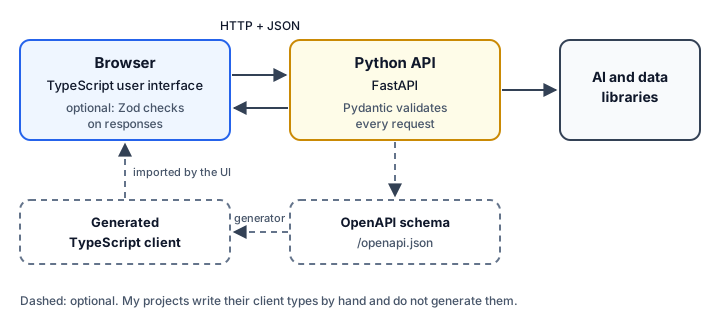
How the pieces fit:
- The TypeScript UI handles the browser: rendering, forms and local state.
- HTTP and JSON form the contract. Agree on names (
snake_caseorcamelCase), how to represent missing values (nullor a missing key), dates (ISO 8601 strings), and large IDs (strings). - Validate at the boundary, on both sides. The Python API validates requests with Pydantic (FastAPI does this automatically for typed parameters). The UI validates the responses it cannot afford to get wrong, with Zod or a hand-written guard like RoboShop's
validFx. - Optionally generate the client. FastAPI publishes an OpenAPI schema at
/openapi.jsonby default, and OpenAPI client generators can turn that into TypeScript types. The jithendar.com executor switches the schema off withopenapi_url=None, and none of my projects generates clients, so this step is untested here.
What two languages cost
Using both languages is not free:
- Two toolchains: two package managers, two lockfile stories, two sets of security updates, and two base images to patch.
- Two deployments, unless you bundle them into one image as MOKS does.
- Contract upkeep. Every field exists twice, and nothing stops the two definitions from drifting unless you generate one from the other or test them against each other.
- Two sets of habits for your team, including every trap in the runtime behaviors section.
A single-language stack avoids all of that. Use both when each side gains something real, such as a Python AI library on one side and a browser UI on the other.
Which language should you choose?
Base the choice on your constraints, not on popularity. Both languages can build APIs, automation and AI applications.
| Situation | Leans towards | Why |
|---|---|---|
| Browser interfaces | TypeScript | Browsers run JavaScript. Python in the browser needs WebAssembly projects and is uncommon. |
| Full-stack web applications | TypeScript, often | One language for UI and server, as jithendar.com's Next.js app shows. A Python backend with a TypeScript UI also works well. |
| DevOps automation and scripts | Either. Python is very common | Python is preinstalled on many Linux systems, and the AWS SDK for Python (boto3) is widely used. Node and TypeScript work well too, especially next to existing JavaScript tooling. |
| Data analysis and machine learning | Python | The main libraries (NumPy, pandas, PyTorch, scikit-learn) are Python-first. MOKS's reranker uses PyTorch. |
| AI APIs and agent services | Either | The major model providers publish official SDKs for both. Python has more agent and machine-learning libraries; MOKS uses LangGraph. TypeScript fits when the agent lives inside a web app. |
| Command-line tools | Either | Python has argparse built in; MOKS ships a moks CLI. Node tools are easy to distribute through npm. |
| Existing team skills | Whatever the team knows | A language your team reviews confidently beats a better fit nobody knows well. |
| Existing codebase and dependencies | Whatever already runs | If a key library exists only in one ecosystem, that usually decides it. |
How do you move from one language to the other?
Python to TypeScript: a learning checklist
- Learn JavaScript's runtime rules first:
===, truthiness,undefinedversusnull, and how numbers work. - Use
constby default andletwhen you must reassign. Never usevar. - Learn array methods:
map,filter,reduce,some,find, and the comparison function forsort. - Learn promises:
async,await,Promise.allandPromise.allSettled. - Learn the type basics:
type,interface, unions, optional properties,unknown, and narrowing. - Turn on
strictintsconfig.jsonand runtsc --noEmitin CI. - Learn how your project builds: framework, bundler or plain
tsc.
TypeScript to Python: a learning checklist
- Indentation is syntax. Set your editor to four spaces.
- Learn the core collections,
list,dict,setandtuple, and when to use each one. - Learn comprehensions and the
forloop forms:enumerate,zipanddict.items(). - Learn keyword arguments and the mutable-default trap.
- Learn exceptions by type:
ValueError,KeyError,TypeError, and writing your own. - Create a virtual environment for every project.
- If you want TypeScript-like checking, add type hints and run mypy or Pyright in CI. It is not on by default.
- Learn asyncio's rules:
asyncio.run, tasks, and keeping blocking calls off the loop.
Habits that do not translate directly
if (arr.length)andif arr:both work, butif (arr)in TypeScript is always true for an array.x || defaultin JavaScript andx or defaultin Python both replace0and"". Only JavaScript has??.- JavaScript objects double as dictionaries. In Python, use a
dictfor data and a class or dataclass for records. - Python's
==compares values. JavaScript's===compares object identity. - Python errors are loud (
KeyError,AttributeError). JavaScript often quietly returnsundefinedorNaN. - TypeScript types and Python hints both disappear at runtime. Validate external data in either language.
- Python creates default arguments once. JavaScript creates them on every call.
Five exercises
Write each one in both languages, with the same input and the same output. Solutions follow, so try them first.
- Word frequency. Given
"the cat and the hat and the bat", print each word and its count, most frequent first, with ties in alphabetical order. - Group and total. Given three orders,
{id: 1, status: "paid", amount: 20.5},{id: 2, status: "pending", amount: 10}and{id: 3, status: "paid", amount: 4.5}, print each status with its order count and total, formatted to two decimal places. - Configuration with defaults and validation. Parse each JSON string in
['{"host": "db"}', '{"port": "8080"}', '{"host": "api", "port": 8443}']. Default the host tolocalhostand the port to5432. Printhost:port, or an error if the port is not an integer from 1 to 65535. Do not convert strings to numbers. - Retry an async operation. Write an async function that fails on its first two calls and succeeds on the third. Retry it up to five times, with a short delay that grows on each attempt, and print each failure and the final result.
- Call a local API. Using the mock server from the API example, fetch
user.jsonand printAda is an adminorAda is not an admin. If the server is not running, printserver unavailableinstead of crashing.
Suggested solutions
Exercise 1.
Standalone comparison example. Same output in both languages.
from collections import Counter

text = "the cat and the hat and the bat"
counts = Counter(text.split())
for word, count in sorted(counts.items(), key=lambda item: (-item[1], item[0])):
    print(word, count)

# Output:
# the 3
# and 2
# bat 1
# cat 1
# hat 1const text = "the cat and the hat and the bat";
const counts = new Map<string, number>();
for (const word of text.split(" ")) {
counts.set(word, (counts.get(word) ?? 0) + 1);
}
const ranked = [...counts].sort((a, b) => b[1] - a[1] || (a[0] < b[0] ? -1 : a[0] > b[0] ? 1 : 0));
for (const [word, count] of ranked) {
console.log(word, count);
}
// Output:
// the 3
// and 2
// bat 1
// cat 1
// hat 1Python sorts by a key tuple, with the count negated for descending order. TypeScript needs a comparison function. I compare with < rather than localeCompare, because localeCompare uses language-aware rules that can order some strings differently from Python's code-point order.
Exercise 2.
Standalone comparison example. Same output in both languages.
from typing import TypedDict


class Order(TypedDict):
    id: int
    status: str
    amount: float


orders: list[Order] = [
    {"id": 1, "status": "paid", "amount": 20.5},
    {"id": 2, "status": "pending", "amount": 10},
    {"id": 3, "status": "paid", "amount": 4.5},
]

groups: dict[str, list[float]] = {}
for order in orders:
    groups.setdefault(order["status"], []).append(order["amount"])

for status, amounts in groups.items():
    print(f"{status}: {len(amounts)} orders, {sum(amounts):.2f}")

# Output:
# paid: 2 orders, 25.00
# pending: 1 orders, 10.00type Order = { id: number; status: string; amount: number };
const orders: Order[] = [
{ id: 1, status: "paid", amount: 20.5 },
{ id: 2, status: "pending", amount: 10 },
{ id: 3, status: "paid", amount: 4.5 },
];
const groups = new Map<string, number[]>();
for (const order of orders) {
const amounts = groups.get(order.status) ?? [];
amounts.push(order.amount);
groups.set(order.status, amounts);
}
for (const [status, amounts] of groups) {
const total = amounts.reduce((sum, amount) => sum + amount, 0);
console.log(`${status}: ${amounts.length} orders, ${total.toFixed(2)}`);
}
// Output:
// paid: 2 orders, 25.00
// pending: 1 orders, 10.00Formatting to two decimal places (:.2f and toFixed(2)) hides the 25.0 versus 25 difference. Node 22 and later also have Object.groupBy and Map.groupBy for this job.
Exercise 3.
Standalone comparison example. Same output in both languages.
import json

inputs = ['{"host": "db"}', '{"port": "8080"}', '{"host": "api", "port": 8443}']

for text in inputs:
    raw = json.loads(text)
    host = raw.get("host", "localhost")
    port = raw.get("port", 5432)
    if isinstance(port, bool) or not isinstance(port, int) or not 1 <= port <= 65535:
        print(f"error: port must be an integer from 1 to 65535, got {port!r}")
        continue
    print(f"{host}:{port}")

# Output:
# db:5432
# error: port must be an integer from 1 to 65535, got '8080'
# api:8443const inputs = ['{"host": "db"}', '{"port": "8080"}', '{"host": "api", "port": 8443}'];
for (const text of inputs) {
const raw: unknown = JSON.parse(text);
const config = typeof raw === "object" && raw !== null ? (raw as Record<string, unknown>) : {};
const host = config["host"] ?? "localhost";
const port = config["port"] ?? 5432;
if (typeof port !== "number" || !Number.isInteger(port) || port < 1 || port > 65535) {
console.log(`error: port must be an integer from 1 to 65535, got ${JSON.stringify(port).replaceAll('"', "'")}`);
continue;
}
console.log(`${host}:${port}`);
}
// Output:
// db:5432
// error: port must be an integer from 1 to 65535, got '8080'
// api:8443Two details matter. In Python, bool is a subclass of int, so isinstance(True, int) is True, and the code rules it out explicitly. In TypeScript, typing the parsed JSON as unknown instead of any forces the checks. Making the error messages identical takes a small quote swap in TypeScript, since Python's !r shows strings in single quotes.
Exercise 4.
Standalone comparison example. Same output in both languages.
import asyncio

calls = 0


async def flaky() -> str:
    global calls
    calls += 1
    if calls < 3:
        raise ConnectionError(f"attempt {calls} failed")
    return "ok"


async def retry(attempts: int = 5, base_delay: float = 0.01) -> str:
    for attempt in range(1, attempts + 1):
        try:
            return await flaky()
        except ConnectionError as err:
            print(err)
            await asyncio.sleep(base_delay * attempt)
    raise RuntimeError("all attempts failed")


print("result:", asyncio.run(retry()), "after", calls, "attempts")

# Output:
# attempt 1 failed
# attempt 2 failed
# result: ok after 3 attemptslet calls = 0;
const sleep = (ms: number) => new Promise<void>((resolve) => setTimeout(resolve, ms));
async function flaky(): Promise<string> {
calls += 1;
if (calls < 3) {
throw new Error(`attempt ${calls} failed`);
}
return "ok";
}
async function retry(attempts = 5, baseDelayMs = 10): Promise<string> {
for (let attempt = 1; attempt <= attempts; attempt++) {
try {
return await flaky();
} catch (err) {
console.log(err instanceof Error ? err.message : String(err));
await sleep(baseDelayMs * attempt);
}
}
throw new Error("all attempts failed");
}
console.log("result:", await retry(), "after", calls, "attempts");
// Output:
// attempt 1 failed
// attempt 2 failed
// result: ok after 3 attemptsNote the return await flaky() inside the try. Without await, a rejected promise would escape the catch, in TypeScript and in Python alike.
Exercise 5. Start the mock server from the API example first.
Standalone comparison example. Same output in both languages.
import json
from urllib.error import URLError
from urllib.request import urlopen

try:
    with urlopen("http://127.0.0.1:8000/user.json", timeout=5) as response:
        user = json.load(response)
    verdict = "is an admin" if "admin" in user["roles"] else "is not an admin"
    print(user["name"], verdict)
except URLError:
    print("server unavailable")

# Output:
# Ada is an admintype User = { name: string; roles: string[] };
try {
const response = await fetch("http://127.0.0.1:8000/user.json", { signal: AbortSignal.timeout(5000) });
if (!response.ok) {
throw new Error(`HTTP ${response.status}`);
}
const user = (await response.json()) as User;
const verdict = user.roles.includes("admin") ? "is an admin" : "is not an admin";
console.log(user.name, verdict);
} catch {
console.log("server unavailable");
}
// Output:
// Ada is an adminBoth print server unavailable when nothing is listening on port 8000. In Python, HTTPError is a subclass of URLError, so the one except also covers 4xx and 5xx responses. In TypeScript, the explicit response.ok check does the same job. As an extension, replace the as User assertion with a Zod schema, or the Python dictionary with a Pydantic model.
Python vs TypeScript quick reference
| Concept | Python | TypeScript | Important difference |
|---|---|---|---|
print(a, b) | console.log(a, b) | Collections and objects print in different formats | |
| Declare a variable | x = 1 | const x = 1; or let x = 1; | Python has no declaration keyword and no const |
| No value | None | null and undefined | JSON has only null; undefined properties are dropped |
| Interpolation | f"{x}" | `${x}` | JavaScript needs backticks |
| Integer division | 7 // 2 | Math.floor(7 / 2) | // is a comment in JavaScript; % differs for negatives |
| Big integers | int has no limit | bigint (2n ** 64n) | number is exact only up to 2^53 − 1 |
| List or array | [1, 2] | [1, 2] | Negative indexes and slicing syntax only in Python; JS sort() is text order |
| Dictionary | {"a": 1} | object or Map | Object keys become strings; missing keys raise only in Python |
| Set | {1, 2} | new Set([1, 2]) | JS compares arrays and objects in a set by identity |
| Tuple | (1, 2), immutable | [number, number] type | TypeScript tuples are mutable arrays at runtime |
| Transform a collection | [f(x) for x in xs if p(x)] | xs.filter(p).map(f) | Python's map and filter are lazy |
| Anonymous function | lambda x: x * 2 | (x) => x * 2 | Python lambdas are one expression only |
| Named arguments | Keyword arguments | Options object | Unknown keywords raise in Python; unknown properties are ignored in JS |
| Default arguments | def f(x=[]) | function f(x = []) | Python evaluates defaults once |
| Equality | == values, is identity | === | JS compares objects by identity; avoid == |
Empty collection in if | False | True | Check .length in JavaScript |
| Errors | raise, try and except | throw, try and catch | JavaScript can throw any value; catch sees unknown |
| Async | asyncio.run(main()) | Top-level await in modules | JS promises start when created; Python coroutines do not |
| Types at runtime | Hints are ignored | Types are erased | Both need runtime validation for external data |
| Safe "anything" type | object | unknown | Any and any turn checking off |
| Runtime validation | Pydantic (in my projects) | Zod (in my projects) | Pydantic converts compatible input by default; Zod does not |
| Dependencies | pyproject.toml, requirements.txt, virtual environment | package.json, package-lock.json, node_modules | npm has one standard lockfile; Python depends on tooling choices |
The takeaway
Python and TypeScript share more than their communities sometimes admit: the same building blocks, the same async model, and annotations that both disappear at runtime. The real differences are in the details that bite, such as truthiness, equality, missing keys, numbers and JSON, and in the ecosystems around each language.
My projects follow the work in front of each piece of code. TypeScript runs wherever there is a browser, Python runs where the models, cloud SDKs and learners' Python code are, and HTTP and JSON connect the two. If you are choosing, start from where your code has to run, which libraries you cannot do without, and what your team can maintain confidently. Then, whichever language you pick, validate the data that crosses your boundaries.
How the examples in this article were checked
Every Standalone comparison example was extracted from this article and run by a script in the site's repository: docs/knowledge-sharing/python-vs-typescript/verify_examples.py. The script compares each program's output with its Output: comment, and checks that pairs labeled "same output" really print the same text. It type-checks the TypeScript with tsc in strict mode, using TypeScript 6.0.3 and 7.0.2, and runs mypy on the Python. Python examples ran on CPython 3.11.9, and TypeScript examples on Node.js 26.13.0. The Actual project code excerpts are compared line by line with the files at the commits listed in the sources.



Discussion comments
No comments yet. Start the discussion.